<?xml version="1.0" encoding="utf-8"?><feed xmlns="http://www.w3.org/2005/Atom" ><generator uri="https://jekyllrb.com/" version="3.9.5">Jekyll</generator><link href="https://unrealist.org/feed.xml" rel="self" type="application/atom+xml" /><link href="https://unrealist.org/" rel="alternate" type="text/html" /><updated>2024-04-13T13:55:08-07:00</updated><id>https://unrealist.org/feed.xml</id><title type="html">Matt’s Game Dev Notebook</title><subtitle>Unreal Engine 5 Tutorials &amp; Dev Blog</subtitle><entry><title type="html">UI Material: Radial Fade Transition with Offset</title><link href="https://unrealist.org/ui-material-radial-fade/" rel="alternate" type="text/html" title="UI Material: Radial Fade Transition with Offset" /><published>2024-04-10T00:00:00-07:00</published><updated>2024-04-10T00:00:00-07:00</updated><id>https://unrealist.org/ui-material-radial-fade</id><content type="html" xml:base="https://unrealist.org/ui-material-radial-fade/"><![CDATA[<p><img src="https://img.shields.io/badge/Unreal%20Engine-informational" alt="Written for Unreal Engine" /> <img src="https://img.shields.io/badge/-Materials-teal" alt="Materials" /></p>

<h2 id="preview">Preview</h2>
<p><img src="/assets/images/radial-fade-preview.gif" width="70%" /></p>

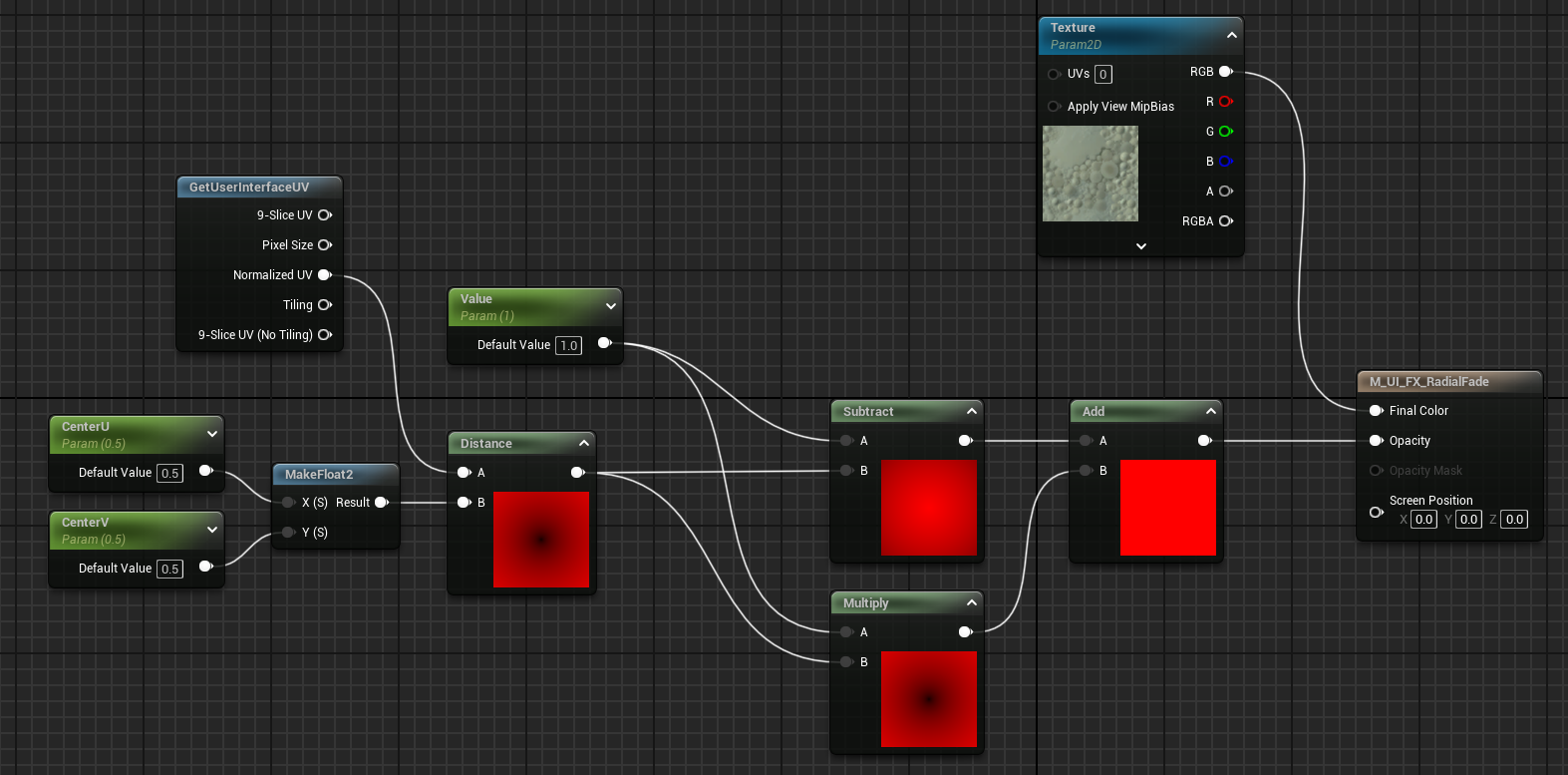
<h2 id="complete-material">Complete material</h2>
<p>Click for full resolution.
<a href="https://unrealist.org/assets/images/complete-material.png" target="_blank"><img src="/assets/images/complete-material.png" /></a></p>

<table>
  <thead>
    <tr>
      <th>Parameter Name</th>
      <th>Type</th>
    </tr>
  </thead>
  <tbody>
    <tr>
      <td><code class="language-plaintext highlighter-rouge">Texture</code></td>
      <td>Texture Sample</td>
    </tr>
    <tr>
      <td><code class="language-plaintext highlighter-rouge">Value</code></td>
      <td>Scalar 0.0–1.0</td>
    </tr>
    <tr>
      <td><code class="language-plaintext highlighter-rouge">CenterU</code></td>
      <td>Scalar 0.0–1.0</td>
    </tr>
    <tr>
      <td><code class="language-plaintext highlighter-rouge">CenterV</code></td>
      <td>Scalar 0.0–1.0</td>
    </tr>
  </tbody>
</table>

<h2 id="usage">Usage</h2>
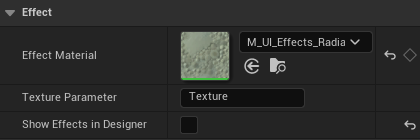
<p>Put your widget in a <em>Retainer Box</em> and set the Effect Material.</p>

<p><img src="/assets/images/radial-fade-retainer-box-details.png" /></p>

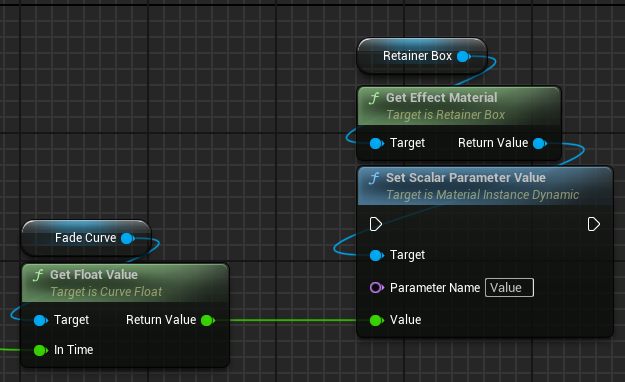
<p>Then on each tick, update the <em>Value</em> parameter to a number between 0–1.</p>

<p>In my game, I evaluate a curve and then plug the value into this parameter.</p>

<p><img src="/assets/images/radial-fade-usage.png" /></p>

<h2 id="how-it-works">How it works</h2>
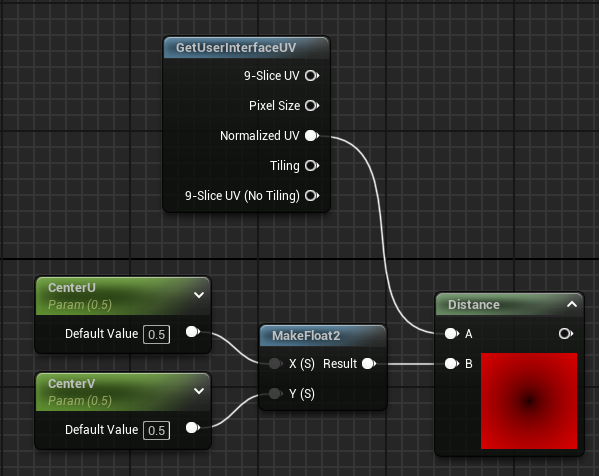
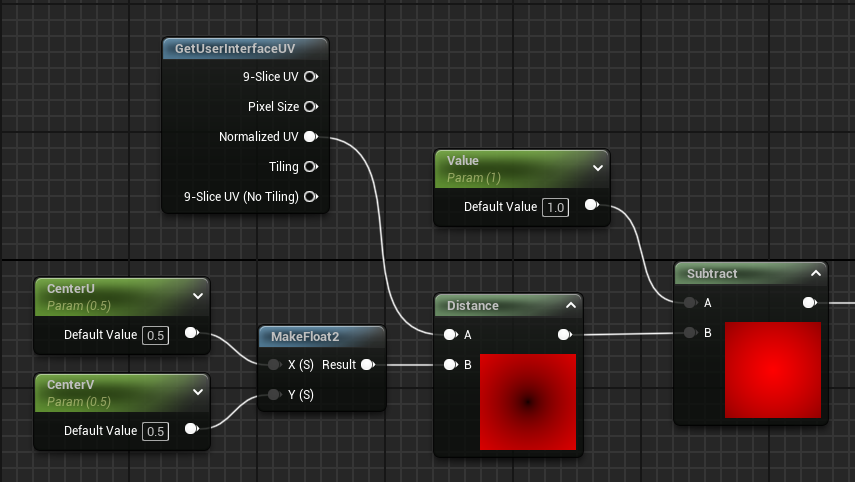
<p>Let’s begin with a simple radial gradient which can be accomplished with the <em>Distance</em> node. We want to use the normalized UV of <strong>GetUserInterfaceUV</strong> because it’ll span the entire widget even when the brush is being drawn as a box or border. This is mapped to texture coordinate index 4.</p>

<p><img src="/assets/images/radial-fade-1.png" /></p>

<p>For this material, we want to control the fade transition with a scalar parameter named <em>Value</em>. Our goal is to make it so that a value of 0 makes the widget completely invisible, and a value of 1 makes it completely visible.</p>

<p>By subtracting the distance from the parameter, we move one step closer to achieving this.</p>

<p><img src="/assets/images/radial-fade-2.png" /></p>

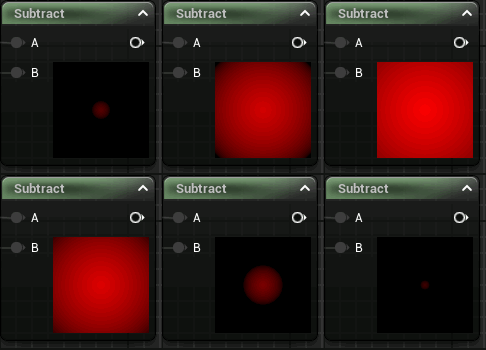
<p>The result of the <em>Subtract</em> node will always be negative when <em>Value</em> is set to 0, rendering the widget completely invisible. As <em>Value</em> approaches 1, UVs closer to the center point will begin to output a positive number causing the widget to begin revealing itself outwards from the center point.</p>

<p><img src="/assets/images/radial-fade-gif-1.gif" /></p>

<p>There are still two issues here:</p>

<ol>
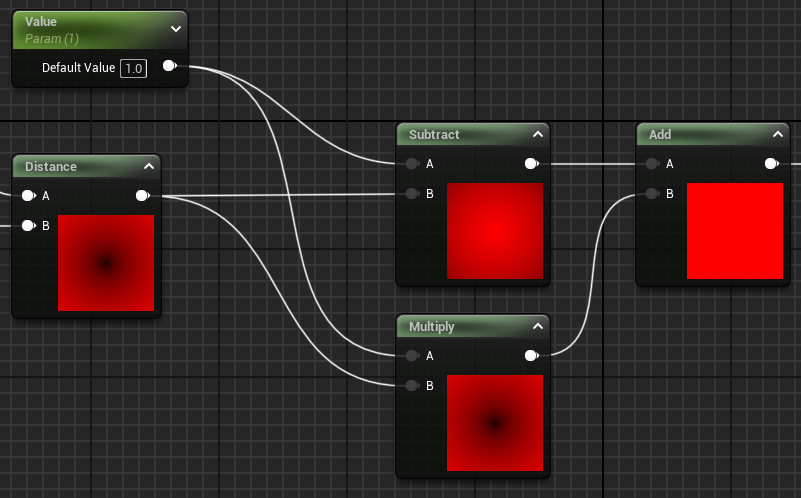
  <li><em>Value</em> is clamped to 1 so subtraction will never output 1 beyond the center which always produces a visible gradient.</li>
  <li>Distances greater than 1, which happens when the center point is shifted to a corner, always output negative values and this portion of the texture will never be visible.</li>
</ol>

<p>To solve this, let’s multiply the distance with <em>Value</em> and then add it to the output of the subtraction.</p>

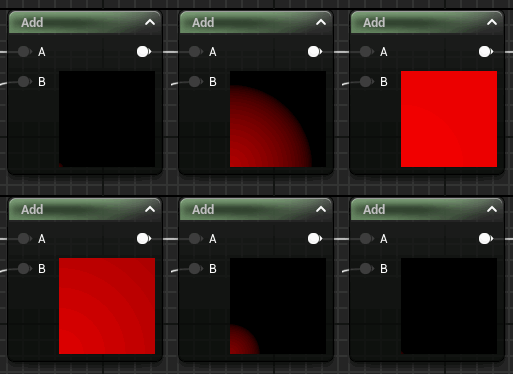
<p><img src="/assets/images/radial-fade-3.png" /></p>

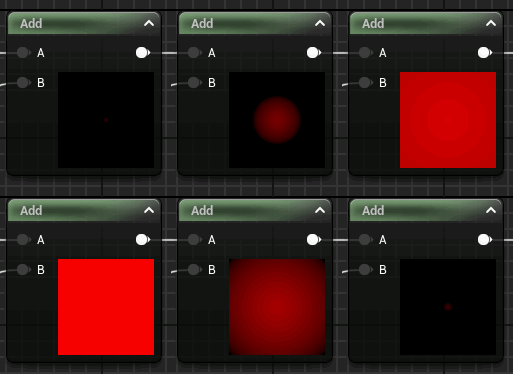
<p>When <em>Value</em> is 1, both outputs negate each other and provides us with a uniform value of 1.0 for all UVs — no matter where the center point is.</p>

<p><img src="/assets/images/radial-fade-gif-3.gif" />
<img src="/assets/images/radial-fade-gif-2.gif" /></p>]]></content><author><name></name></author><category term="Materials" /><category term="unreal" /><summary type="html"><![CDATA[]]></summary></entry><entry><title type="html">Dev Log 03: StateTree Isn’t Just for AI</title><link href="https://unrealist.org/dev-log-03-statetree-isnt-just-for-ai/" rel="alternate" type="text/html" title="Dev Log 03: StateTree Isn’t Just for AI" /><published>2024-03-28T00:00:00-07:00</published><updated>2024-03-28T00:00:00-07:00</updated><id>https://unrealist.org/dev-log-03-statetree-isnt-just-for-ai</id><content type="html" xml:base="https://unrealist.org/dev-log-03-statetree-isnt-just-for-ai/"><![CDATA[<p><img src="https://img.shields.io/badge/Unreal%20Engine-5.4-informational" alt="Written for Unreal Engine 5.4" /> <img src="https://img.shields.io/badge/-Dev%20Log-red" alt="Dev Log" /></p>

<p>StateTree is a hierarchical state machine introduced in Unreal Engine 5.</p>

<p><img src="/assets/images/plugin-1.png" alt="StateTree plugin description in the Plugin window" /></p>

<p>The base <code class="language-plaintext highlighter-rouge">StateTree</code> plugin provides a general-purpose hierarchical state machine, but it does not provide any schema or even a processor to actually execute a StateTree.</p>

<p>Unreal Engine comes with a handful of plugins with their own schemas and processors.</p>

<table>
  <thead>
    <tr>
      <th>Plugin</th>
      <th>Purpose</th>
      <th>Processor</th>
    </tr>
  </thead>
  <tbody>
    <tr>
      <td><code class="language-plaintext highlighter-rouge">GameplayStateTree</code></td>
      <td>StateTree for actors.</td>
      <td><code class="language-plaintext highlighter-rouge">StateTreeComponent</code> actor component</td>
    </tr>
    <tr>
      <td><code class="language-plaintext highlighter-rouge">GameplayInteractions</code></td>
      <td>StateTree for smart objects.</td>
      <td><code class="language-plaintext highlighter-rouge">UAITask_UseGameplayInteraction</code> gameplay task</td>
    </tr>
    <tr>
      <td><code class="language-plaintext highlighter-rouge">MassAI</code></td>
      <td>StateTree for Mass entities.</td>
      <td>Various Mass processors</td>
    </tr>
  </tbody>
</table>

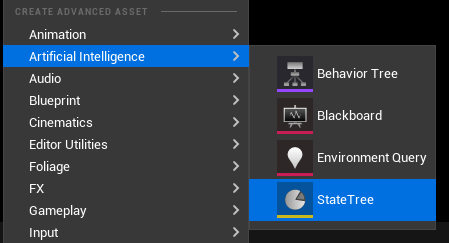
<p>Unreal Engine uses StateTree exclusively for AI, and even placed the asset type under the <em>Artificial Intelligence</em> category.</p>

<p><img src="/assets/images/st-picker.png" alt="StateTree asset type categorized under Artificial Intelligence" /></p>

<p><strong>I’m here to let you know that it’s not just for AI!</strong></p>

<p>Once again, StateTree is a <em>general purpose</em> state machine built into Unreal Engine with its own editor. You don’t need a third-party plugin or develop your own state machine. In fact, Unreal Engine 5.4 has made it even more useful with linked assets and themes.</p>

<h2 id="why-do-i-need-a-state-machine">Why do I need a state machine?</h2>

<p>First, let’s take a look at my game’s frontend.</p>

<p>The player goes through this sequence when launching my game — and no, I don’t expect you to read it all.</p>

<svg class="mermaid" id="mermaid-svg" width="100%" xmlns="http://www.w3.org/2000/svg" style="max-width: 950.718994140625px;" viewBox="-38.78499984741211 -8 950.718994140625 1883.359375" role="graphics-document document" aria-roledescription="flowchart-v2" xmlns:xlink="http://www.w3.org/1999/xlink"><style>#mermaid-svg{font-family:"trebuchet ms",verdana,arial,sans-serif;font-size:16px;fill:#ccc;}#mermaid-svg .error-icon{fill:#a44141;}#mermaid-svg .error-text{fill:#ddd;stroke:#ddd;}#mermaid-svg .edge-thickness-normal{stroke-width:2px;}#mermaid-svg .edge-thickness-thick{stroke-width:3.5px;}#mermaid-svg .edge-pattern-solid{stroke-dasharray:0;}#mermaid-svg .edge-pattern-dashed{stroke-dasharray:3;}#mermaid-svg .edge-pattern-dotted{stroke-dasharray:2;}#mermaid-svg .marker{fill:lightgrey;stroke:lightgrey;}#mermaid-svg .marker.cross{stroke:lightgrey;}#mermaid-svg svg{font-family:"trebuchet ms",verdana,arial,sans-serif;font-size:16px;}#mermaid-svg .label{font-family:"trebuchet ms",verdana,arial,sans-serif;color:#ccc;}#mermaid-svg .cluster-label text{fill:#F9FFFE;}#mermaid-svg .cluster-label span,#mermaid-svg p{color:#F9FFFE;}#mermaid-svg .label text,#mermaid-svg span,#mermaid-svg p{fill:#ccc;color:#ccc;}#mermaid-svg .node rect,#mermaid-svg .node circle,#mermaid-svg .node ellipse,#mermaid-svg .node polygon,#mermaid-svg .node path{fill:#1f2020;stroke:#81B1DB;stroke-width:1px;}#mermaid-svg .flowchart-label text{text-anchor:middle;}#mermaid-svg .node .katex path{fill:#000;stroke:#000;stroke-width:1px;}#mermaid-svg .node .label{text-align:center;}#mermaid-svg .node.clickable{cursor:pointer;}#mermaid-svg .arrowheadPath{fill:lightgrey;}#mermaid-svg .edgePath .path{stroke:lightgrey;stroke-width:2.0px;}#mermaid-svg .flowchart-link{stroke:lightgrey;fill:none;}#mermaid-svg .edgeLabel{background-color:hsl(0, 0%, 34.4117647059%);text-align:center;}#mermaid-svg .edgeLabel rect{opacity:0.5;background-color:hsl(0, 0%, 34.4117647059%);fill:hsl(0, 0%, 34.4117647059%);}#mermaid-svg .labelBkg{background-color:rgba(87.75, 87.75, 87.75, 0.5);}#mermaid-svg .cluster rect{fill:hsl(180, 1.5873015873%, 28.3529411765%);stroke:rgba(255, 255, 255, 0.25);stroke-width:1px;}#mermaid-svg .cluster text{fill:#F9FFFE;}#mermaid-svg .cluster span,#mermaid-svg p{color:#F9FFFE;}#mermaid-svg div.mermaidTooltip{position:absolute;text-align:center;max-width:200px;padding:2px;font-family:"trebuchet ms",verdana,arial,sans-serif;font-size:12px;background:hsl(20, 1.5873015873%, 12.3529411765%);border:1px solid rgba(255, 255, 255, 0.25);border-radius:2px;pointer-events:none;z-index:100;}#mermaid-svg .flowchartTitleText{text-anchor:middle;font-size:18px;fill:#ccc;}#mermaid-svg :root{--mermaid-font-family:"trebuchet ms",verdana,arial,sans-serif;}</style><g><marker id="mermaid-svg_flowchart-pointEnd" class="marker flowchart" viewBox="0 0 10 10" refX="6" refY="5" markerUnits="userSpaceOnUse" markerWidth="12" markerHeight="12" orient="auto"><path d="M 0 0 L 10 5 L 0 10 z" class="arrowMarkerPath" style="stroke-width: 1; stroke-dasharray: 1, 0;"></path></marker><marker id="mermaid-svg_flowchart-pointStart" class="marker flowchart" viewBox="0 0 10 10" refX="4.5" refY="5" markerUnits="userSpaceOnUse" markerWidth="12" markerHeight="12" orient="auto"><path d="M 0 5 L 10 10 L 10 0 z" class="arrowMarkerPath" style="stroke-width: 1; stroke-dasharray: 1, 0;"></path></marker><marker id="mermaid-svg_flowchart-circleEnd" class="marker flowchart" viewBox="0 0 10 10" refX="11" refY="5" markerUnits="userSpaceOnUse" markerWidth="11" markerHeight="11" orient="auto"><circle cx="5" cy="5" r="5" class="arrowMarkerPath" style="stroke-width: 1; stroke-dasharray: 1, 0;"></circle></marker><marker id="mermaid-svg_flowchart-circleStart" class="marker flowchart" viewBox="0 0 10 10" refX="-1" refY="5" markerUnits="userSpaceOnUse" markerWidth="11" markerHeight="11" orient="auto"><circle cx="5" cy="5" r="5" class="arrowMarkerPath" style="stroke-width: 1; stroke-dasharray: 1, 0;"></circle></marker><marker id="mermaid-svg_flowchart-crossEnd" class="marker cross flowchart" viewBox="0 0 11 11" refX="12" refY="5.2" markerUnits="userSpaceOnUse" markerWidth="11" markerHeight="11" orient="auto"><path d="M 1,1 l 9,9 M 10,1 l -9,9" class="arrowMarkerPath" style="stroke-width: 2; stroke-dasharray: 1, 0;"></path></marker><marker id="mermaid-svg_flowchart-crossStart" class="marker cross flowchart" viewBox="0 0 11 11" refX="-1" refY="5.2" markerUnits="userSpaceOnUse" markerWidth="11" markerHeight="11" orient="auto"><path d="M 1,1 l 9,9 M 10,1 l -9,9" class="arrowMarkerPath" style="stroke-width: 2; stroke-dasharray: 1, 0;"></path></marker><g class="root"><g class="clusters"></g><g class="edgePaths"><path d="M445.488,34C445.488,42.333,445.488,50.667,445.488,59C445.488,65.567,445.488,72.133,445.488,78.7" id="L-launch-splash-0" class=" edge-thickness-normal edge-pattern-solid flowchart-link LS-launch LE-splash" style="fill:none;" marker-end="url(#mermaid-svg_flowchart-pointEnd)"></path><path d="M445.488,118C445.488,126.333,445.488,134.667,445.488,143C445.488,149.567,445.488,156.133,445.488,162.7" id="L-splash-title_screen-0" class=" edge-thickness-normal edge-pattern-solid flowchart-link LS-splash LE-title_screen" style="fill:none;" marker-end="url(#mermaid-svg_flowchart-pointEnd)"></path><path d="M445.488,226C445.488,238.333,445.488,250.667,445.488,263C445.488,273.733,445.703,284.467,445.918,295.2" id="L-title_screen-signin-0" class=" edge-thickness-normal edge-pattern-solid flowchart-link LS-title_screen LE-signin" style="fill:none;" marker-end="url(#mermaid-svg_flowchart-pointEnd)"></path><path d="M476.296,433.395C495.193,454.831,514.09,476.267,514.09,497.703C514.09,507.436,514.09,517.17,514.09,526.903" id="L-signin-error_modal_signin-0" class=" edge-thickness-normal edge-pattern-solid flowchart-link LS-signin LE-error_modal_signin" style="fill:none;" marker-end="url(#mermaid-svg_flowchart-pointEnd)"></path><path d="M514.09,566.203C514.09,574.536,514.09,582.87,514.09,591.203C514.09,607.052,494.791,622.902,475.491,638.751" id="L-error_modal_signin-oobe-0" class=" edge-thickness-normal edge-pattern-solid flowchart-link LS-error_modal_signin LE-oobe" style="fill:none;" marker-end="url(#mermaid-svg_flowchart-pointEnd)"></path><path d="M415.68,433.395C396.283,454.831,376.887,476.267,376.887,497.703C376.887,514.87,376.887,532.036,376.887,549.203C376.887,563.203,376.887,577.203,376.887,591.203C376.887,607.065,396.662,622.928,416.438,638.79" id="L-signin-oobe-0" class=" edge-thickness-normal edge-pattern-solid flowchart-link LS-signin LE-oobe" style="fill:none;" marker-end="url(#mermaid-svg_flowchart-pointEnd)"></path><path d="M482.074,696.023C540.407,719.385,598.739,742.747,599.406,766.109C599.689,776.01,599.76,785.91,599.831,795.81" id="L-oobe-quick_resume-0" class=" edge-thickness-normal edge-pattern-solid flowchart-link LS-oobe LE-quick_resume" style="fill:none;" marker-end="url(#mermaid-svg_flowchart-pointEnd)"></path><path d="M553.567,931.551C508.776,958.331,463.984,985.111,463.984,1011.891C463.984,1029.057,463.984,1046.224,463.984,1063.391C463.984,1080.557,463.984,1097.724,463.984,1114.891C463.984,1135.396,409.959,1155.902,355.934,1176.408" id="L-quick_resume-title_menu-0" class=" edge-thickness-normal edge-pattern-solid flowchart-link LS-quick_resume LE-title_menu" style="fill:none;" marker-end="url(#mermaid-svg_flowchart-pointEnd)"></path><path d="M630.021,947.776C646.465,969.148,662.91,990.519,662.91,1011.891C662.91,1021.624,662.91,1031.357,662.91,1041.091" id="L-quick_resume-confirm_load_save-0" class=" edge-thickness-normal edge-pattern-solid flowchart-link LS-quick_resume LE-confirm_load_save" style="fill:none;" marker-end="url(#mermaid-svg_flowchart-pointEnd)"></path><path d="M593.793,1069.181C320.994,1084.418,48.195,1099.654,48.195,1114.891C48.195,1139.006,141.331,1163.121,234.466,1187.237" id="L-confirm_load_save-title_menu-0" class=" edge-thickness-normal edge-pattern-solid flowchart-link LS-confirm_load_save LE-title_menu" style="fill:none;" marker-end="url(#mermaid-svg_flowchart-pointEnd)"></path><path d="M732.027,1078.159C817.98,1090.403,903.934,1102.647,903.934,1114.891C903.934,1146.891,903.934,1178.891,903.934,1210.891C903.934,1242.891,903.934,1274.891,903.934,1306.891C903.934,1340.552,903.934,1374.214,903.934,1407.875C903.934,1441.536,903.934,1475.198,903.934,1508.859C903.934,1526.026,903.934,1543.193,903.934,1560.359C903.934,1577.526,903.934,1594.693,903.934,1611.859C903.934,1629.026,903.934,1646.193,903.934,1663.359C903.934,1680.526,903.934,1697.693,903.934,1714.859C903.934,1729.644,713.363,1744.429,522.792,1759.214" id="L-confirm_load_save-lobby-0" class=" edge-thickness-normal edge-pattern-solid flowchart-link LS-confirm_load_save LE-lobby" style="fill:none;" marker-end="url(#mermaid-svg_flowchart-pointEnd)"></path><path d="M491.405,686.693C638.853,713.165,786.301,739.637,786.301,766.109C786.301,807.073,786.301,848.036,786.301,889C786.301,929.964,786.301,970.927,786.301,1011.891C786.301,1029.057,786.301,1046.224,786.301,1063.391C786.301,1080.557,786.301,1097.724,786.301,1114.891C786.301,1146.891,786.301,1178.891,786.301,1210.891C786.301,1242.891,786.301,1274.891,786.301,1306.891C786.301,1340.552,786.301,1374.214,786.301,1407.875C786.301,1441.536,786.301,1475.198,786.301,1508.859C786.301,1518.593,786.301,1528.326,786.301,1538.059" id="L-oobe-settings_firstrun-0" class=" edge-thickness-normal edge-pattern-solid flowchart-link LS-oobe LE-settings_firstrun" style="fill:none;" marker-end="url(#mermaid-svg_flowchart-pointEnd)"></path><path d="M786.301,1577.359C786.301,1588.859,786.301,1600.359,786.301,1611.859C786.301,1623.347,704.423,1634.835,622.546,1646.323" id="L-settings_firstrun-charcreate-0" class=" edge-thickness-normal edge-pattern-solid flowchart-link LS-settings_firstrun LE-charcreate" style="fill:none;" marker-end="url(#mermaid-svg_flowchart-pointEnd)"></path><path d="M239.406,1247.159C206.245,1267.07,173.084,1286.98,147.242,1306.891C112.554,1333.617,91.053,1360.343,69.551,1387.069" id="L-title_menu-settings-0" class=" edge-thickness-normal edge-pattern-solid flowchart-link LS-title_menu LE-settings" style="fill:none;" marker-end="url(#mermaid-svg_flowchart-pointEnd)"></path><path d="M49.391,1390.875C49.391,1362.88,49.391,1334.885,49.391,1306.891C49.391,1282.813,141.93,1258.736,234.469,1234.658" id="L-settings-title_menu-0" class=" edge-thickness-normal edge-pattern-solid flowchart-link LS-settings LE-title_menu" style="fill:none;" marker-end="url(#mermaid-svg_flowchart-pointEnd)"></path><path d="M240.328,1272.391C224.891,1283.891,209.453,1295.391,209.453,1306.891C209.453,1333.119,209.453,1359.347,209.453,1385.575" id="L-title_menu-exit-0" class=" edge-thickness-normal edge-pattern-solid flowchart-link LS-title_menu LE-exit" style="fill:none;" marker-end="url(#mermaid-svg_flowchart-pointEnd)"></path><path d="M513.671,1646.359C485.337,1634.859,457.004,1623.359,457.004,1611.859C457.004,1594.693,457.004,1577.526,457.004,1560.359C457.004,1543.193,457.004,1526.026,457.004,1508.859C457.004,1475.198,457.004,1441.536,457.004,1407.875C457.004,1374.214,457.004,1340.552,457.004,1306.891C457.004,1286.872,406.444,1266.853,355.885,1246.834" id="L-charcreate-title_menu-0" class=" edge-thickness-normal edge-pattern-solid flowchart-link LS-charcreate LE-title_menu" style="fill:none;" marker-end="url(#mermaid-svg_flowchart-pointEnd)"></path><path d="M541.594,1680.359C541.594,1691.859,541.594,1703.359,541.594,1714.859C541.594,1725.405,516.961,1735.95,492.328,1746.496" id="L-charcreate-lobby-0" class=" edge-thickness-normal edge-pattern-solid flowchart-link LS-charcreate LE-lobby" style="fill:none;" marker-end="url(#mermaid-svg_flowchart-pointEnd)"></path><path d="M351.328,1229.663C466.072,1255.405,580.815,1281.148,581.551,1306.891C581.834,1316.791,581.904,1326.691,581.975,1336.591" id="L-title_menu-has_slots-0" class=" edge-thickness-normal edge-pattern-solid flowchart-link LS-title_menu LE-has_slots" style="fill:none;" marker-end="url(#mermaid-svg_flowchart-pointEnd)"></path><path d="M607.173,1449.737C625.03,1469.444,642.887,1489.152,642.887,1508.859C642.887,1526.026,642.887,1543.193,642.887,1560.359C642.887,1577.526,642.887,1594.693,642.887,1611.859C642.887,1622.559,611.321,1633.258,579.755,1643.957" id="L-has_slots-charcreate-0" class=" edge-thickness-normal edge-pattern-solid flowchart-link LS-has_slots LE-charcreate" style="fill:none;" marker-end="url(#mermaid-svg_flowchart-pointEnd)"></path><path d="M566.291,1459.1C558.233,1475.686,550.176,1492.273,550.176,1508.859C550.176,1518.593,550.176,1528.326,550.176,1538.059" id="L-has_slots-loadgame-0" class=" edge-thickness-normal edge-pattern-solid flowchart-link LS-has_slots LE-loadgame" style="fill:none;" marker-end="url(#mermaid-svg_flowchart-pointEnd)"></path><path d="M550.176,1577.359C550.176,1588.859,550.176,1600.359,550.176,1611.859C550.176,1621.617,547.737,1631.374,545.298,1641.131" id="L-loadgame-charcreate-0" class=" edge-thickness-normal edge-pattern-solid flowchart-link LS-loadgame LE-charcreate" style="fill:none;" marker-end="url(#mermaid-svg_flowchart-pointEnd)"></path><path d="M501.863,1573.625C432.236,1586.369,362.609,1599.114,362.609,1611.859C362.609,1629.026,362.609,1646.193,362.609,1663.359C362.609,1680.526,362.609,1697.693,362.609,1714.859C362.609,1725.543,393.348,1736.226,424.086,1746.909" id="L-loadgame-lobby-0" class=" edge-thickness-normal edge-pattern-solid flowchart-link LS-loadgame LE-lobby" style="fill:none;" marker-end="url(#mermaid-svg_flowchart-pointEnd)"></path><path d="M35.894,1390.875C2.554,1362.88,-30.785,1334.885,-30.785,1306.891C-30.785,1274.891,-30.785,1242.891,-30.785,1210.891C-30.785,1178.891,-30.785,1146.891,-30.785,1114.891C-30.785,1097.724,-30.785,1080.557,-30.785,1063.391C-30.785,1046.224,-30.785,1029.057,-30.785,1011.891C-30.785,970.927,-30.785,929.964,-30.785,889C-30.785,848.036,-30.785,807.073,-30.785,766.109C-30.785,738.661,183.43,711.213,397.644,683.765" id="L-settings-oobe-0" class=" edge-thickness-thick edge-pattern-solid flowchart-link LS-settings LE-oobe" style="stroke-width: 0;fill:none;"></path><path d="M405.8,1749.359C349.388,1737.859,292.977,1726.359,292.977,1714.859C292.977,1697.693,292.977,1680.526,292.977,1663.359C292.977,1646.193,292.977,1629.026,292.977,1611.859C292.977,1594.693,292.977,1577.526,292.977,1560.359C292.977,1543.193,292.977,1526.026,292.977,1508.859C292.977,1475.198,292.977,1441.536,292.977,1407.875C292.977,1374.214,292.977,1340.552,292.977,1306.891C292.977,1297.157,293.34,1287.423,293.704,1277.689" id="L-lobby-title_menu-0" class=" edge-thickness-normal edge-pattern-solid flowchart-link LS-lobby LE-title_menu" style="fill:none;" marker-end="url(#mermaid-svg_flowchart-pointEnd)"></path><path d="M461.395,1783.359C461.395,1791.693,461.395,1800.026,461.395,1808.359C461.395,1814.926,461.395,1821.493,461.395,1828.059" id="L-lobby-start-0" class=" edge-thickness-normal edge-pattern-solid flowchart-link LS-lobby LE-start" style="fill:none;" marker-end="url(#mermaid-svg_flowchart-pointEnd)"></path></g><g class="edgeLabels"><g class="edgeLabel"><g class="label" transform="translate(0, 0)"><foreignObject width="0" height="0"><div xmlns="http://www.w3.org/1999/xhtml" style="display: inline-block; white-space: nowrap;"><span class="edgeLabel"></span></div></foreignObject></g></g><g class="edgeLabel"><g class="label" transform="translate(0, 0)"><foreignObject width="0" height="0"><div xmlns="http://www.w3.org/1999/xhtml" style="display: inline-block; white-space: nowrap;"><span class="edgeLabel"></span></div></foreignObject></g></g><g class="edgeLabel" transform="translate(445.48828125, 263)"><g class="label" transform="translate(-37.2734375, -12)"><foreignObject width="74.546875" height="24"><div xmlns="http://www.w3.org/1999/xhtml" style="display: inline-block; white-space: nowrap;"><span class="edgeLabel">Pressed 🅐</span></div></foreignObject></g></g><g class="edgeLabel" transform="translate(514.08984375, 497.703125)"><g class="label" transform="translate(-21.8671875, -9.5)"><foreignObject width="43.734375" height="19"><div xmlns="http://www.w3.org/1999/xhtml" style="display: inline-block; white-space: nowrap;"><span class="edgeLabel">Failed</span></div></foreignObject></g></g><g class="edgeLabel"><g class="label" transform="translate(0, 0)"><foreignObject width="0" height="0"><div xmlns="http://www.w3.org/1999/xhtml" style="display: inline-block; white-space: nowrap;"><span class="edgeLabel"></span></div></foreignObject></g></g><g class="edgeLabel" transform="translate(376.88671875, 549.203125)"><g class="label" transform="translate(-26.984375, -9.5)"><foreignObject width="53.96875" height="19"><div xmlns="http://www.w3.org/1999/xhtml" style="display: inline-block; white-space: nowrap;"><span class="edgeLabel">Success</span></div></foreignObject></g></g><g class="edgeLabel" transform="translate(599.40625, 766.109375)"><g class="label" transform="translate(-9.3984375, -9.5)"><foreignObject width="18.796875" height="19"><div xmlns="http://www.w3.org/1999/xhtml" style="display: inline-block; white-space: nowrap;"><span class="edgeLabel">No</span></div></foreignObject></g></g><g class="edgeLabel" transform="translate(463.984375, 1063.390625)"><g class="label" transform="translate(-9.3984375, -9.5)"><foreignObject width="18.796875" height="19"><div xmlns="http://www.w3.org/1999/xhtml" style="display: inline-block; white-space: nowrap;"><span class="edgeLabel">No</span></div></foreignObject></g></g><g class="edgeLabel" transform="translate(662.91015625, 1011.890625)"><g class="label" transform="translate(-11.328125, -9.5)"><foreignObject width="22.65625" height="19"><div xmlns="http://www.w3.org/1999/xhtml" style="display: inline-block; white-space: nowrap;"><span class="edgeLabel">Yes</span></div></foreignObject></g></g><g class="edgeLabel" transform="translate(48.1953125, 1114.890625)"><g class="label" transform="translate(-9.3984375, -9.5)"><foreignObject width="18.796875" height="19"><div xmlns="http://www.w3.org/1999/xhtml" style="display: inline-block; white-space: nowrap;"><span class="edgeLabel">No</span></div></foreignObject></g></g><g class="edgeLabel"><g class="label" transform="translate(0, 0)"><foreignObject width="0" height="0"><div xmlns="http://www.w3.org/1999/xhtml" style="display: inline-block; white-space: nowrap;"><span class="edgeLabel"></span></div></foreignObject></g></g><g class="edgeLabel" transform="translate(786.30078125, 1114.890625)"><g class="label" transform="translate(-11.328125, -9.5)"><foreignObject width="22.65625" height="19"><div xmlns="http://www.w3.org/1999/xhtml" style="display: inline-block; white-space: nowrap;"><span class="edgeLabel">Yes</span></div></foreignObject></g></g><g class="edgeLabel" transform="translate(786.30078125, 1611.859375)"><g class="label" transform="translate(-49.390625, -9.5)"><foreignObject width="98.78125" height="19"><div xmlns="http://www.w3.org/1999/xhtml" style="display: inline-block; white-space: nowrap;"><span class="edgeLabel">Save / Cancel</span></div></foreignObject></g></g><g class="edgeLabel" transform="translate(147.2421875, 1306.890625)"><g class="label" transform="translate(-28.4609375, -9.5)"><foreignObject width="56.921875" height="19"><div xmlns="http://www.w3.org/1999/xhtml" style="display: inline-block; white-space: nowrap;"><span class="edgeLabel">Settings</span></div></foreignObject></g></g><g class="edgeLabel" transform="translate(49.390625, 1306.890625)"><g class="label" transform="translate(-49.390625, -9.5)"><foreignObject width="98.78125" height="19"><div xmlns="http://www.w3.org/1999/xhtml" style="display: inline-block; white-space: nowrap;"><span class="edgeLabel">Save / Cancel</span></div></foreignObject></g></g><g class="edgeLabel" transform="translate(209.453125, 1306.890625)"><g class="label" transform="translate(-13.75, -9.5)"><foreignObject width="27.5" height="19"><div xmlns="http://www.w3.org/1999/xhtml" style="display: inline-block; white-space: nowrap;"><span class="edgeLabel">Exit</span></div></foreignObject></g></g><g class="edgeLabel" transform="translate(457.00390625, 1508.859375)"><g class="label" transform="translate(-24.046875, -9.5)"><foreignObject width="48.09375" height="19"><div xmlns="http://www.w3.org/1999/xhtml" style="display: inline-block; white-space: nowrap;"><span class="edgeLabel">Cancel</span></div></foreignObject></g></g><g class="edgeLabel" transform="translate(541.59375, 1714.859375)"><g class="label" transform="translate(-28.4375, -9.5)"><foreignObject width="56.875" height="19"><div xmlns="http://www.w3.org/1999/xhtml" style="display: inline-block; white-space: nowrap;"><span class="edgeLabel">Confirm</span></div></foreignObject></g></g><g class="edgeLabel" transform="translate(581.55078125, 1306.890625)"><g class="label" transform="translate(-14.96875, -9.5)"><foreignObject width="29.9375" height="19"><div xmlns="http://www.w3.org/1999/xhtml" style="display: inline-block; white-space: nowrap;"><span class="edgeLabel">Play</span></div></foreignObject></g></g><g class="edgeLabel" transform="translate(642.88671875, 1560.359375)"><g class="label" transform="translate(-9.3984375, -9.5)"><foreignObject width="18.796875" height="19"><div xmlns="http://www.w3.org/1999/xhtml" style="display: inline-block; white-space: nowrap;"><span class="edgeLabel">No</span></div></foreignObject></g></g><g class="edgeLabel" transform="translate(550.17578125, 1508.859375)"><g class="label" transform="translate(-11.328125, -9.5)"><foreignObject width="22.65625" height="19"><div xmlns="http://www.w3.org/1999/xhtml" style="display: inline-block; white-space: nowrap;"><span class="edgeLabel">Yes</span></div></foreignObject></g></g><g class="edgeLabel" transform="translate(550.17578125, 1611.859375)"><g class="label" transform="translate(-64.859375, -9.5)"><foreignObject width="129.71875" height="19"><div xmlns="http://www.w3.org/1999/xhtml" style="display: inline-block; white-space: nowrap;"><span class="edgeLabel">Create New Game</span></div></foreignObject></g></g><g class="edgeLabel" transform="translate(362.609375, 1663.359375)"><g class="label" transform="translate(-49.6328125, -9.5)"><foreignObject width="99.265625" height="19"><div xmlns="http://www.w3.org/1999/xhtml" style="display: inline-block; white-space: nowrap;"><span class="edgeLabel">Save Selected</span></div></foreignObject></g></g><g class="edgeLabel"><g class="label" transform="translate(0, 0)"><foreignObject width="0" height="0"><div xmlns="http://www.w3.org/1999/xhtml" style="display: inline-block; white-space: nowrap;"><span class="edgeLabel"></span></div></foreignObject></g></g><g class="edgeLabel" transform="translate(292.9765625, 1560.359375)"><g class="label" transform="translate(-24.046875, -9.5)"><foreignObject width="48.09375" height="19"><div xmlns="http://www.w3.org/1999/xhtml" style="display: inline-block; white-space: nowrap;"><span class="edgeLabel">Cancel</span></div></foreignObject></g></g><g class="edgeLabel"><g class="label" transform="translate(0, 0)"><foreignObject width="0" height="0"><div xmlns="http://www.w3.org/1999/xhtml" style="display: inline-block; white-space: nowrap;"><span class="edgeLabel"></span></div></foreignObject></g></g></g><g class="nodes"><g class="node default default flowchart-label" id="flowchart-launch-0" data-node="true" data-id="launch" transform="translate(445.48828125, 17)"><rect style="" rx="17" ry="17" x="-37.078125" y="-17" width="74.15625" height="34"></rect><g class="label" style="" transform="translate(-25.328125, -9.5)"><rect></rect><foreignObject width="50.65625" height="19"><div xmlns="http://www.w3.org/1999/xhtml" style="display: inline-block; white-space: nowrap;"><span class="nodeLabel">Launch</span></div></foreignObject></g></g><g class="node default default flowchart-label" id="flowchart-splash-1" data-node="true" data-id="splash" transform="translate(445.48828125, 101)"><rect class="basic label-container" style="" rx="5" ry="5" x="-60.015625" y="-17" width="120.03125" height="34"></rect><g class="label" style="" transform="translate(-52.515625, -9.5)"><rect></rect><foreignObject width="105.03125" height="19"><div xmlns="http://www.w3.org/1999/xhtml" style="display: inline-block; white-space: nowrap;"><span class="nodeLabel">Startup Movies</span></div></foreignObject></g></g><g class="node default default flowchart-label" id="flowchart-title_screen-3" data-node="true" data-id="title_screen" transform="translate(445.48828125, 197)"><rect class="basic label-container" style="" rx="0" ry="0" x="-68.296875" y="-29" width="136.59375" height="58"></rect><g class="label" style="" transform="translate(-60.796875, -21.5)"><rect></rect><foreignObject width="121.59375" height="43"><div xmlns="http://www.w3.org/1999/xhtml" style="display: inline-block; white-space: nowrap;"><span class="nodeLabel">Title Screen <br /> 'Press 🅐 to Start'</span></div></foreignObject></g></g><g class="node default default flowchart-label" id="flowchart-signin-6" data-node="true" data-id="signin" transform="translate(445.48828125, 381.6015625)"><polygon points="81.6015625,0 163.203125,-81.6015625 81.6015625,-163.203125 0,-81.6015625" class="label-container" transform="translate(-81.6015625,81.6015625)" style=""></polygon><g class="label" style="" transform="translate(-57.1015625, -9.5)"><rect></rect><foreignObject width="114.203125" height="19"><div xmlns="http://www.w3.org/1999/xhtml" style="display: inline-block; white-space: nowrap;"><span class="nodeLabel">Platform sign-in</span></div></foreignObject></g></g><g class="node default default flowchart-label" id="flowchart-error_modal_signin-9" data-node="true" data-id="error_modal_signin" transform="translate(514.08984375, 549.203125)"><rect class="basic label-container" style="" rx="0" ry="0" x="-75.21875" y="-17" width="150.4375" height="34"></rect><g class="label" style="" transform="translate(-67.71875, -9.5)"><rect></rect><foreignObject width="135.4375" height="19"><div xmlns="http://www.w3.org/1999/xhtml" style="display: inline-block; white-space: nowrap;"><span class="nodeLabel">Begin offline mode</span></div></foreignObject></g></g><g class="node default default flowchart-label" id="flowchart-oobe-12" data-node="true" data-id="oobe" transform="translate(445.48828125, 673.90625)"><polygon points="57.703125,0 115.40625,-57.703125 57.703125,-115.40625 0,-57.703125" class="label-container" transform="translate(-57.703125,57.703125)" style=""></polygon><g class="label" style="" transform="translate(-33.203125, -9.5)"><rect></rect><foreignObject width="66.40625" height="19"><div xmlns="http://www.w3.org/1999/xhtml" style="display: inline-block; white-space: nowrap;"><span class="nodeLabel">First run?</span></div></foreignObject></g></g><g class="node default default flowchart-label" id="flowchart-quick_resume-16" data-node="true" data-id="quick_resume" transform="translate(599.40625, 889)"><polygon points="88.390625,0 176.78125,-88.390625 88.390625,-176.78125 0,-88.390625" class="label-container" transform="translate(-88.390625,88.390625)" style=""></polygon><g class="label" style="" transform="translate(-63.890625, -9.5)"><rect></rect><foreignObject width="127.78125" height="19"><div xmlns="http://www.w3.org/1999/xhtml" style="display: inline-block; white-space: nowrap;"><span class="nodeLabel">Has existing save?</span></div></foreignObject></g></g><g class="node default default flowchart-label" id="flowchart-title_menu-19" data-node="true" data-id="title_menu" transform="translate(295.3671875, 1210.890625)"><rect class="basic label-container" style="" rx="0" ry="0" x="-55.9609375" y="-61.5" width="111.921875" height="123"></rect><g class="label" style="" transform="translate(-48.4609375, -54)"><rect></rect><foreignObject width="96.921875" height="108"><div xmlns="http://www.w3.org/1999/xhtml" style="display: inline-block; white-space: nowrap;"><span class="nodeLabel">Title Menu<br /><ul style="text-align: left;"><li>Play</li><li>Settings</li><li>Exit</li></ul></span></div></foreignObject></g></g><g class="node default default flowchart-label" id="flowchart-confirm_load_save-21" data-node="true" data-id="confirm_load_save" transform="translate(662.91015625, 1063.390625)"><rect class="basic label-container" style="" rx="0" ry="0" x="-69.1171875" y="-17" width="138.234375" height="34"></rect><g class="label" style="" transform="translate(-61.6171875, -9.5)"><rect></rect><foreignObject width="123.234375" height="19"><div xmlns="http://www.w3.org/1999/xhtml" style="display: inline-block; white-space: nowrap;"><span class="nodeLabel">Prompt load save</span></div></foreignObject></g></g><g class="node default default flowchart-label" id="flowchart-lobby-26" data-node="true" data-id="lobby" transform="translate(461.39453125, 1766.359375)"><rect style="" rx="17" ry="17" x="-56.1328125" y="-17" width="112.265625" height="34"></rect><g class="label" style="" transform="translate(-44.3828125, -9.5)"><rect></rect><foreignObject width="88.765625" height="19"><div xmlns="http://www.w3.org/1999/xhtml" style="display: inline-block; white-space: nowrap;"><span class="nodeLabel">Co-op Lobby</span></div></foreignObject></g></g><g class="node default default flowchart-label" id="flowchart-settings_firstrun-29" data-node="true" data-id="settings_firstrun" transform="translate(786.30078125, 1560.359375)"><rect class="basic label-container" style="" rx="0" ry="0" x="-82.6328125" y="-17" width="165.265625" height="34"></rect><g class="label" style="" transform="translate(-75.1328125, -9.5)"><rect></rect><foreignObject width="150.265625" height="19"><div xmlns="http://www.w3.org/1999/xhtml" style="display: inline-block; white-space: nowrap;"><span class="nodeLabel">Accessibility Settings</span></div></foreignObject></g></g><g class="node default default flowchart-label" id="flowchart-charcreate-32" data-node="true" data-id="charcreate" transform="translate(541.59375, 1663.359375)"><rect class="basic label-container" style="" rx="0" ry="0" x="-75.765625" y="-17" width="151.53125" height="34"></rect><g class="label" style="" transform="translate(-68.265625, -9.5)"><rect></rect><foreignObject width="136.53125" height="19"><div xmlns="http://www.w3.org/1999/xhtml" style="display: inline-block; white-space: nowrap;"><span class="nodeLabel">Character Creation</span></div></foreignObject></g></g><g class="node default default flowchart-label" id="flowchart-settings-35" data-node="true" data-id="settings" transform="translate(49.390625, 1407.875)"><rect class="basic label-container" style="" rx="0" ry="0" x="-35.9609375" y="-17" width="71.921875" height="34"></rect><g class="label" style="" transform="translate(-28.4609375, -9.5)"><rect></rect><foreignObject width="56.921875" height="19"><div xmlns="http://www.w3.org/1999/xhtml" style="display: inline-block; white-space: nowrap;"><span class="nodeLabel">Settings</span></div></foreignObject></g></g><g class="node default default flowchart-label" id="flowchart-exit-40" data-node="true" data-id="exit" transform="translate(209.453125, 1407.875)"><rect style="" rx="17" ry="17" x="-48.5234375" y="-17" width="97.046875" height="34"></rect><g class="label" style="" transform="translate(-36.7734375, -9.5)"><rect></rect><foreignObject width="73.546875" height="19"><div xmlns="http://www.w3.org/1999/xhtml" style="display: inline-block; white-space: nowrap;"><span class="nodeLabel">Exit Game</span></div></foreignObject></g></g><g class="node default default flowchart-label" id="flowchart-has_slots-48" data-node="true" data-id="has_slots" transform="translate(581.55078125, 1407.875)"><polygon points="66.484375,0 132.96875,-66.484375 66.484375,-132.96875 0,-66.484375" class="label-container" transform="translate(-66.484375,66.484375)" style=""></polygon><g class="label" style="" transform="translate(-41.984375, -9.5)"><rect></rect><foreignObject width="83.96875" height="19"><div xmlns="http://www.w3.org/1999/xhtml" style="display: inline-block; white-space: nowrap;"><span class="nodeLabel">Saves exist?</span></div></foreignObject></g></g><g class="node default default flowchart-label" id="flowchart-loadgame-53" data-node="true" data-id="loadgame" transform="translate(550.17578125, 1560.359375)"><rect class="basic label-container" style="" rx="0" ry="0" x="-48.3125" y="-17" width="96.625" height="34"></rect><g class="label" style="" transform="translate(-40.8125, -9.5)"><rect></rect><foreignObject width="81.625" height="19"><div xmlns="http://www.w3.org/1999/xhtml" style="display: inline-block; white-space: nowrap;"><span class="nodeLabel">Select Save</span></div></foreignObject></g></g><g class="node default default flowchart-label" id="flowchart-start-64" data-node="true" data-id="start" transform="translate(461.39453125, 1850.359375)"><rect class="basic label-container" style="" rx="0" ry="0" x="-48.03125" y="-17" width="96.0625" height="34"></rect><g class="label" style="" transform="translate(-40.53125, -9.5)"><rect></rect><foreignObject width="81.0625" height="19"><div xmlns="http://www.w3.org/1999/xhtml" style="display: inline-block; white-space: nowrap;"><span class="nodeLabel">Start Game</span></div></foreignObject></g></g></g></g></g><style>@import url("https://cdnjs.cloudflare.com/ajax/libs/font-awesome/6.4.0/css/all.min.css");</style></svg>

<p>I want to bring my players into the game as soon as possible. Launching the game for the first time opens accessibility settings. On this screen, players may switch to graphics and audio settings if they wish.</p>

<p>Then it proceeds to the character creation screen. Next, the game creates a new save and enters the co-op lobby with the save slot name as a URL parameter.</p>

<p>If it’s not the first time, then it will prompt the player if they want to load their most recent save. Declining will bring the player to the main menu. This means for most players, they will never see the main menu at all!</p>

<p>But widgets have to have references to other widgets. The main menu widget has to be responsible for showing the settings and save selection menus. Some widgets have to check whether a save slot exists and then create a different widget based on this information. I could go on and on…</p>

<p><strong>Without a state machine, this produces <a href="https://blueprintsfromhell.tumblr.com/">Blueprint spaghetti</a> that is fragile, hard to maintain, and prone to bugs!</strong></p>

<h2 id="using-statetree-for-the-frontend">Using StateTree for the frontend</h2>

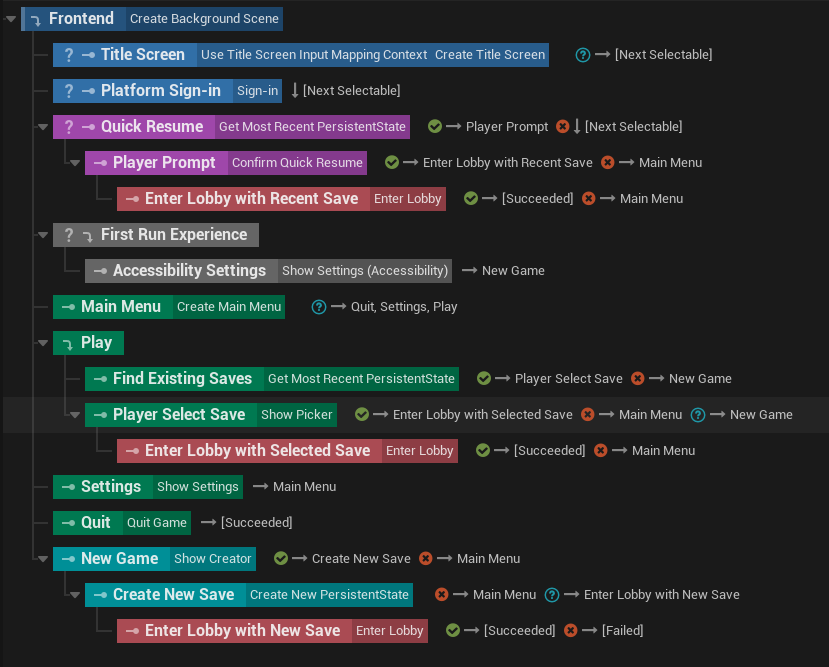
<p>Here’s what my frontend looks as a StateTree. Each step in the flowchart above is implemented as a self-contained discrete state with tasks, conditions, and transitions.</p>

<p><img src="/assets/images/st-frontend.png" alt="My game's frontend flow implemented as a StateTree showing a hierarchy of states" /></p>

<p>The <em>StateTree Component</em> schema provides an actor as context data. Since my use case involves input and widgets, I set the actor type to PlayerController. The startup level in my game uses a special PlayerController actor that has a StateTree Component. This makes the StateTree immediately begin executing when the game loads.</p>

<hr />

<p>The funny thing is I actually spent weeks building a UMG StateTree with its own custom schema and a set of tasks. Unfortunately, what I ended up with is more or less the same thing as the built-in GameplayStateTree plugin. The only real difference between my plugin and GameplayStateTree is that the processor is implemented as a subsystem rather than as an actor component.</p>

<p>I even wrote a whole article about this, but it doesn’t feel right to publish it when I realized the better solution is to just use GameplayStateTree.</p>

<hr />

<p>Most tasks complete in a success or failed state. For example, a player wanting to back out of character creation causes the state to fail. This will trigger a transition to bring the player back to the main menu.</p>

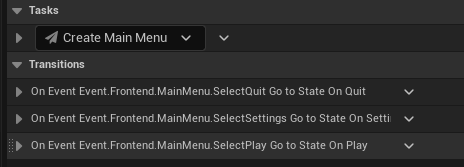
<p>As for the main menu, there’s no success or failure condition. Instead, clicking on a menu button raises a StateTree event. A transition is set up for each event to enter another state that actually does something. The main menu widget only <em>reports</em> player intent, and leaves it to the StateTree to decide what to do next.</p>

<p><img src="/assets/images/st-mainmenu-events.png" alt="Details panel for state with Create Main Menu task and transitions for Select Quit, Select Settings, and Select Play events" /></p>

<p>Widgets are clearly not tasks, so how did I raise a StateTree event? My solution is to create a base widget class with an event dispatcher that top-level widgets must subclass from.</p>

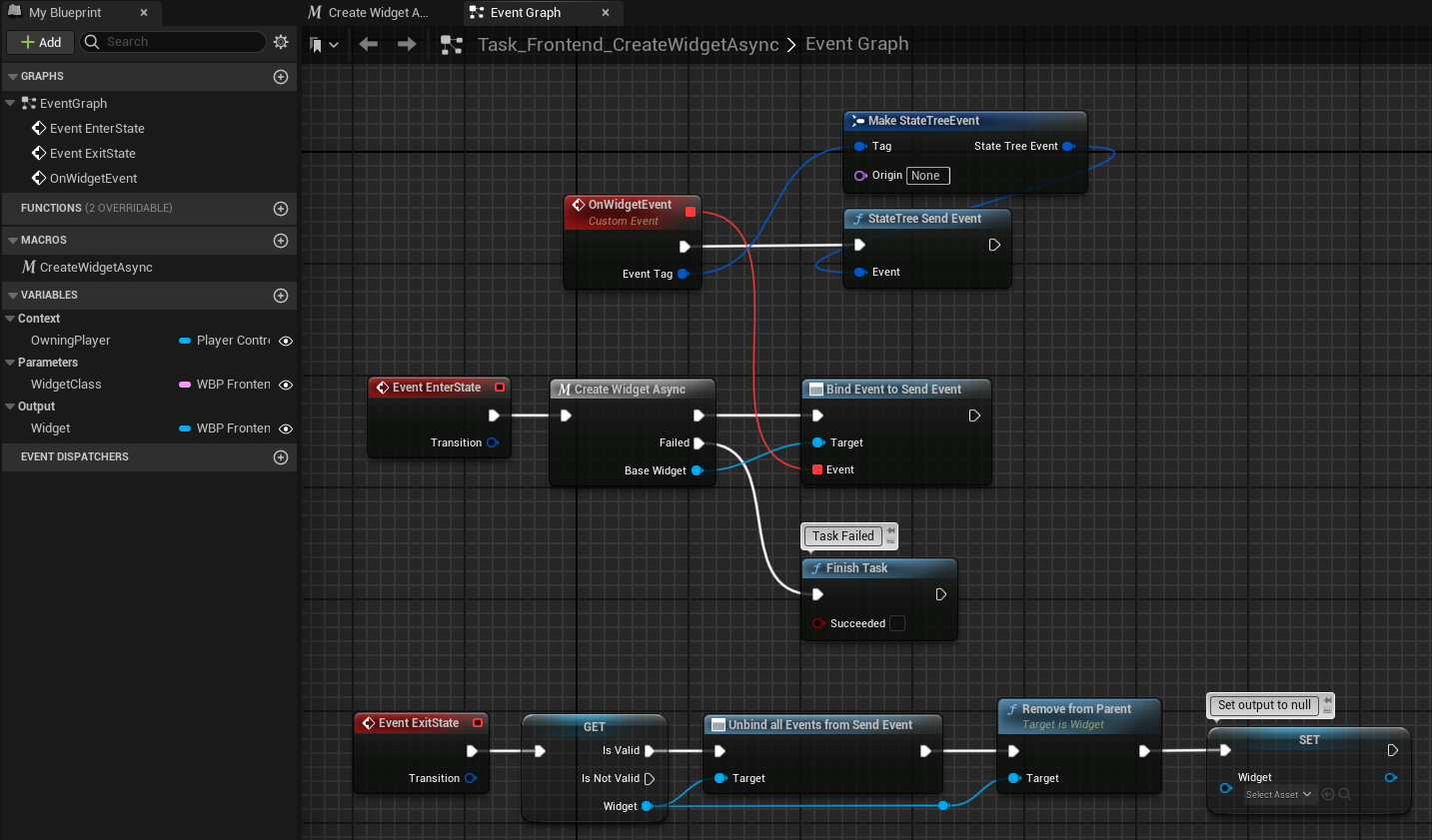
<p>Tasks bind to this event dispatcher after creating the widget. To simplify this even further, I created a base task class called <em>CreateWidgetAsync</em> that takes in a soft class reference as a parameter. By subclassing from this task, I don’t need to reimplement the same logic over and over.</p>

<p><img src="/assets/images/st-createwidgetasync.png" alt="Blueprint graph for CreateWidgetAsync. Enter State event calls Create Widget Async macro and binds to the widget's On Widget Event which then calls State Tree Send Event." /></p>

<p>Notably, it does not call <em>Finish Task</em> unless there was an error. This is how a widget remains visible indefinitely.</p>

<p>By the way, <strong>always use soft references in task parameters!</strong> Avoid hard references to any blueprint widget (other than the base class). If you’re not careful, the StateTree’s memory footprint will skyrocket.</p>

<h2 id="statetree-tips--tricks">StateTree tips &amp; tricks</h2>
<p>Here are some things about StateTree I wish I knew about earlier.</p>

<h3 id="rename-tasks">Rename tasks</h3>
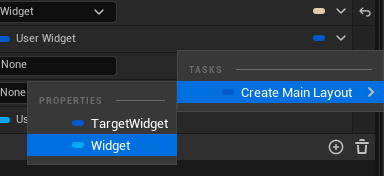
<p>Did you know you could rename tasks? I didn’t for an embarassingly long time. This really helps with identifying which widget to target in a property binding.</p>

<p>Just click on the task name to edit it.</p>

<p><img src="/assets/images/rename-task.png" alt="Task picker with a portion of the task named highlighted" />
<br />
<img src="/assets/images/property-binding.png" alt="Property binding showing the new task name in the picker" /></p>

<p>This also works for conditions and evaluators.</p>

<h3 id="organize-blueprint-nodes">Organize blueprint nodes</h3>
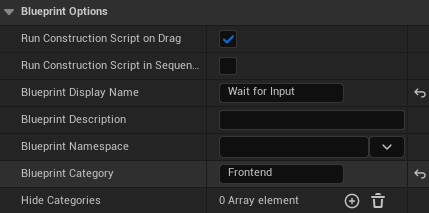
<p>In each one of your blueprint nodes (tasks, conditions, or evaluators), be sure to go to <em>Class Settings</em> and override the display name and category. This will make it easier to find your nodes in the picker.</p>

<p><img src="/assets/images/st-blueprint-options.png" alt="Blueprint options with Blueprint Display Name set to Wait for Input and Blueprint Category set to Frontend" /></p>

<h3 id="parameter-types">Parameter types</h3>
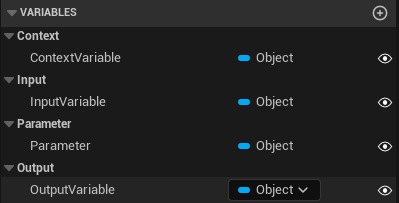
<p>The Category sets the <em>type</em> of a parameter.</p>

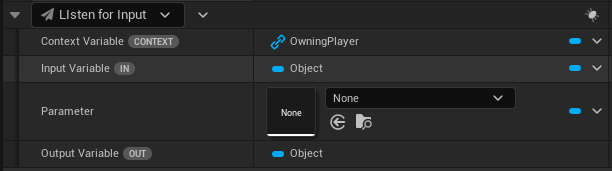
<p><img src="/assets/images/st-parameter-types.png" alt="Blueprint variables under the Context, Input, Parameter, and Output categories" />
<br /></p>

<p><img src="/assets/images/st-parameters.png" alt="Aforementioned parameters displayed as bindable properties in task details. One labeled Context, one labeled In, one labeled Out." /></p>

<p>There are 3 special types of parameters:</p>

<table>
  <thead>
    <tr>
      <th>Category</th>
      <th>Behavior</th>
    </tr>
  </thead>
  <tbody>
    <tr>
      <td><code class="language-plaintext highlighter-rouge">Context</code></td>
      <td>A value is required. Automatically links to context data in the StateTree with the same type, but may be overridden with a binding.</td>
    </tr>
    <tr>
      <td><code class="language-plaintext highlighter-rouge">Input</code></td>
      <td>A value is required unless marked optional with <code class="language-plaintext highlighter-rouge">meta=(Optional)</code> in C++. This value can only be set with a binding.</td>
    </tr>
    <tr>
      <td><code class="language-plaintext highlighter-rouge">Output</code></td>
      <td>This value can only be bound to other properties.</td>
    </tr>
  </tbody>
</table>

<p>Parameters in all other categories appear normal.</p>

<h3 id="condition-operators-and-indentation">Condition operators and indentation</h3>
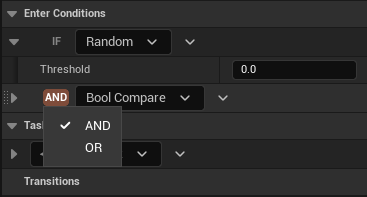
<p>Adding more than one condition will reveal operators. Click on it to switch between AND/OR.</p>

<p><img src="/assets/images/state-tree-condition-operator.png" alt="Condition details with a button with a popup containing the OR AND logical operators" /></p>

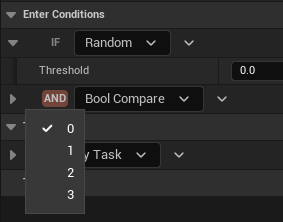
<p>There is also an invisible button right before the operator button. Click on it to change the indentation of a condition. Operators apply to conditions within the same indentation.</p>

<p><img src="/assets/images/state-tree-condition-indent.png" alt="Popup with numbers 0 to 3 are shown below an empty space next to the logical operator button" /></p>

<h3 id="subtree-transitions">Subtree transitions</h3>
<p>The <em>Tree Succeeded</em> and <em>Tree Failed</em> transitions inside a subtree will surface to the linked state and no further. However, if a subtree was entered by a transition instead of a linked state, then these transitions will affect the whole StateTree.</p>

<h3 id="blueprint-latent-node-caveat">Blueprint Latent Node Caveat</h3>
<p>Be mindful when using certain latent nodes (e.g. Async Save Game). Calling <em>Finish Task</em> from these latent nodes will not trigger transitions. Consider raising a StateTree event instead.</p>

<h2 id="ending-thoughts">Ending thoughts</h2>
<p>I’m not claiming this is the best approach, but it does work pretty well. The biggest benefit of using StateTree is that I can see the entire flow within a single asset. So, yeah, I’m happy with what I have right now. :)</p>]]></content><author><name></name></author><category term="Dev Logs" /><category term="unreal" /><summary type="html"><![CDATA[]]></summary></entry><entry><title type="html">Dev Log 02: How I’m Making My Game Accessible</title><link href="https://unrealist.org/dev-log-02-accessibility/" rel="alternate" type="text/html" title="Dev Log 02: How I’m Making My Game Accessible" /><published>2024-03-15T00:00:00-07:00</published><updated>2024-03-15T00:00:00-07:00</updated><id>https://unrealist.org/dev-log-02-accessibility</id><content type="html" xml:base="https://unrealist.org/dev-log-02-accessibility/"><![CDATA[<p><img src="https://img.shields.io/badge/Unreal%20Engine-5-informational" alt="Written for Unreal Engine 5" /> <img src="https://img.shields.io/badge/-Dev%20Log-red" alt="Dev Log" /> <img src="https://img.shields.io/badge/-C%2B%2B-orange" alt="C++" /></p>

<p>Did you know that <strong><a href="https://www.gamesindustry.biz/popcap-games-research-publisher-s-latest-survey-says-that-casual-games-are-big-with-disabled-people">one in five casual gamers have a disability</a></strong>—myself included? I’m creating a cozy life simulation game, so players with disabilities make up a significant portion of my target audience. It’s clear that my game must be accessible.</p>

<p>There are <a href="https://gameaccessibilityguidelines.com/">many ways to make a game accessible</a>, and I strive to implement as much as I reasonably can.</p>

<p>— But that’s not the focus of this article.</p>

<p>Retrofitting a game with accessible features is hard, and this is why many games end up with just a band-aid solution. <strong>I want to share <em>how</em> I’m setting up my game to be accessible in a modular way—as Game Feature plugins.</strong></p>

<h2 id="accessibility-as-a-game-feature-plugin">Accessibility as a Game Feature plugin?</h2>
<p>Yes. And it works really well!</p>

<details open="" style="margin-bottom: 1em;">
  <summary class="toggle-link" style="cursor: pointer;">Toggle animated preview</summary>
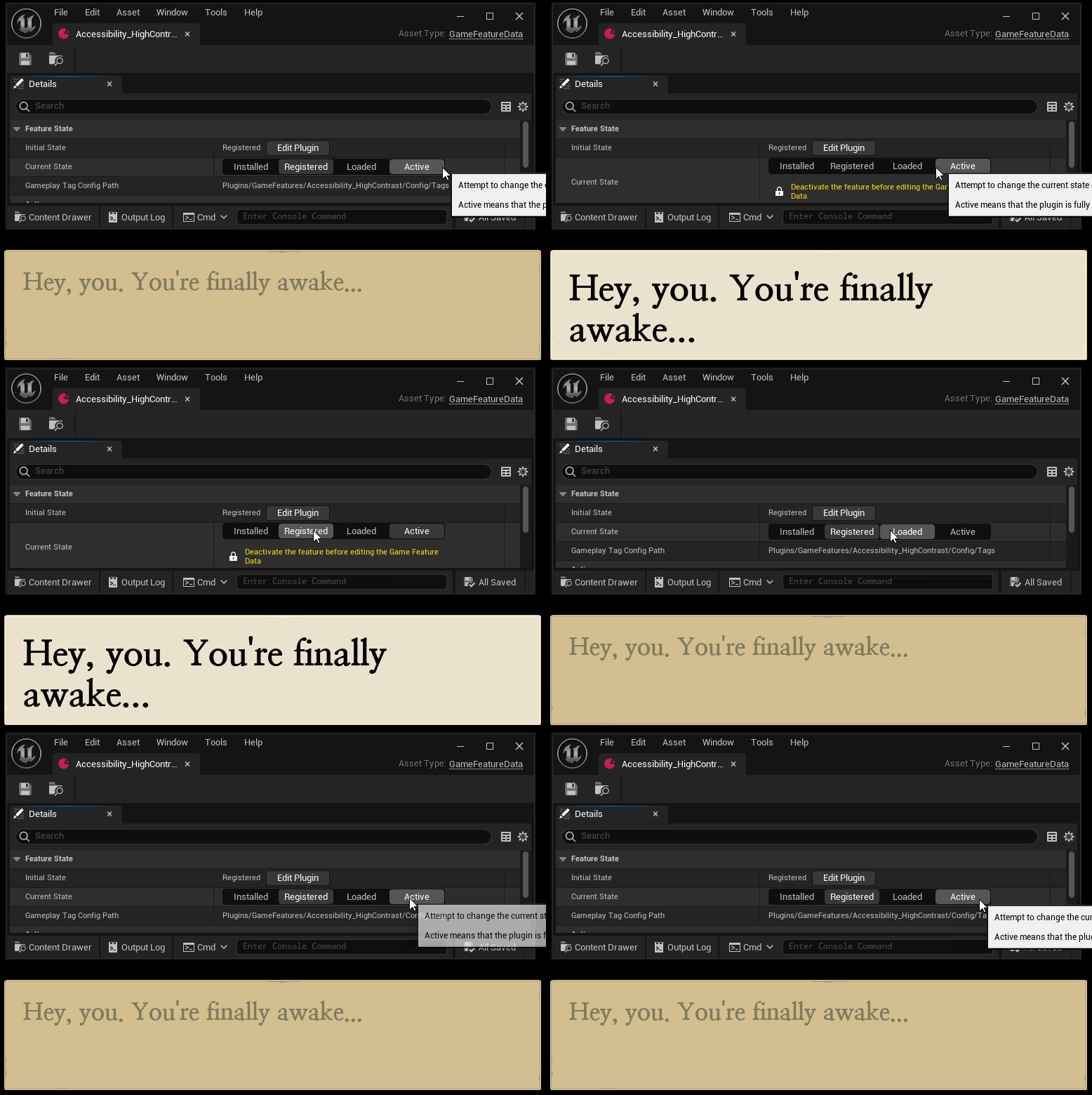
  <img src="/assets/images/accessibility-plugin2.gif" style="height: 400px;" alt="The high contrast and large text settings are applied to a dialog box when the Game Feature is activated. It reverts to the default styling when deactivated." />
</details>

<p>Just to be clear, I don’t mean <em>game features</em> as a concept. I am referring to the <a href="https://docs.unrealengine.com/5.3/en-US/game-features-and-modular-gameplay-in-unreal-engine/">Game Features system</a>, which is a relatively new Unreal Engine feature that makes it possible to create standalone content for a game.</p>

<p>In my game, each accessibility setting is implemented as a Game Feature plugin for these reasons:</p>
<ul>
  <li>It enables previewing UMG widgets with accessible settings at design time.</li>
  <li>Some settings require assets that I don’t want loaded when they’re not in use, such as <a href="https://opendyslexic.org/">alternative fonts</a>, additional icons, and replacement textures.</li>
  <li>Compartmentalization makes it easy to add (and maintain) accessibility settings.</li>
  <li>The Game Features system has a built-in activation/deactivation mechanism that also works in the editor.</li>
  <li>The only responsibility of a save game system is to activate the correct plugin based on user preferences.</li>
</ul>

<p>To make all of this work, the game not only needs to know about these settings, but also needs to do so in a modular manner.</p>

<p>To solve this problem, I created the Global Parameters plugin that integrates with the Game Features system. A custom Game Feature action overrides global parameters when activated.</p>

<h2 id="global-parameters">Global Parameters</h2>
<p>A variable that’s used as input for some function or calculation is a parameter.</p>

<p>Global variables are generally a sign of poor design, but global <em>parameters</em> are appropriate for some purposes such as:</p>
<ul>
  <li>feature flags</li>
  <li>accessibility overrides</li>
  <li>UI theme system (dark mode, maybe? 🌚)</li>
</ul>

<h3 id="querying">Querying</h3>
<p>Gameplay tags are used for parameter names.</p>

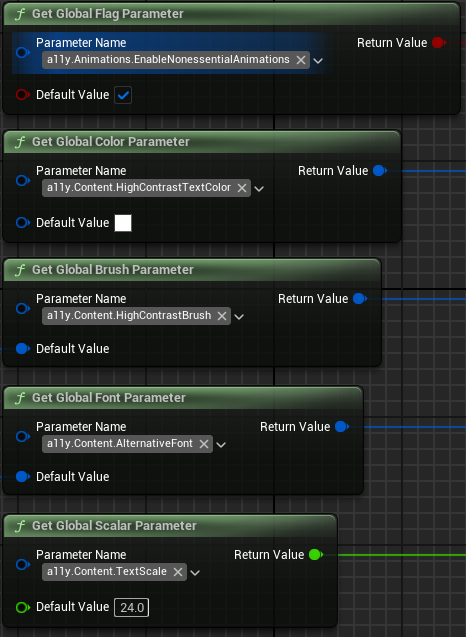
<p>Any <code class="language-plaintext highlighter-rouge">UObject</code> may query a global parameter. All accessors have a default fallback value for when the parameter is not set.</p>

<p><img src="/assets/images/dev-log-02-accessors.png" alt="Pure Blueprint nodes for getting the value from global flag, color, brush, font, and scalar parameters." /></p>

<h3 id="parameter-collections">Parameter collections</h3>
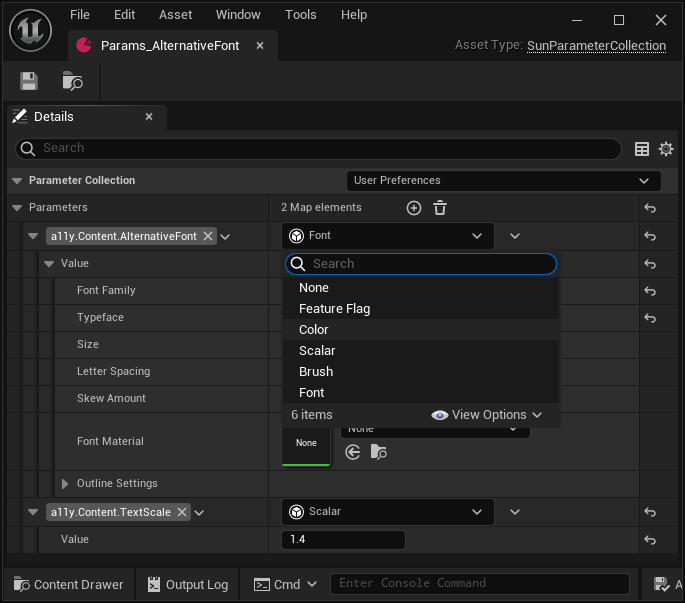
<p>Parameters are defined in a custom data asset, <code class="language-plaintext highlighter-rouge">USunParameterCollection</code>. This is similar to <code class="language-plaintext highlighter-rouge">UMaterialParameterCollection</code>, but it supports more than just scalar and vector values.</p>

<p>Each value is an <a href="https://docs.unrealengine.com/5.3/en-US/API/Plugins/StructUtils/FInstancedStruct/">instanced struct</a> (from the <code class="language-plaintext highlighter-rouge">StructUtils</code> plugin), which means it can be any struct type.</p>

<div class="language-cpp highlighter-rouge"><div class="highlight"><pre class="highlight"><code><span class="n">UCLASS</span><span class="p">(</span><span class="n">MinimalAPI</span><span class="p">,</span> <span class="n">BlueprintType</span><span class="p">,</span> <span class="n">DisplayName</span><span class="o">=</span><span class="s">"Parameter Collection"</span><span class="p">)</span>
<span class="k">class</span> <span class="nc">USunParameterCollection</span> <span class="o">:</span> <span class="k">public</span> <span class="n">UDataAsset</span>
<span class="p">{</span>
    <span class="n">GENERATED_BODY</span><span class="p">()</span>

<span class="nl">public:</span>
    <span class="cm">/** Indicates the priority of this collection compared to other collections. */</span>
    <span class="n">UPROPERTY</span><span class="p">(</span><span class="n">EditAnywhere</span><span class="p">,</span> <span class="n">Category</span><span class="o">=</span><span class="s">"Parameter Collection"</span><span class="p">,</span> <span class="n">meta</span><span class="o">=</span><span class="p">(</span><span class="n">InlineCategoryProperty</span><span class="p">))</span>
    <span class="n">ESunParameterCollectionPriority</span> <span class="n">Priority</span><span class="p">;</span>

    <span class="cm">/** The parameters in this collection. */</span>
    <span class="n">UPROPERTY</span><span class="p">(</span><span class="n">EditAnywhere</span><span class="p">,</span> <span class="n">Category</span><span class="o">=</span><span class="s">"Parameter Collection"</span><span class="p">,</span> <span class="n">meta</span><span class="o">=</span><span class="p">(</span><span class="n">ForceInlineRow</span><span class="p">,</span> <span class="n">BaseStruct</span><span class="o">=</span><span class="s">"/Script/GlobalParameters.SunParameterBase"</span><span class="p">,</span> <span class="n">ExcludeBaseStruct</span><span class="p">,</span> <span class="n">ShowOnlyInnerProperties</span><span class="p">))</span>
    <span class="n">TMap</span><span class="o">&lt;</span><span class="n">FGameplayTag</span><span class="p">,</span> <span class="n">FInstancedStruct</span><span class="o">&gt;</span> <span class="n">Parameters</span><span class="p">;</span>

    <span class="c1">// - IsDataValid (to check for duplicate parameter names)</span>
    <span class="c1">// - Getter and setter functions for each parameter type using a template</span>
<span class="p">}</span>
</code></pre></div></div>

<p>Using the <code class="language-plaintext highlighter-rouge">BaseStruct</code> metadata for the <code class="language-plaintext highlighter-rouge">Parameters</code> property, I limit the parameter value to one of the following:</p>

<div class="language-cpp highlighter-rouge"><div class="highlight"><pre class="highlight"><code><span class="c1">// GENERATED_BODY and UPROPERTY macros omitted for brevity.</span>
<span class="c1">// Each Value UPROPERTY needs the `EditAnywhere` modifier.</span>

<span class="n">USTRUCT</span><span class="p">()</span> <span class="k">struct</span> <span class="nc">FSunParameterBase</span><span class="p">;</span>
<span class="n">USTRUCT</span><span class="p">(</span><span class="n">DisplayName</span><span class="o">=</span><span class="s">"Feature Flag"</span><span class="p">)</span> <span class="k">struct</span> <span class="nc">FSunFlagParameter</span> <span class="o">:</span> <span class="k">public</span> <span class="n">FSunParameterBase</span> <span class="p">{</span> <span class="kt">bool</span> <span class="n">Value</span><span class="p">;</span> <span class="p">};</span>
<span class="n">USTRUCT</span><span class="p">(</span><span class="n">DisplayName</span><span class="o">=</span><span class="s">"Scalar"</span><span class="p">)</span> <span class="k">struct</span> <span class="nc">FSunScalarParameter</span> <span class="o">:</span> <span class="k">public</span> <span class="n">FSunParameterBase</span> <span class="p">{</span> <span class="kt">float</span> <span class="n">Value</span><span class="p">;</span> <span class="p">};</span>
<span class="n">USTRUCT</span><span class="p">(</span><span class="n">DisplayName</span><span class="o">=</span><span class="s">"Color"</span><span class="p">)</span> <span class="k">struct</span> <span class="nc">FSunLinearColorParameter</span> <span class="o">:</span> <span class="k">public</span> <span class="n">FSunParameterBase</span> <span class="p">{</span> <span class="n">FLinearColor</span> <span class="n">Value</span><span class="p">;</span> <span class="p">};</span>
<span class="n">USTRUCT</span><span class="p">(</span><span class="n">DisplayName</span><span class="o">=</span><span class="s">"Brush"</span><span class="p">)</span> <span class="k">struct</span> <span class="nc">FSunSlateBrushParameter</span> <span class="o">:</span> <span class="k">public</span> <span class="n">FSunParameterBase</span> <span class="p">{</span> <span class="n">FSlateBrush</span> <span class="n">Value</span><span class="p">;</span> <span class="p">};</span>
<span class="n">USTRUCT</span><span class="p">(</span><span class="n">DisplayName</span><span class="o">=</span><span class="s">"Font"</span><span class="p">)</span> <span class="k">struct</span> <span class="nc">FSunSlateFontParameter</span> <span class="o">:</span> <span class="k">public</span> <span class="n">FSunParameterBase</span> <span class="p">{</span> <span class="n">FSlateFontInfo</span> <span class="n">Value</span><span class="p">;</span> <span class="p">};</span>
</code></pre></div></div>

<p>Unreal Editor has built-in detail customization for <code class="language-plaintext highlighter-rouge">FInstancedStruct</code>. When adding a parameter to a Parameter Collection, I’m able to pick any one of above structs as the value type.</p>

<p><img src="/assets/images/dev-log-02-collection.png" alt="Details panel for a Parameter Collection data asset. A font parameter and a scalar parameter are visible. Pop-up menu is visible with None, Feature Flag, Color, Scalar, Brush, and Font options." /></p>

<p>Each collection has a <code class="language-plaintext highlighter-rouge">Priority</code> property that provides control over how multiple collections are simultaneously loaded at runtime.</p>

<div class="language-cpp highlighter-rouge"><div class="highlight"><pre class="highlight"><code><span class="n">UENUM</span><span class="p">()</span>
<span class="k">enum</span> <span class="k">class</span> <span class="nc">ESunParameterCollectionPriority</span>
<span class="p">{</span>
    <span class="cm">/* The collection represents default values. */</span>
    <span class="n">Default</span> <span class="o">=</span> <span class="mi">0</span><span class="p">,</span>

    <span class="cm">/** The collection represents user preferences (including accessibility). */</span>
    <span class="n">UserPreferences</span> <span class="o">=</span> <span class="mi">1</span><span class="p">,</span>

    <span class="cm">/** The collection represents a patch. */</span>
    <span class="n">Patch</span> <span class="o">=</span> <span class="mi">2</span>
<span class="p">};</span>
</code></pre></div></div>

<p>Right now, I’m unsure about this order. I may rearrange and/or add new priority levels later.</p>

<h3 id="runtime-state">Runtime state</h3>
<p>Accessible UI requires fluid layouts and that’s hard to get right. There will be many, many iterations to make a widget look good in both normal and accessible modes. To make this easier, I need to preview what a UMG widget looks like with one or more accessiblity setting turned on in the widget designer. This rules out any gameplay framework objects including <code class="language-plaintext highlighter-rouge">UGameInstance</code>.</p>

<p>I ended up with a custom <code class="language-plaintext highlighter-rouge">UEngineSubsystem</code>. My subsystem maps each World Context’s handle to a runtime collection. This means the editor and each PIE session have their own separate runtime state.</p>

<p>A runtime collection maintains a list of pointers to collection assets, sorted by priority, for each parameter.</p>

<p>When a parameter is queried, the collection asset with the highest priority is returned. A templated function in the Blueprint function library reads the value directly from the collection.</p>

<div class="language-cpp highlighter-rouge"><div class="highlight"><pre class="highlight"><code><span class="n">UCLASS</span><span class="p">(</span><span class="n">MinimalAPI</span><span class="p">)</span>
<span class="k">class</span> <span class="nc">USunGlobalParameterStatics</span> <span class="k">final</span> <span class="o">:</span> <span class="k">public</span> <span class="n">UBlueprintFunctionLibrary</span>
<span class="p">{</span>
  <span class="n">GENERATED_BODY</span><span class="p">()</span>

<span class="nl">public:</span>
    <span class="cm">/** Retrieves a global font parameter value or the default value if the parameter was not set. */</span>
    <span class="n">UFUNCTION</span><span class="p">(</span><span class="n">BlueprintPure</span><span class="p">,</span> <span class="n">Category</span><span class="o">=</span><span class="s">"Global Parameters"</span><span class="p">,</span> <span class="n">meta</span><span class="o">=</span><span class="p">(</span><span class="n">WorldContext</span><span class="o">=</span><span class="s">"WorldContextObject"</span><span class="p">))</span>
    <span class="k">static</span> <span class="n">GLOBALPARAMETERS_API</span> <span class="n">FSlateFontInfo</span> <span class="n">GetGlobalFontParameter</span><span class="p">(</span><span class="n">UObject</span><span class="o">*</span> <span class="n">WorldContextObject</span><span class="p">,</span> <span class="n">FGameplayTag</span> <span class="n">ParameterName</span><span class="p">,</span> <span class="n">FSlateFontInfo</span> <span class="n">DefaultValue</span> <span class="o">=</span> <span class="n">FSlateFontInfo</span><span class="p">())</span>
    <span class="p">{</span>
        <span class="k">return</span> <span class="n">GetParameter</span><span class="o">&lt;</span><span class="n">FSunSlateFontParameter</span><span class="p">,</span> <span class="n">FSlateFontInfo</span><span class="o">&gt;</span><span class="p">(</span><span class="n">WorldContextObject</span><span class="p">,</span> <span class="n">ParameterName</span><span class="p">,</span> <span class="n">DefaultValue</span><span class="p">);</span>
    <span class="p">}</span>

    <span class="c1">// GetGlobalScalarParameter, GetGlobalColorParameter, etc...</span>

<span class="nl">private:</span>
    <span class="k">static</span> <span class="n">FSunRuntimeParameterCollection</span><span class="o">*</span> <span class="n">GetRuntimeCollectionFromWorldContextObject</span><span class="p">(</span><span class="n">UObject</span><span class="o">*</span> <span class="n">WorldContextObject</span><span class="p">);</span>
    <span class="k">static</span> <span class="n">FWorldContext</span><span class="o">*</span> <span class="n">GetWorldContextFromObject</span><span class="p">(</span><span class="n">UObject</span><span class="o">*</span> <span class="n">WorldContextObject</span><span class="p">);</span>

    <span class="k">template</span><span class="o">&lt;</span><span class="k">typename</span> <span class="nc">TParameter</span><span class="p">,</span> <span class="k">typename</span> <span class="nc">TParameterType</span><span class="p">&gt;</span>
    <span class="k">static</span> <span class="n">TParameterType</span> <span class="n">GetParameter</span><span class="p">(</span><span class="n">UObject</span><span class="o">*</span> <span class="n">WorldContextObject</span><span class="p">,</span> <span class="n">FGameplayTag</span> <span class="n">ParameterName</span><span class="p">,</span> <span class="n">TParameterType</span> <span class="n">DefaultValue</span><span class="p">)</span>
    <span class="p">{</span>
        <span class="k">if</span> <span class="p">(</span><span class="k">const</span> <span class="n">FSunRuntimeParameterCollection</span><span class="o">*</span> <span class="n">Collection</span> <span class="o">=</span> <span class="n">GetRuntimeCollectionFromWorldContextObject</span><span class="p">(</span><span class="n">WorldContextObject</span><span class="p">))</span>
        <span class="p">{</span>
            <span class="c1">// GetParameterValue calls GetPtr&lt;TParameter&gt;() on the FInstancedStruct.</span>
            <span class="k">if</span> <span class="p">(</span><span class="k">const</span> <span class="n">TParameter</span><span class="o">*</span> <span class="n">ParameterValue</span> <span class="o">=</span> <span class="n">Collection</span><span class="o">-&gt;</span><span class="n">GetParameterValue</span><span class="o">&lt;</span><span class="n">TParameter</span><span class="o">&gt;</span><span class="p">(</span><span class="n">ParameterName</span><span class="p">))</span>
            <span class="p">{</span>
                <span class="k">return</span> <span class="n">ParameterValue</span><span class="o">-&gt;</span><span class="n">Value</span><span class="p">;</span>
            <span class="p">}</span>
        <span class="p">}</span>

        <span class="k">return</span> <span class="n">DefaultValue</span><span class="p">;</span>
    <span class="p">}</span>
<span class="p">}</span>
</code></pre></div></div>

<p>This approach makes changes to a parameter collection apply in realtime during a PIE session.</p>

<h3 id="observing-changes">Observing changes</h3>
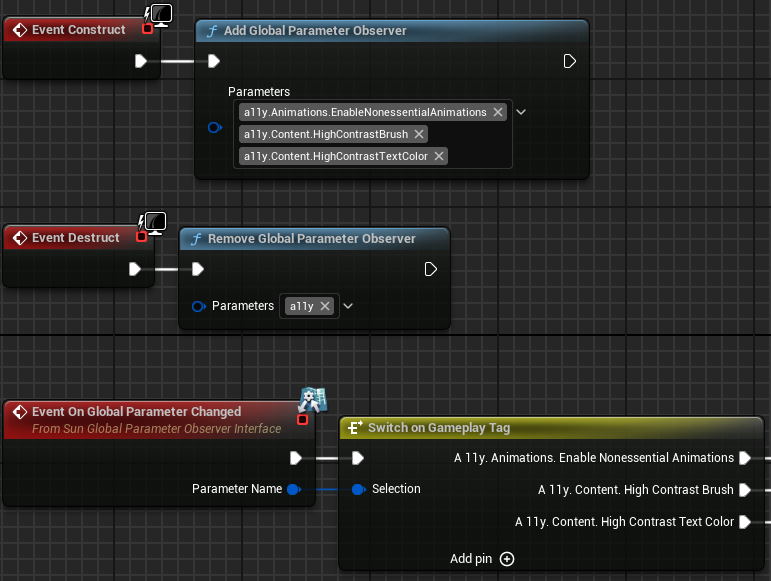
<p>Rather than querying in each tick, an <code class="language-plaintext highlighter-rouge">UObject</code> may subscribe to one or more parameters.</p>

<p><img src="/assets/images/dev-log-02-observing.png" alt="Blueprint graph with Construct event linked to Add Global Parameter Observer with gameplay tags as input. Destruct event is linked to Remove Global Parameter Observer. On Global Parameter Changed event is linked to Switch On Gameplay Tag." /></p>

<p><code class="language-plaintext highlighter-rouge">HidePin</code> and <code class="language-plaintext highlighter-rouge">DefaultToSelf</code> metadata modifiers are used to implicitly select the calling object as the observer.</p>

<div class="language-cpp highlighter-rouge"><div class="highlight"><pre class="highlight"><code><span class="n">UFUNCTION</span><span class="p">(</span><span class="n">BlueprintCallable</span><span class="p">,</span> <span class="n">Category</span><span class="o">=</span><span class="s">"Global Parameters"</span><span class="p">,</span> <span class="n">meta</span><span class="o">=</span><span class="p">(</span><span class="n">HidePin</span><span class="o">=</span><span class="s">"Observer"</span><span class="p">,</span> <span class="n">DefaultToSelf</span><span class="o">=</span><span class="s">"Observer"</span><span class="p">))</span>
<span class="k">static</span> <span class="n">GLOBALPARAMETERS_API</span> <span class="kt">void</span> <span class="nf">AddGlobalParameterObserver</span><span class="p">(</span><span class="n">FGameplayTagContainer</span> <span class="n">Parameters</span><span class="p">,</span> <span class="n">UObject</span><span class="o">*</span> <span class="n">Observer</span><span class="p">);</span>

<span class="n">UFUNCTION</span><span class="p">(</span><span class="n">BlueprintCallable</span><span class="p">,</span> <span class="n">Category</span><span class="o">=</span><span class="s">"Global Parameters"</span><span class="p">,</span> <span class="n">meta</span><span class="o">=</span><span class="p">(</span><span class="n">HidePin</span><span class="o">=</span><span class="s">"Observer"</span><span class="p">,</span> <span class="n">DefaultToSelf</span><span class="o">=</span><span class="s">"Observer"</span><span class="p">))</span>
<span class="k">static</span> <span class="n">GLOBALPARAMETERS_API</span> <span class="kt">void</span> <span class="nf">RemoveGlobalParameterObserver</span><span class="p">(</span><span class="n">FGameplayTagContainer</span> <span class="n">Parameters</span><span class="p">,</span> <span class="n">UObject</span><span class="o">*</span> <span class="n">Observer</span><span class="p">);</span>
</code></pre></div></div>

<p>Following a similar approach as <code class="language-plaintext highlighter-rouge">UGameFeaturesSubsystem</code>, the observing <code class="language-plaintext highlighter-rouge">UObject</code> must implement an interface to be notified. I find this easier to work with  in a Blueprint graph compared to binding and unbinding delegates.</p>

<div class="language-cpp highlighter-rouge"><div class="highlight"><pre class="highlight"><code><span class="k">class</span> <span class="nc">ISunGlobalParameterObserverInterface</span>
<span class="p">{</span>
    <span class="n">GENERATED_BODY</span><span class="p">()</span>

<span class="nl">public:</span>
    <span class="cm">/** Raised when an observed global parameter value changes. */</span>
    <span class="n">UFUNCTION</span><span class="p">(</span><span class="n">BlueprintImplementableEvent</span><span class="p">,</span> <span class="n">Category</span><span class="o">=</span><span class="s">"Global Parameters"</span><span class="p">)</span>
    <span class="kt">void</span> <span class="n">OnGlobalParameterChanged</span><span class="p">(</span><span class="n">FGameplayTag</span> <span class="n">ParameterName</span><span class="p">);</span>
<span class="p">};</span>
</code></pre></div></div>

<h3 id="loading-collections">Loading collections</h3>
<p>There are two ways I can load and unload Parameter Collections.</p>

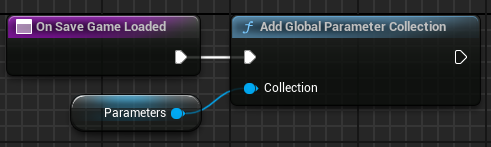
<p>When loading a save game, I use the <code class="language-plaintext highlighter-rouge">AddGlobalParameterCollection</code> and <code class="language-plaintext highlighter-rouge">RemoveGlobalParameterCollection</code> Blueprint functions.</p>

<p><img src="/assets/images/dev-log-02-add-collection.png" alt="Blueprint graph of On Save Game Loaded function linked to Add Global Parameter Collection with a parameter collection as input." /></p>

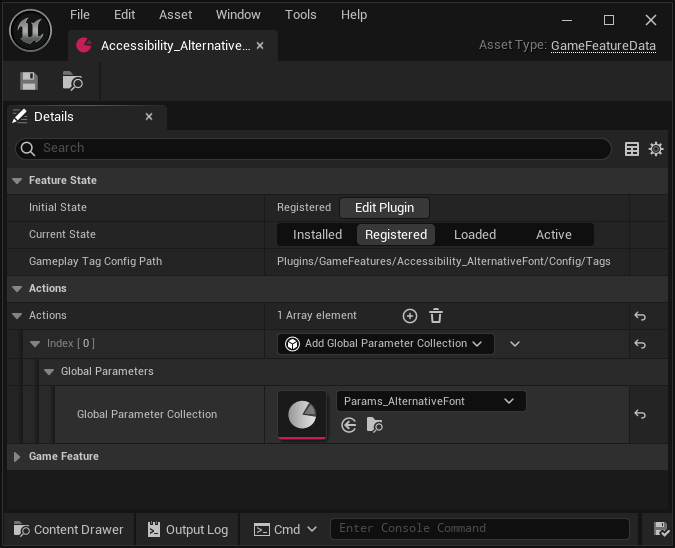
<p>Otherwise, I use the <code class="language-plaintext highlighter-rouge">Add Global Parameter Collection</code> Game Feature action.</p>

<p><img src="/assets/images/dev-log-02-overview.png" alt="Details panel for a Game Feature data asset. Add Global Parameter Collection action has a reference to a parameter collection asset." /></p>

<p>Using the Game Feature action is the preferred approach. When the Game Feature is activated (or deactivated), the collection is added (or removed) for each world context.</p>

<div class="language-cpp highlighter-rouge"><div class="highlight"><pre class="highlight"><code><span class="kt">void</span> <span class="n">UGameFeatureAction_AddGlobalParameterCollection</span><span class="o">::</span><span class="n">OnGameFeatureActivating</span><span class="p">(</span><span class="n">FGameFeatureActivatingContext</span><span class="o">&amp;</span> <span class="n">Context</span><span class="p">)</span>
<span class="p">{</span>
    <span class="k">auto</span><span class="o">&amp;</span> <span class="n">GlobalParameterSubsystem</span> <span class="o">=</span> <span class="n">USunGlobalParameterSubsystem</span><span class="o">::</span><span class="n">Get</span><span class="p">();</span>
    <span class="k">for</span> <span class="p">(</span><span class="n">FWorldContext</span> <span class="n">WorldContext</span> <span class="o">:</span> <span class="n">GEngine</span><span class="o">-&gt;</span><span class="n">GetWorldContexts</span><span class="p">())</span>
    <span class="p">{</span>
        <span class="k">if</span> <span class="p">(</span><span class="n">Context</span><span class="p">.</span><span class="n">ShouldApplyToWorldContext</span><span class="p">(</span><span class="n">WorldContext</span><span class="p">))</span>
        <span class="p">{</span>
           <span class="n">GlobalParameterSubsystem</span><span class="p">.</span><span class="n">AddParameterCollection</span><span class="p">(</span><span class="n">WorldContext</span><span class="p">,</span> <span class="n">GlobalParameterCollection</span><span class="p">);</span>
        <span class="p">}</span>
    <span class="p">}</span>
<span class="p">}</span>

<span class="kt">void</span> <span class="n">UGameFeatureAction_AddGlobalParameterCollection</span><span class="o">::</span><span class="n">OnGameFeatureDeactivating</span><span class="p">(</span><span class="n">FGameFeatureDeactivatingContext</span><span class="o">&amp;</span> <span class="n">Context</span><span class="p">)</span>
<span class="p">{</span>
    <span class="k">auto</span><span class="o">&amp;</span> <span class="n">GlobalParameterSubsystem</span> <span class="o">=</span> <span class="n">USunGlobalParameterSubsystem</span><span class="o">::</span><span class="n">Get</span><span class="p">();</span>
    <span class="k">for</span> <span class="p">(</span><span class="n">FWorldContext</span> <span class="n">WorldContext</span> <span class="o">:</span> <span class="n">GEngine</span><span class="o">-&gt;</span><span class="n">GetWorldContexts</span><span class="p">())</span>
    <span class="p">{</span>
        <span class="k">if</span> <span class="p">(</span><span class="n">Context</span><span class="p">.</span><span class="n">ShouldApplyToWorldContext</span><span class="p">(</span><span class="n">WorldContext</span><span class="p">))</span>
        <span class="p">{</span>
            <span class="n">GlobalParameterSubsystem</span><span class="p">.</span><span class="n">RemoveParameterCollection</span><span class="p">(</span><span class="n">WorldContext</span><span class="p">,</span> <span class="n">GlobalParameterCollection</span><span class="p">);</span>
        <span class="p">}</span>
    <span class="p">}</span>
<span class="p">}</span>
</code></pre></div></div>

<h2 id="whats-next">What’s next?</h2>
<p>The next step is to build a library of reusable widgets that have most of this wired up. Having semantic widgets like <code class="language-plaintext highlighter-rouge">ContentTextBlock</code> and <code class="language-plaintext highlighter-rouge">TitleTextBlock</code> that observe accessibility modifiers will help me make my game accessible with lesser effort.</p>

<p>I hope this article has helped you in one way or another. 😊</p>

<p>Over the past few months, I built several plugins and components I think is cool and really want to share with you all. The next dev log will be about how I used a <a href="https://docs.unrealengine.com/5.3/en-US/overview-of-state-tree-in-unreal-engine/">StateTree</a> as a UI system.</p>]]></content><author><name></name></author><category term="Dev Logs" /><category term="unreal" /><summary type="html"><![CDATA[]]></summary></entry><entry><title type="html">Dev Log 01: Ten Essential Steps When Starting an Unreal Engine Project</title><link href="https://unrealist.org/dev-log-01-essential-steps-for-new-unreal-projects/" rel="alternate" type="text/html" title="Dev Log 01: Ten Essential Steps When Starting an Unreal Engine Project" /><published>2024-01-31T00:00:00-08:00</published><updated>2024-01-31T00:00:00-08:00</updated><id>https://unrealist.org/dev-log-01-essential-steps-for-new-unreal-projects</id><content type="html" xml:base="https://unrealist.org/dev-log-01-essential-steps-for-new-unreal-projects/"><![CDATA[<p><img src="https://img.shields.io/badge/Unreal%20Engine-5-informational" alt="Written for Unreal Engine 5" /> <img src="https://img.shields.io/badge/-Dev%20Log-red" alt="Dev Log" /></p>

<p>I am a huge fan of <a href="https://www.reddit.com/r/CozyGamers/">cozy games</a> because they are relaxing and stress-relieving, which is what I want after a long day at work. Unfortunately, I haven’t found a game that feels sufficiently satisfying yet, inspiring me to make my own cozy life simulation game centered around two things I enjoy: trains and traveling!</p>

<p>In these dev logs, <strong>I share my thought process and decision-making in hopes that others find it interesting</strong>. The logs will cover both technical and game design topics.</p>

<p>Let’s begin with the ten essential steps I always take when creating a new Unreal Engine project:</p>

<h2 id="1-think-about-the-games-architecture">1. Think about the game’s architecture</h2>
<p>The architecture of a game makes a lasting impact in every way, yet is very difficult to change later on. <strong>A well-designed architecture is the glue that holds any software—especially games—together</strong>.</p>

<p>Poorly designed architecture not only makes it harder to implement features but also manifests in visible ways, such as longer loading times and a less polished player experience. This goes the other way; an architecture that is too rigid will have the same negative impact on a game.</p>

<p>Now, how do I know if my architecture is <em>just right</em>? The best one can do is learn from prior experience. In my role as a software engineer, I’ve been fortunate to have the opportunity to dive deep into well-designed software systems. Although I did not work on games, general software engineering principles and best practices absolutely do apply to video games.</p>

<p><strong>I will make mistakes as I develop my game</strong>. My architecture may not represent the “best” way of doing things. All I can do is learn from my mistakes as well as learn from others. A game developer must make a lifetime commitment to learning.</p>

<p>Let’s start with three overarching goals I hope to achieve with my architecture:</p>

<ol>
  <li><strong>Modular</strong>—Organize content into self-contained plugins.</li>
  <li><strong>Designer-focused</strong>—Develop building blocks in C++ and implement features in Blueprints.</li>
  <li><strong>Data-driven</strong>—Create content with data assets, data tables, and registries.</li>
</ol>

<h3 id="organize-content-into-self-contained-plugins">Organize content into self-contained plugins</h3>
<p>With the <a href="https://docs.unrealengine.com/5.3/en-US/game-features-and-modular-gameplay-in-unreal-engine/">Game Features</a> plugin, content is organized into self-contained plugins. Deactivating any Game Feature plugin must not hinder the game from running.</p>

<p>Now, let’s define what I mean by “content”. In my view, content is anything that adds to the core sandbox experience. Here, <strong>the sandbox is the minimum viable player experience</strong>, and content is an extension built upon this sandbox. Individual pieces of content are bundled together as a Game Feature plugin, serving as a content pack.</p>

<p>Why does the definition matter? With a clear definition, I can easily determine whether an asset or class belongs in the sandbox or should be added as a Game Feature plugin.</p>

<p>These <em>are</em> content:</p>
<ul>
  <li>Characters (except archetypes)</li>
  <li>Items (e.g., clothes, furniture, consumables)</li>
  <li>Maps</li>
  <li>Quests</li>
  <li><a href="https://docs.unrealengine.com/5.3/en-US/gameplay-ability-system-for-unreal-engine/">Gameplay abilities</a></li>
  <li>Title Menu &amp; Lobby*</li>
</ul>

<p>*The title menu and lobby are not necessary for the sandbox itself to function, and therefore can be isolated as a Game Feature plugin. For example, a demo build of the game may launch directly into the sandbox.</p>

<p>And these are <em>not</em> content:</p>

<ul>
  <li>I/O systems (e.g., input, game saves, UI, haptics)</li>
  <li><code class="language-plaintext highlighter-rouge">AGameState</code> and <code class="language-plaintext highlighter-rouge">APlayerState</code></li>
  <li>Character archetypes</li>
  <li>Inventory system*</li>
</ul>

<p>*The inventory system is a core game mechanic within the sandbox, and most content will have a dependency on the inventory system. For this reason, it is not content.</p>

<h3 id="develop-building-blocks-in-c-and-implement-features-in-blueprints">Develop building blocks in C++ and implement features in Blueprints</h3>
<p><strong>Systems, APIs, and tools are coded in C++ and then called from Blueprint graphs</strong>. These serve as building blocks that designers use to implement features. When a Blueprint graph becomes overly complex, then parts of it will be broken down and refactored into C++.</p>

<p>My understanding is that this is the intended way of using Unreal Engine. Developing the entire game solely in either C++ or Blueprints would be needlessly challenging, so I am using both.</p>

<h3 id="create-content-with-data-assets-data-tables-and-registries">Create content with data assets, data tables, and registries</h3>
<p>For actors, this means creating an archetype actor with a property that points to a data asset which defines the appearance and behavior of the actor.</p>

<svg class="mermaid" id="mermaid-svg" width="100%" xmlns="http://www.w3.org/2000/svg" style="max-width: 484.09375px;" viewBox="-8 -8 484.09375 153" role="graphics-document document" aria-roledescription="flowchart-v2" xmlns:xlink="http://www.w3.org/1999/xlink"><style>#mermaid-svg{font-family:"trebuchet ms",verdana,arial,sans-serif;font-size:16px;fill:#ccc;}#mermaid-svg .error-icon{fill:#a44141;}#mermaid-svg .error-text{fill:#ddd;stroke:#ddd;}#mermaid-svg .edge-thickness-normal{stroke-width:2px;}#mermaid-svg .edge-thickness-thick{stroke-width:3.5px;}#mermaid-svg .edge-pattern-solid{stroke-dasharray:0;}#mermaid-svg .edge-pattern-dashed{stroke-dasharray:3;}#mermaid-svg .edge-pattern-dotted{stroke-dasharray:2;}#mermaid-svg .marker{fill:lightgrey;stroke:lightgrey;}#mermaid-svg .marker.cross{stroke:lightgrey;}#mermaid-svg svg{font-family:"trebuchet ms",verdana,arial,sans-serif;font-size:16px;}#mermaid-svg .label{font-family:"trebuchet ms",verdana,arial,sans-serif;color:#ccc;}#mermaid-svg .cluster-label text{fill:#F9FFFE;}#mermaid-svg .cluster-label span,#mermaid-svg p{color:#F9FFFE;}#mermaid-svg .label text,#mermaid-svg span,#mermaid-svg p{fill:#ccc;color:#ccc;}#mermaid-svg .node rect,#mermaid-svg .node circle,#mermaid-svg .node ellipse,#mermaid-svg .node polygon,#mermaid-svg .node path{fill:#1f2020;stroke:#81B1DB;stroke-width:1px;}#mermaid-svg .flowchart-label text{text-anchor:middle;}#mermaid-svg .node .katex path{fill:#000;stroke:#000;stroke-width:1px;}#mermaid-svg .node .label{text-align:center;}#mermaid-svg .node.clickable{cursor:pointer;}#mermaid-svg .arrowheadPath{fill:lightgrey;}#mermaid-svg .edgePath .path{stroke:lightgrey;stroke-width:2.0px;}#mermaid-svg .flowchart-link{stroke:lightgrey;fill:none;}#mermaid-svg .edgeLabel{background-color:hsl(0, 0%, 34.4117647059%);text-align:center;}#mermaid-svg .edgeLabel rect{opacity:0.5;background-color:hsl(0, 0%, 34.4117647059%);fill:hsl(0, 0%, 34.4117647059%);}#mermaid-svg .labelBkg{background-color:rgba(87.75, 87.75, 87.75, 0.5);}#mermaid-svg .cluster rect{fill:hsl(180, 1.5873015873%, 28.3529411765%);stroke:rgba(255, 255, 255, 0.25);stroke-width:1px;}#mermaid-svg .cluster text{fill:#F9FFFE;}#mermaid-svg .cluster span,#mermaid-svg p{color:#F9FFFE;}#mermaid-svg div.mermaidTooltip{position:absolute;text-align:center;max-width:200px;padding:2px;font-family:"trebuchet ms",verdana,arial,sans-serif;font-size:12px;background:hsl(20, 1.5873015873%, 12.3529411765%);border:1px solid rgba(255, 255, 255, 0.25);border-radius:2px;pointer-events:none;z-index:100;}#mermaid-svg .flowchartTitleText{text-anchor:middle;font-size:18px;fill:#ccc;}#mermaid-svg :root{--mermaid-font-family:"trebuchet ms",verdana,arial,sans-serif;}</style><g><marker id="mermaid-svg_flowchart-pointEnd" class="marker flowchart" viewBox="0 0 10 10" refX="6" refY="5" markerUnits="userSpaceOnUse" markerWidth="12" markerHeight="12" orient="auto"><path d="M 0 0 L 10 5 L 0 10 z" class="arrowMarkerPath" style="stroke-width: 1; stroke-dasharray: 1, 0;"></path></marker><marker id="mermaid-svg_flowchart-pointStart" class="marker flowchart" viewBox="0 0 10 10" refX="4.5" refY="5" markerUnits="userSpaceOnUse" markerWidth="12" markerHeight="12" orient="auto"><path d="M 0 5 L 10 10 L 10 0 z" class="arrowMarkerPath" style="stroke-width: 1; stroke-dasharray: 1, 0;"></path></marker><marker id="mermaid-svg_flowchart-circleEnd" class="marker flowchart" viewBox="0 0 10 10" refX="11" refY="5" markerUnits="userSpaceOnUse" markerWidth="11" markerHeight="11" orient="auto"><circle cx="5" cy="5" r="5" class="arrowMarkerPath" style="stroke-width: 1; stroke-dasharray: 1, 0;"></circle></marker><marker id="mermaid-svg_flowchart-circleStart" class="marker flowchart" viewBox="0 0 10 10" refX="-1" refY="5" markerUnits="userSpaceOnUse" markerWidth="11" markerHeight="11" orient="auto"><circle cx="5" cy="5" r="5" class="arrowMarkerPath" style="stroke-width: 1; stroke-dasharray: 1, 0;"></circle></marker><marker id="mermaid-svg_flowchart-crossEnd" class="marker cross flowchart" viewBox="0 0 11 11" refX="12" refY="5.2" markerUnits="userSpaceOnUse" markerWidth="11" markerHeight="11" orient="auto"><path d="M 1,1 l 9,9 M 10,1 l -9,9" class="arrowMarkerPath" style="stroke-width: 2; stroke-dasharray: 1, 0;"></path></marker><marker id="mermaid-svg_flowchart-crossStart" class="marker cross flowchart" viewBox="0 0 11 11" refX="-1" refY="5.2" markerUnits="userSpaceOnUse" markerWidth="11" markerHeight="11" orient="auto"><path d="M 1,1 l 9,9 M 10,1 l -9,9" class="arrowMarkerPath" style="stroke-width: 2; stroke-dasharray: 1, 0;"></path></marker><g class="root"><g class="clusters"></g><g class="edgePaths"><path d="M191.292,34L176.83,39.75C162.369,45.5,133.446,57,118.985,67.617C104.523,78.233,104.523,87.967,104.523,92.833L104.523,97.7" id="L-archetype-npc1-0" class=" edge-thickness-normal edge-pattern-solid flowchart-link LS-archetype LE-npc1" style="fill:none;" marker-end="url(#mermaid-svg_flowchart-pointEnd)"></path><path d="M276.802,34L291.264,39.75C305.725,45.5,334.648,57,349.109,67.617C363.57,78.233,363.57,87.967,363.57,92.833L363.57,97.7" id="L-archetype-npc2-0" class=" edge-thickness-normal edge-pattern-solid flowchart-link LS-archetype LE-npc2" style="fill:none;" marker-end="url(#mermaid-svg_flowchart-pointEnd)"></path></g><g class="edgeLabels"><g class="edgeLabel" transform="translate(104.5234375, 68.5)"><g class="label" transform="translate(-16.484375, -9.5)"><foreignObject width="32.96875" height="19"><div xmlns="http://www.w3.org/1999/xhtml" style="display: inline-block; white-space: nowrap;"><span class="edgeLabel">Data</span></div></foreignObject></g></g><g class="edgeLabel" transform="translate(363.5703125, 68.5)"><g class="label" transform="translate(-16.484375, -9.5)"><foreignObject width="32.96875" height="19"><div xmlns="http://www.w3.org/1999/xhtml" style="display: inline-block; white-space: nowrap;"><span class="edgeLabel">Data</span></div></foreignObject></g></g></g><g class="nodes"><g class="node default default flowchart-label" id="flowchart-archetype-0" data-node="true" data-id="archetype" transform="translate(234.046875, 17)"><rect class="basic label-container" style="" rx="0" ry="0" x="-110.96875" y="-17" width="221.9375" height="34"></rect><g class="label" style="" transform="translate(-103.46875, -9.5)"><rect></rect><foreignObject width="206.9375" height="19"><div xmlns="http://www.w3.org/1999/xhtml" style="display: inline-block; white-space: nowrap;"><span class="nodeLabel">ASunshineCharacter (AActor)</span></div></foreignObject></g></g><g class="node default default flowchart-label" id="flowchart-npc1-1" data-node="true" data-id="npc1" transform="translate(104.5234375, 120)"><rect class="basic label-container" style="" rx="0" ry="0" x="-104.5234375" y="-17" width="209.046875" height="34"></rect><g class="label" style="" transform="translate(-97.0234375, -9.5)"><rect></rect><foreignObject width="194.046875" height="19"><div xmlns="http://www.w3.org/1999/xhtml" style="display: inline-block; white-space: nowrap;"><span class="nodeLabel">NPC 1 (UPrimaryDataAsset)</span></div></foreignObject></g></g><g class="node default default flowchart-label" id="flowchart-npc2-2" data-node="true" data-id="npc2" transform="translate(363.5703125, 120)"><rect class="basic label-container" style="" rx="0" ry="0" x="-104.5234375" y="-17" width="209.046875" height="34"></rect><g class="label" style="" transform="translate(-97.0234375, -9.5)"><rect></rect><foreignObject width="194.046875" height="19"><div xmlns="http://www.w3.org/1999/xhtml" style="display: inline-block; white-space: nowrap;"><span class="nodeLabel">NPC 2 (UPrimaryDataAsset)</span></div></foreignObject></g></g></g></g></g><style>@import url("https://cdnjs.cloudflare.com/ajax/libs/font-awesome/6.4.0/css/all.min.css");</style></svg>

<p><strong>This completely decouples content from the sandbox</strong>, allowing me to make significant changes to actor archetypes and other parts of the sandbox without potentially invalidating hundreds of downstream assets. Actor components attached to the archetype bring it to life using data from the data asset.</p>

<p>Data tables and <a href="https://docs.unrealengine.com/5.3/en-US/data-registries-in-unreal-engine/">data registries</a> are also useful for the same reason.</p>

<h2 id="2-create-the-initial-project">2. Create the initial project</h2>
<p>My project is created with the following hierarchy and a few assets:</p>

<div class="language-plaintext highlighter-rouge"><div class="highlight"><pre class="highlight"><code>🕹️Sunshine
 ├── 📂Config
 │   ├── ...
 │   └── DefaultSunshine.ini
 ├── 📂Content
 │   ├── 📂Developers
 │   │   └── 📂Matt
 │   ├── 📂Maps
 │   │   └── L_Default.umap
 │   ├── 📂Movies
 │   │   └── UnrealEngine.mp4
 │   ├── 📂Splash
 │   │   └── Splash.bmp
 │   ├── 📂Sunshine
 │   └── 📂Legal
 │       └── ThirdPartyNotices.txt
 ├── 📂Plugins
 │   ├── 📂GameFeatures
 │   ├── 📂System
 │   └── 📂UI
 ├── 📂Source
 ├── .editorconfig
 ├── .gitattributes
 ├── .gitignore
 └── Sunshine.uproject
</code></pre></div></div>

<p><code class="language-plaintext highlighter-rouge">Sunshine</code> is the working title of my project. It’s not the final name of my game. I need to pick (and stick to) a working title so that I can add a prefix to all of my C++ types, e.g., <code class="language-plaintext highlighter-rouge">USunAssetManager</code>. This prevents conflicting with engine types.</p>

<p>By the way, I use <a href="https://www.jetbrains.com/rider/">JetBrians Rider</a> as my IDE, and it directly works with <code class="language-plaintext highlighter-rouge">.uproject</code>. That’s why I don’t have a Visual Studio <code class="language-plaintext highlighter-rouge">.sln</code> solution file.</p>

<h2 id="3-add-initial-assets">3. Add initial assets</h2>

<h3 id="maps">Maps</h3>
<p>This folder contains internal system maps such as an empty <code class="language-plaintext highlighter-rouge">L_Default</code> map that is used as the fallback map. Maps for the game are content and belong in Game Feature plugins.</p>

<h3 id="movies">Movies</h3>
<p>While entirely optional, I prefer starting with at least one startup movie to observe the transition from startup into the first map, i.e., the title screen. The <a href="https://www.unrealengine.com/en-US/branding">animated Unreal Engine logo</a> is used as a placeholder.</p>

<h3 id="splash">Splash</h3>
<p>Optional as well, a temporary splash image can serve as inspiration. I’ve created a simple placeholder splash with my project’s name on it.</p>

<h3 id="legal">Legal</h3>
<p>Software licenses must be taken seriously, even as an indie developer.</p>

<p>All applicable third-party licenses are tracked in <code class="language-plaintext highlighter-rouge">ThirdPartyNotices.txt</code>. When using an open-source plugin or asset, I add their license to this file.</p>

<p>I configured <em>Additional Non-Asset Directories To Copy</em> in Packaging Settings to automatically include this folder for distribution.</p>

<h2 id="4-enable-the-developers-folder">4. Enable the Developers folder</h2>
<p>To support experimentation and development, I enabled the <a href="https://docs.unrealengine.com/5.3/en-US/developers-folder-in-unreal-engine/">Developers folder</a>.</p>

<p>Having my own sandbox folder allows me to freely create Blueprints and assets without worrying about cleanup afterwards. Additionally, I’ve excluded this folder from cooked builds in Packaging Settings to avoid accidentally including test assets in the distributed game.</p>

<h2 id="5-make-an-editorconfig">5. Make an EditorConfig</h2>
<p>Both Visual Studio and JetBrains Rider support <a href="https://editorconfig.org/">EditorConfig</a>. By placing an <code class="language-plaintext highlighter-rouge">.editorconfig</code> file in the project’s root folder, I enforce a consistent code style throughout the entire project.</p>

<p>I recommend having these global rules to ensure all files are encoded and formatted the same way:</p>

<pre><code class="language-editorconfig">root = true

[*]
indent_style = space
indent_size = 4
end_of_line = lf
charset = utf-8
trim_trailing_whitespace = true
insert_final_newline = true
</code></pre>

<p>Feel free to grab a copy of my <a href="https://gist.github.com/the-unrealist/861fdc90c0e13b88c46be68a6418b80d">.editorconfig file</a>. Just bear in mind that most of these rules were added by Rider, so it’s unclear to me whether Visual Studio understands them.</p>

<h2 id="6-create-game-and-editor-modules-in-c">6. Create game and editor modules in C++</h2>
<p>I created two game modules specifically for the sandbox: <code class="language-plaintext highlighter-rouge">SunshineGame</code> and <code class="language-plaintext highlighter-rouge">SunshineEditor</code>. <code class="language-plaintext highlighter-rouge">SunshineGame</code> contains all the code needed to implement the sandbox, and <code class="language-plaintext highlighter-rouge">SunshineEditor</code> contains editor-only tooling.</p>

<h2 id="7-setup-source-control">7. Setup source control</h2>
<p>Although Perforce is the industry standard, I’m very conscious of my budget as a solo developer and don’t want to pay for cloud hosting if I can avoid it. This is why I am pleased to learn that <strong><a href="https://azure.microsoft.com/en-us/products/devops">Azure DevOps</a> offers free unlimited Git Large File Storage (LFS) hosting</strong>! For this reason, I use Git and Git LFS as my game’s version control system.</p>

<p>To enable Git LFS, I created a <code class="language-plaintext highlighter-rouge">.gitattributes</code> file targeting <code class="language-plaintext highlighter-rouge">.uasset</code>, <code class="language-plaintext highlighter-rouge">.umap</code>, and other binary files. These assets will use binary-compatible Git LFS instead of text-based Git for diffs. This is absolutely essential for game development.</p>

<pre><code class="language-gitignore"># Unreal Assets
*.uasset filter=lfs diff=lfs merge=lfs -text lockable
*.umap filter=lfs diff=lfs merge=lfs -text lockable

# Non-UFS Assets
*.mp4 filter=lfs diff=lfs merge=lfs -text lockable
*.bmp filter=lfs diff=lfs merge=lfs -text lockable
</code></pre>

<p>It’s good practice to run <code class="language-plaintext highlighter-rouge">git lfs status</code> before each commit to ensure all binary files are properly handled by Git LFS.</p>

<p>It’s not feasible to merge two binary files so file locking is the standard operating procedure when working with assets. Each rule in my <code class="language-plaintext highlighter-rouge">.gitattributes</code> includes the <code class="language-plaintext highlighter-rouge">lockable</code> flag which makes binary files readonly by default. To make changes to a binary file, I must try to lock it first. Unreal Editor has built-in support for file locking. I get prompted to lock a file when I attempt to save changes to an asset.</p>

<p>Now, we don’t want to check nonessential files into version control. I created a <code class="language-plaintext highlighter-rouge">.gitignore</code> file to exclude auto-generated files. It’s a habit of mine to craft my own exclusion list from scratch. In this case, there is no need to add Visual Studio files to the list because I use JetBrains Rider, so files like <code class="language-plaintext highlighter-rouge">.sln</code> do not appear in my workspace at all.</p>

<pre><code class="language-gitignore"># Miscellaneous JetBrains Rider files.
.idea/
*.DotSettings.user

# Ignore RiderLink Plugin since it's automatically reinstalled by JetBrains Rider.
Plugins/Developer/RiderLink/

# Exclude compiled files.
Binaries/
Intermediate/

# Exclude generated config files and autosaves.
Saved/

# Exclude other generated Unreal Engine directories.
DerivedDataCache/
Build/
</code></pre>

<h2 id="8-create-a-project-config">8. Create a project config</h2>
<p><code class="language-plaintext highlighter-rouge">DefaultSunshine.ini</code> stores the project-level config for all of my <a href="#develop-building-blocks-in-c-and-implement-features-in-blueprints">building blocks and game features</a>. By adding <code class="language-plaintext highlighter-rouge">Config=Sunshine</code> to the <code class="language-plaintext highlighter-rouge">UCLASS</code> macro, config properties will be written to this file.</p>

<p>Having a separate config file helps clearly delineate game-related config for designers to modify. <code class="language-plaintext highlighter-rouge">DefaultGame.ini</code> is still used for configuring most Unreal Engine features.</p>

<p><strong>By default, Unreal will not cook any custom configuration file</strong>. <code class="language-plaintext highlighter-rouge">DefaultSunshine.ini</code> must be allowlisted in <code class="language-plaintext highlighter-rouge">DefaultGame.ini</code>.</p>

<div class="language-ini highlighter-rouge"><div class="highlight"><pre class="highlight"><code><span class="nn">[Staging]</span>
<span class="err">+</span><span class="py">AllowedConfigFiles</span><span class="p">=</span><span class="s">Sunshine/Config/DefaultSunshine.ini</span>
</code></pre></div></div>

<h2 id="9-prepare-for-a-multilingual-audience">9. Prepare for a multilingual audience</h2>
<p>Sharing my game with the whole world would be fantastic, but for this to happen, the game must first be translated into different languages.</p>

<p>It would be a mistake to think about localization as an afterthought. In my project, localization was set up right from the beginning, even before writing the first line of text.</p>

<p>To set my project up for localization, I followed these steps:</p>

<ol>
  <li>Open the Localization Dashboard.</li>
  <li>Select the <em>Game</em> target.</li>
  <li>Check <em>Gather from Packages</em></li>
  <li>Add <code class="language-plaintext highlighter-rouge">Sunshine/Content/*</code> to <em>Include Path Wildcards</em>.</li>
  <li>Verify <code class="language-plaintext highlighter-rouge">.uasset</code> and <code class="language-plaintext highlighter-rouge">.umap</code> are in <em>File Extensions</em>.</li>
</ol>

<p>As time goes on, I’ll consistently press the <em>Gather Text</em> button to scan for all localizable text in my game. To be honest, I haven’t really looked into how translations will work here. Nonetheless, I see buttons for exporting and importing translations, so I believe this is the right step.</p>

<p>The Localization Dashboard generates several files for each culture. I added <code class="language-plaintext highlighter-rouge">.locmeta</code> and <code class="language-plaintext highlighter-rouge">.locres</code> file extensions to my <code class="language-plaintext highlighter-rouge">.gitignore</code> because these are compiled from localization source files, so I believe they don’t need to be tracked by git.</p>

<pre><code class="language-gitignore"># Exclude compiled localization files.
*.locmeta
*.locres
</code></pre>

<p>Some of the generated text files are encoded as UTF-16 with a byte order mark (BOM). Git mistakenly treats these files as binary for diffs. To fix this, I added the following to my <code class="language-plaintext highlighter-rouge">.gitattributes</code>:</p>

<pre><code class="language-gitignore"># Correctly handle generated localization file encoding.
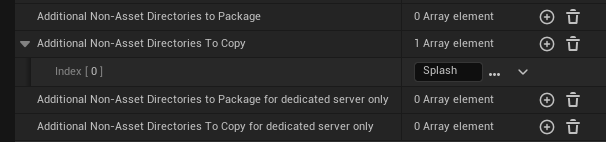
*.archive diff working-tree-encoding=UTF-16LE-BOM eol=CRLF
*.manifest diff working-tree-encoding=UTF-16LE-BOM eol=CRLF
</code></pre>

<h2 id="10-package-a-shipping-build">10. Package a shipping build</h2>
<p>Before each commit to my git repo, I package a shipping build to catch packaging errors early on. I do <em>not</em> want to find out something’s seriously wrong with my project when it’s deep into the development cycle.</p>

<p>Some day, I would like to set up continuous integration and delivery (CI/CD) using the <a href="https://docs.unrealengine.com/5.3/en-US/unreal-automation-tool-for-unreal-engine/">Unreal Automation Tool</a> to automate this process.</p>

<h2 id="whats-next">What’s next?</h2>
<p>Stay tuned for more dev logs as I make progress on my game in the coming months.</p>

<p>Please don’t hesitate to drop your feedback in the comments below (requires a GitHub account).</p>]]></content><author><name></name></author><category term="Dev Logs" /><category term="unreal" /><summary type="html"><![CDATA[]]></summary></entry><entry><title type="html">Extend the Unreal Header Tool with Plugins</title><link href="https://unrealist.org/uht-plugins/" rel="alternate" type="text/html" title="Extend the Unreal Header Tool with Plugins" /><published>2024-01-18T00:00:00-08:00</published><updated>2024-01-18T00:00:00-08:00</updated><id>https://unrealist.org/uht-plugins</id><content type="html" xml:base="https://unrealist.org/uht-plugins/"><![CDATA[<p><img src="https://img.shields.io/badge/Unreal%20Engine-5.3-informational" alt="Written for Unreal Engine 5.3" /> <img src="https://img.shields.io/badge/-C%2B%2B-orange" alt="C++" /> <img src="https://img.shields.io/badge/-C%23-green" alt="C#" /></p>

<h2 id="about-the-unreal-header-tool">About the Unreal Header Tool</h2>
<p>The Unreal Header Tool (UHT) parses and generates code for <code class="language-plaintext highlighter-rouge">UObject</code> types. Many of the C++ macros in the Unreal Engine source code are actually implemented by the UHT.</p>

<p>For example, given a simple <code class="language-plaintext highlighter-rouge">UObject</code>:</p>

<div class="language-cpp highlighter-rouge"><div class="highlight"><pre class="highlight"><code><span class="c1">// File: Example.h</span>

<span class="cp">#pragma once
</span>
<span class="cp">#include</span> <span class="cpf">"Example.generated.h"</span><span class="cp">
</span>
<span class="cm">/** This is an example UObject. */</span>
<span class="n">UCLASS</span><span class="p">()</span>
<span class="k">class</span> <span class="nc">UExample</span> <span class="o">:</span> <span class="k">public</span> <span class="n">UObject</span>
<span class="p">{</span>
    <span class="n">GENERATED_BODY</span><span class="p">()</span>
<span class="p">};</span>
</code></pre></div></div>

<p>The UHT generates <a href="https://gist.github.com/the-unrealist/0aa6b16d1a89c13cd0065b685b9a0bce">two files named <code class="language-plaintext highlighter-rouge">Example.generated.h</code> and <code class="language-plaintext highlighter-rouge">Example.gen.cpp</code></a> with code generated for the <code class="language-plaintext highlighter-rouge">UCLASS()</code> and <code class="language-plaintext highlighter-rouge">GENERATED_BODY()</code> macros.</p>

<p>This is how Unreal implements <a href="https://docs.unrealengine.com/5.3/en-US/unreal-object-handling-in-unreal-engine/#run-timetypeinformationandcasting">reflection</a> and <a href="https://docs.unrealengine.com/5.3/en-US/unreal-object-handling-in-unreal-engine/#garbagecollection">garbage collection</a> in a language that does not support these. Serialization, network replication, and editor integration are also implemented as generated code.</p>

<h2 id="exporters">Exporters</h2>
<p>C++ code generation is implemented as an <strong>exporter</strong> in the UHT.</p>

<p>An exporter processes the parsed code and then optionally <em>exports</em> files to the <code class="language-plaintext highlighter-rouge">Intermediate</code> directory. An exporter may serve as an analyzer and not export any files—as demonstrated in the <code class="language-plaintext highlighter-rouge">Stats</code> exporter sample.</p>

<p>UHT implements these exporters under <code class="language-plaintext highlighter-rouge">/Engine/Source/Programs/Shared/EpicGames.UHT/Exporters/</code>.</p>

<table>
  <thead>
    <tr>
      <th>Name</th>
      <th>Enabled by default?</th>
      <th>Purpose</th>
    </tr>
  </thead>
  <tbody>
    <tr>
      <td>CodeGen</td>
      <td>Yes</td>
      <td>Generates C++ code for the <code class="language-plaintext highlighter-rouge">UObject</code> system.</td>
    </tr>
    <tr>
      <td>Json</td>
      <td>No</td>
      <td>A sample exporter that shows how to output files. This exporter dumps all UObjects into a JSON file for each package.</td>
    </tr>
    <tr>
      <td>Stats</td>
      <td>No</td>
      <td>A sample exporter that shows how to log details about types in the codebase.</td>
    </tr>
  </tbody>
</table>

<p>Exporters that are not enabled by default are triggered by adding <code class="language-plaintext highlighter-rouge">-&lt;EXPORTER_NAME&gt;</code> to the commandline arguments for the UHT.</p>

<p>The following command will execute both the <code class="language-plaintext highlighter-rouge">Stats</code> and <code class="language-plaintext highlighter-rouge">Json</code> exporters. Replace <code class="language-plaintext highlighter-rouge">MyGameEditor</code>, <code class="language-plaintext highlighter-rouge">Win64</code>, and <code class="language-plaintext highlighter-rouge">Development</code> with the desired target, platform, and build configuration.</p>

<div class="language-shell highlighter-rouge"><div class="highlight"><pre class="highlight"><code>C:<span class="se">\U</span>E_5.3<span class="se">\E</span>ngine<span class="se">\B</span>uild<span class="se">\B</span>atchFiles&gt;RunUBT.bat <span class="nt">-Mode</span><span class="o">=</span>UnrealHeaderTool <span class="nt">-Stats</span> <span class="nt">-Json</span> <span class="s2">"-Target=MyGameEditor Win64 Development -Project=</span><span class="se">\"</span><span class="s2">C:/Path/To/MyGame.uproject</span><span class="se">\"</span><span class="s2">"</span>
</code></pre></div></div>

<h2 id="extend-the-uht-with-plugins">Extend the UHT with plugins</h2>
<p>The Unreal Build Tool (UBT) scans for <a href="https://docs.unrealengine.com/5.3/en-US/unreal-header-tool-for-unreal-engine/#extendinguhtwithscriptgenerators">extension plugins</a> in both engine and your game’s source, and automatically activates them.</p>

<p>At this time, only exporters are supported in UBT plugins.</p>

<p>I created a UBT plugin called <a href="https://github.com/the-unrealist/specifier-reference-viewer"><strong>Specifier Reference Viewer</strong></a> that scans for all specifier keywords used in the source code for the engine, game, and all plugins. I recommend looking at my plugin’s source code to learn more about creating UBT plugins.</p>

<p>Let’s walk through the steps needed to create an exporter plugin.</p>

<h3 id="1-create-a-plugin">1. Create a plugin</h3>
<p>Create a <code class="language-plaintext highlighter-rouge">.uplugin</code> with at least one module. A module is required even if you’re not outputting any file, and it must have the <code class="language-plaintext highlighter-rouge">Runtime</code> type.</p>

<div class="language-json highlighter-rouge"><div class="highlight"><pre class="highlight"><code><span class="p">{</span><span class="w">
    </span><span class="nl">"Modules"</span><span class="p">:</span><span class="w"> </span><span class="p">[</span><span class="w">
        </span><span class="p">{</span><span class="w">
            </span><span class="nl">"Name"</span><span class="p">:</span><span class="w"> </span><span class="s2">"MyCustomExporter"</span><span class="p">,</span><span class="w">
            </span><span class="nl">"Type"</span><span class="p">:</span><span class="w"> </span><span class="s2">"Runtime"</span><span class="p">,</span><span class="w">
            </span><span class="nl">"LoadingPhase"</span><span class="p">:</span><span class="w"> </span><span class="s2">"PreDefault"</span><span class="w">
        </span><span class="p">}</span><span class="w">
    </span><span class="p">]</span><span class="w">
</span><span class="p">}</span><span class="w">
</span></code></pre></div></div>

<h3 id="2-add-code-to-the-module">2. Add code to the module</h3>
<p>A module must have at least one <code class="language-plaintext highlighter-rouge">UObject</code> in it to be added to the <code class="language-plaintext highlighter-rouge">.uhtmanifest</code> file. An empty module will not be added to the <code class="language-plaintext highlighter-rouge">.uhtmanifest</code> file which means the custom exporter will not execute.</p>

<h3 id="3-create-the-c-project">3. Create the C# project</h3>
<p>Create a C# project file with the <code class="language-plaintext highlighter-rouge">.ubtplugin.csproj</code> extension. It must have this extension to be detected by UHT.</p>

<p>This file should be configured to:</p>
<ul>
  <li>import <code class="language-plaintext highlighter-rouge">/Engine/Source/Programs/Shared/UnrealEngine.csproj.props</code>,</li>
  <li>reference the <code class="language-plaintext highlighter-rouge">EpicGames.Build</code>, <code class="language-plaintext highlighter-rouge">EpicGames.Core</code>, <code class="language-plaintext highlighter-rouge">EpicGames.UHT</code>, and <code class="language-plaintext highlighter-rouge">UnrealBuildTool</code> assemblies, and</li>
  <li>output the compiled binaries to <code class="language-plaintext highlighter-rouge">&lt;PROJECT_NAME&gt;/Binaries/DotNET/UnrealBuildTool/Plugins/&lt;PLUGIN_NAME&gt;</code>.</li>
</ul>

<p>Instead of creating the project file from scratch, it may be easier to <a href="https://github.com/the-unrealist/specifier-reference-viewer/blob/main/Source/ReferenceGenerator/ReferenceGenerator.ubtplugin.csproj">copy it from my plugin</a> and then edit the <code class="language-plaintext highlighter-rouge">EngineDir</code>, <code class="language-plaintext highlighter-rouge">GeneratorName</code>, and <code class="language-plaintext highlighter-rouge">RootNamespace</code> properties.</p>

<p>The Visual Studio solution file (<code class="language-plaintext highlighter-rouge">.sln</code>) is not necessary. The C# project will be rebuilt each time the game is built.</p>

<h3 id="4-create-the-exporter">4. Create the exporter</h3>
<p>Next, create a class and static method to serve as the main entry point for the exporter.</p>

<p>The class must have the <code class="language-plaintext highlighter-rouge">[UnrealHeaderTool]</code> attribute, and the exporter’s method must have the <code class="language-plaintext highlighter-rouge">[UhtExporter]</code> attribute. The <code class="language-plaintext highlighter-rouge">Name</code> and <code class="language-plaintext highlighter-rouge">ModuleName</code> properties are required.</p>

<div class="language-csharp highlighter-rouge"><div class="highlight"><pre class="highlight"><code><span class="k">using</span> <span class="nn">EpicGames.UHT.Tables</span><span class="p">;</span>
<span class="k">using</span> <span class="nn">EpicGames.UHT.Utils</span><span class="p">;</span>

<span class="p">[</span><span class="n">UnrealHeaderTool</span><span class="p">]</span>
<span class="k">public</span> <span class="k">static</span> <span class="k">class</span> <span class="nc">Exporter</span>
<span class="p">{</span>
    <span class="p">[</span><span class="nf">UhtExporter</span><span class="p">(</span><span class="n">Name</span> <span class="p">=</span> <span class="s">"MyCustomExporter"</span><span class="p">,</span> <span class="n">ModuleName</span> <span class="p">=</span> <span class="s">"MyCustomExporter"</span><span class="p">,</span> <span class="n">Options</span> <span class="p">=</span> <span class="n">UhtExporterOptions</span><span class="p">.</span><span class="n">Default</span><span class="p">)]</span>
    <span class="k">public</span> <span class="k">static</span> <span class="k">void</span> <span class="nf">Generate</span><span class="p">(</span><span class="n">IUhtExportFactory</span> <span class="n">factory</span><span class="p">)</span>
    <span class="p">{</span>
        <span class="c1">// Process parsed code via factory.Session here.</span>
        <span class="n">factory</span><span class="p">.</span><span class="n">Session</span><span class="p">.</span><span class="nf">LogInfo</span><span class="p">(</span><span class="s">"MyCustomExporter executed!"</span><span class="p">);</span>
    <span class="p">}</span>
<span class="p">}</span>
</code></pre></div></div>

<p><code class="language-plaintext highlighter-rouge">UhtExporterOptions.Default</code> indicates that this exporter will be automatically executed each time UBT executes. Remove it or use <code class="language-plaintext highlighter-rouge">UhtExporterOptions.None</code> to make it opt-in just like the <a href="#exporters">sample exporters</a>.</p>

<h3 id="5-build">5. Build</h3>
<p>Build the game. Logs emitted by your exporter will appear in the build output.</p>

<div class="language-plaintext highlighter-rouge"><div class="highlight"><pre class="highlight"><code>0&gt;  Running Internal UnrealHeaderTool C:\Path\To\MyGame.uproject C:\Path\To\MyGame\Intermediate\Build\Win64\MyGameEditor\Development\MyGameEditor.uhtmanifest -WarningsAsErrors -installed
0&gt;Total of 0 written
0&gt;C:\UE_5.3\Engine\Source\UnknownSource(1): Info: MyCustomExporter executed!
</code></pre></div></div>]]></content><author><name></name></author><category term="Engine" /><category term="unreal" /><summary type="html"><![CDATA[]]></summary></entry><entry><title type="html">Engine Startup Preload Screens</title><link href="https://unrealist.org/engine-startup-preload-screens/" rel="alternate" type="text/html" title="Engine Startup Preload Screens" /><published>2024-01-07T00:00:00-08:00</published><updated>2024-01-07T00:00:00-08:00</updated><id>https://unrealist.org/engine-startup-preload-screens</id><content type="html" xml:base="https://unrealist.org/engine-startup-preload-screens/"><![CDATA[<p><img src="https://img.shields.io/badge/Unreal%20Engine-5.3-informational" alt="Written for Unreal Engine 5.3" /> <img src="https://img.shields.io/badge/-C%2B%2B-orange" alt="C++" /> <img src="https://img.shields.io/badge/-Slate-purple" alt="Slate" /></p>

<p>Up to <em>four</em> different <strong>engine preloading screens</strong> may be shown when an Unreal Engine game launches—one for each engine startup phase. While these screens are being displayed, the engine is initializing and the game has not even started loading yet.</p>

<p>Most developers find the default startup movie player perfectly acceptable, but a custom engine preloading screen makes sense if you’re looking for more control over the startup experience. For example, you may want to display a loading throbber or a series of images instead of movies at startup.</p>

<p>Read on to learn more about each engine startup phase and how to customize all four engine preloading screens.</p>

<h2 id="preload-screens-sequence">Preload Screens Sequence</h2>
<p><img src="/assets/images/preload-screen-diagram.png" alt="A diagram showing the sequence of preload screens as the engine initializes." /></p>

<h2 id="platform-splash-screen">Platform splash screen</h2>
<p>The game displays a small splash screen on desktop platforms (Windows, MacOS and Linux).</p>

<p>This is displayed under the following conditions:</p>

<ul>
  <li>A splash image is selected for the platform in Project Settings (e.g., Platforms &gt; Windows &gt; Splash).</li>
  <li>It’s running on a desktop OS.</li>
  <li>It’s not running as a dedicated server or commandlet.</li>
  <li>The game was <em>not</em> launched with the <code class="language-plaintext highlighter-rouge">-nosplash</code> commandline argument.</li>
</ul>

<p>At this point, the engine has not even started loading yet. This means the splash image must exist outside the Unreal File System (UFS) as a standalone file in the packaged build, i.e., <code class="language-plaintext highlighter-rouge">&lt;Game&gt;/Content/Splash/Splash.bmp</code>.</p>

<p>The platform splash screen does not use Slate. It runs on its own thread with its own window created via platform-specific hooks. It’s as low-level as it gets. The game window has not been created yet.</p>

<h3 id="using-a-bmp-image">Using a BMP image</h3>
<p>The Unreal Automation Tool (UAT) specifically looks for a bitmap file named <code class="language-plaintext highlighter-rouge">Splash.bmp</code> to copy when packaging. This means <strong>bitmap is the recommended image format</strong> to use for the splash screen. When you use a bitmap, the splash screen “just works” in a packaged build.</p>

<h3 id="using-a-png-or-jpeg-image">Using a PNG or JPEG image</h3>
<p>To use PNG or JPEG, you must manually stage the image in Project Settings or <code class="language-plaintext highlighter-rouge">DefaultGame.ini</code>.</p>

<p>The “Additional Non-Asset Directories To Copy” setting is found under Project &gt; Packaging. Make sure <code class="language-plaintext highlighter-rouge">Splash</code> is included in this setting.</p>

<p><img src="/assets/images/nonasset-dirs-to-copy.png" alt="Screenshot of Packaging Settings in Project Settings showing Splash directory is added to Additional Non-Asset Directories to Copy." /></p>

<p>Alternatively, add the following to <code class="language-plaintext highlighter-rouge">DefaultGame.ini</code>:</p>
<div class="language-ini highlighter-rouge"><div class="highlight"><pre class="highlight"><code><span class="nn">[/Script/GameFeatures.GameFeaturesSubsystemSettings]</span>
<span class="err">+</span><span class="py">DirectoriesToAlwaysStageAsNonUFS</span><span class="p">=</span><span class="s">(Path="Splash")</span>
</code></pre></div></div>

<p>A word of caution: all files under the <code class="language-plaintext highlighter-rouge">/Content/Splash/</code> directory will be copied for distribution. As far as I know, you cannot stage individual files via config unless you extend the UAT. Really, just use a bitmap to make things easier on yourself.</p>

<h2 id="engine-preloading-screens">Engine preloading screens</h2>
<p>After the platform splash screen, the game window is created. All screens from here on are platform-independent and have access to the game’s Slate application.</p>

<p>As the engine goes through each initialization stage, more Unreal Engine features become available to use in your custom preload screens.</p>

<table>
  <thead>
    <tr>
      <th>Preload Screen Type</th>
      <th>Module Load Phase</th>
      <th>Available Features</th>
    </tr>
  </thead>
  <tbody>
    <tr>
      <td><code class="language-plaintext highlighter-rouge">CustomSplashScreen</code></td>
      <td><code class="language-plaintext highlighter-rouge">PostSplashScreen</code></td>
      <td>Slate &amp; Localization</td>
    </tr>
    <tr>
      <td><code class="language-plaintext highlighter-rouge">EarlyStartupScreen</code></td>
      <td><code class="language-plaintext highlighter-rouge">PreEarlyLoadingScreen</code></td>
      <td>Slate, Localization, &amp; Config (raw access via <code class="language-plaintext highlighter-rouge">GConfig</code>)</td>
    </tr>
    <tr>
      <td><code class="language-plaintext highlighter-rouge">EngineLoadingScreen</code></td>
      <td><code class="language-plaintext highlighter-rouge">PreLoadingScreen</code></td>
      <td>Slate, Localization, Config (via <code class="language-plaintext highlighter-rouge">UCLASS</code> and <code class="language-plaintext highlighter-rouge">UPROPERTY</code> specifiers), &amp; <code class="language-plaintext highlighter-rouge">UObject</code></td>
    </tr>
  </tbody>
</table>

<h2 id="creating-a-preload-screen">Creating a preload screen</h2>
<p><code class="language-plaintext highlighter-rouge">FPreLoadScreenBase</code> is used for all Slate-based engine preloading screens.</p>

<p>Preload screens of all types should override <code class="language-plaintext highlighter-rouge">Init</code>, <code class="language-plaintext highlighter-rouge">GetPreLoadScreenType</code>, and <code class="language-plaintext highlighter-rouge">GetWidget</code>.</p>
<div class="language-cpp highlighter-rouge"><div class="highlight"><pre class="highlight"><code><span class="c1">// .h</span>

<span class="cp">#pragma once
</span>
<span class="cp">#include</span> <span class="cpf">"PreLoadScreenBase.h"</span><span class="cp">
</span>
<span class="k">class</span> <span class="nc">FMyCustomPreloadScreen</span> <span class="o">:</span> <span class="k">public</span> <span class="n">FPreLoadScreenBase</span>
<span class="p">{</span>
<span class="nl">public:</span>
    <span class="k">virtual</span> <span class="kt">void</span> <span class="n">Init</span><span class="p">()</span> <span class="k">override</span><span class="p">;</span>
    <span class="k">virtual</span> <span class="kt">void</span> <span class="n">RenderTick</span><span class="p">(</span><span class="kt">float</span> <span class="n">DeltaTime</span><span class="p">)</span> <span class="k">override</span><span class="p">;</span>

    <span class="k">virtual</span> <span class="n">EPreLoadScreenTypes</span> <span class="n">GetPreLoadScreenType</span><span class="p">()</span> <span class="k">const</span> <span class="k">override</span>
    <span class="p">{</span>
        <span class="c1">// Change this to indicate which phase you want this screen to be created in.</span>
        <span class="k">return</span> <span class="n">EPreLoadScreenTypes</span><span class="o">::</span><span class="n">EarlyStartupScreen</span><span class="p">;</span>
    <span class="p">}</span>

    <span class="k">virtual</span> <span class="n">TSharedPtr</span><span class="o">&lt;</span><span class="n">SWidget</span><span class="o">&gt;</span> <span class="n">GetWidget</span><span class="p">()</span> <span class="k">override</span>
    <span class="p">{</span>
        <span class="k">return</span> <span class="n">Widget</span><span class="p">;</span>
    <span class="p">}</span>

<span class="nl">protected:</span>
    <span class="n">TSharedPtr</span><span class="o">&lt;</span><span class="n">SWidget</span><span class="o">&gt;</span> <span class="n">Widget</span><span class="p">;</span>
<span class="p">};</span>
</code></pre></div></div>

<div class="language-cpp highlighter-rouge"><div class="highlight"><pre class="highlight"><code><span class="c1">// .cpp</span>

<span class="cp">#include</span> <span class="cpf">"CustomPreLoadScreen.h"</span><span class="cp">
</span>
<span class="kt">void</span> <span class="n">FMyCustomPreloadScreen</span><span class="o">::</span><span class="n">Init</span><span class="p">()</span>
<span class="p">{</span>
    <span class="c1">// Read from config here if needed.</span>
    <span class="c1">// EarlyStartupScreen - use GConfig to read raw values.</span>
    <span class="c1">// EngineLoadingScreen - UObjects like UDeveloperSettings may be used.</span>

    <span class="c1">// Create your Slate widget here.</span>
    <span class="n">Widget</span> <span class="o">=</span> <span class="n">SNew</span><span class="p">(</span><span class="n">SOverlay</span><span class="p">);</span>
<span class="p">}</span>

<span class="kt">void</span> <span class="n">FMyCustomPreloadScreen</span><span class="o">::</span><span class="n">RenderTick</span><span class="p">(</span><span class="kt">float</span> <span class="n">DeltaTime</span><span class="p">)</span>
<span class="p">{</span>
    <span class="c1">// This is executed on the render thread. Use it to animate the widget if desired.</span>
<span class="p">}</span>
</code></pre></div></div>

<p>For <code class="language-plaintext highlighter-rouge">CustomSplashScreen</code> and <code class="language-plaintext highlighter-rouge">EarlyStartupScreen</code> types, the preload screen is visible for as long <code class="language-plaintext highlighter-rouge">GetWidget()</code> returns a valid Slate widget. For <code class="language-plaintext highlighter-rouge">EngineLoadingScreen</code>, it is visible until <code class="language-plaintext highlighter-rouge">bIsEngineLoadingFinished</code> is true. Override <code class="language-plaintext highlighter-rouge">IsDone()</code> to customize this behavior to support skipping or some other custom logic.</p>

<p>The custom preload screen must be registered in the module.</p>

<div class="language-cpp highlighter-rouge"><div class="highlight"><pre class="highlight"><code><span class="c1">// Module.cpp</span>

<span class="cp">#include</span> <span class="cpf">"MyCustomPreloadScreen.h"</span><span class="cp">
#include</span> <span class="cpf">"PreLoadScreenManager.h"</span><span class="cp">
</span>
<span class="k">class</span> <span class="nc">FMyCustomPreloadScreenModule</span> <span class="o">:</span> <span class="k">public</span> <span class="n">IModuleInterface</span>
<span class="p">{</span>
<span class="nl">public:</span>
    <span class="k">virtual</span> <span class="kt">void</span> <span class="n">StartupModule</span><span class="p">()</span> <span class="k">override</span><span class="p">;</span>

<span class="nl">private:</span>
    <span class="n">TSharedPtr</span><span class="o">&lt;</span><span class="n">FMyCustomPreloadScreen</span><span class="o">&gt;</span> <span class="n">MyCustomPreloadScreen</span><span class="p">;</span>

    <span class="kt">void</span> <span class="n">OnPreLoadScreenManagerCleanUp</span><span class="p">();</span>
<span class="p">};</span>

<span class="kt">void</span> <span class="n">FMyCustomPreloadScreenModule</span><span class="o">::</span><span class="n">StartupModule</span><span class="p">()</span>
<span class="p">{</span>
    <span class="c1">// Preload screens will never be displayed on a dedicated server or commandlet.</span>
    <span class="k">if</span> <span class="p">(</span><span class="n">IsRunningDedicatedServer</span><span class="p">()</span> <span class="o">||</span> <span class="n">IsRunningCommandlet</span><span class="p">())</span>
    <span class="p">{</span>
        <span class="k">return</span><span class="p">;</span>
    <span class="p">}</span>

    <span class="c1">// There's also no point in doing anything while in the editor or in headless mode.</span>
    <span class="k">if</span> <span class="p">(</span><span class="n">GIsEditor</span> <span class="o">||</span> <span class="o">!</span><span class="n">FApp</span><span class="o">::</span><span class="n">CanEverRender</span><span class="p">()</span> <span class="o">||</span> <span class="o">!</span><span class="n">FPreLoadScreenManager</span><span class="o">::</span><span class="n">Get</span><span class="p">())</span>
    <span class="p">{</span>
        <span class="k">return</span><span class="p">;</span>
    <span class="p">}</span>

    <span class="k">if</span> <span class="p">(</span><span class="n">FPreLoadScreenManager</span><span class="o">*</span> <span class="n">PreLoadScreenManager</span> <span class="o">=</span> <span class="n">FPreLoadScreenManager</span><span class="o">::</span><span class="n">Get</span><span class="p">())</span>
    <span class="p">{</span>
        <span class="n">MyCustomPreloadScreen</span> <span class="o">=</span> <span class="n">MakeShared</span><span class="o">&lt;</span><span class="n">FMyCustomPreloadScreen</span><span class="o">&gt;</span><span class="p">();</span>
        <span class="n">MyCustomPreloadScreen</span><span class="o">-&gt;</span><span class="n">Init</span><span class="p">();</span>

        <span class="n">PreLoadScreenManager</span><span class="o">-&gt;</span><span class="n">RegisterPreLoadScreen</span><span class="p">(</span><span class="n">MyCustomPreloadScreen</span><span class="p">);</span>

        <span class="n">PreLoadScreenManager</span><span class="o">-&gt;</span><span class="n">OnPreLoadScreenManagerCleanUp</span><span class="p">.</span><span class="n">AddRaw</span><span class="p">(</span>
            <span class="k">this</span><span class="p">,</span> <span class="o">&amp;</span><span class="n">FMyCustomPreloadScreenModule</span><span class="o">::</span><span class="n">OnPreLoadScreenManagerCleanUp</span><span class="p">);</span>
    <span class="p">}</span>
<span class="p">}</span>

<span class="kt">void</span> <span class="n">FMyCustomPreloadScreenModule</span><span class="o">::</span><span class="n">OnPreLoadScreenManagerCleanUp</span><span class="p">()</span>
<span class="p">{</span>
    <span class="n">MyCustomPreloadScreen</span><span class="p">.</span><span class="n">Reset</span><span class="p">();</span>
<span class="p">}</span>

<span class="n">IMPLEMENT_MODULE</span><span class="p">(</span><span class="n">FMyCustomPreloadScreenModule</span><span class="p">,</span> <span class="n">MyCustomPreloadScreen</span><span class="p">)</span>

</code></pre></div></div>

<p>Finally, in <code class="language-plaintext highlighter-rouge">.uplugin</code> or <code class="language-plaintext highlighter-rouge">.uproject</code>, make sure the module uses the correct loading phase. Refer to <a href="#engine-preloading-screens">the table above</a> to determine which loading phase to use.</p>

<div class="language-json highlighter-rouge"><div class="highlight"><pre class="highlight"><code><span class="p">{</span><span class="w">
    </span><span class="nl">"Modules"</span><span class="p">:</span><span class="w"> </span><span class="p">[</span><span class="w">
        </span><span class="p">{</span><span class="w">
            </span><span class="nl">"Name"</span><span class="p">:</span><span class="w"> </span><span class="s2">"MyCustomPreloadScreen"</span><span class="p">,</span><span class="w">
            </span><span class="nl">"Type"</span><span class="p">:</span><span class="w"> </span><span class="s2">"ClientOnlyNoCommandlet"</span><span class="p">,</span><span class="w">
            </span><span class="nl">"LoadingPhase"</span><span class="p">:</span><span class="w"> </span><span class="s2">"PreEarlyLoadingScreen"</span><span class="w">
        </span><span class="p">}</span><span class="w">
    </span><span class="p">]</span><span class="w">
</span><span class="p">}</span><span class="w">
</span></code></pre></div></div>

<h2 id="custom-splash-screen">Custom splash screen</h2>
<p>This is the second screen that may be displayed under the following conditions:</p>

<ul>
  <li>It’s not running as a dedicated server or commandlet.</li>
  <li>The game was <em>not</em> launched with the <code class="language-plaintext highlighter-rouge">-noloadingscreen</code> commandline argument.</li>
  <li>A module with the <code class="language-plaintext highlighter-rouge">PostSplashScreen</code> load phase contains a <code class="language-plaintext highlighter-rouge">FPreLoadScreenBase</code> subclass with the type set to <code class="language-plaintext highlighter-rouge">CustomSplashScreen</code> and registered with <code class="language-plaintext highlighter-rouge">FPreLoadScreenManager</code>.</li>
</ul>

<p>Unlike the platform splash screen, this screen will appear on all platforms and runs on the Slate render thread. In practice, there’s not really a good reason to have a custom splash screen. It will block the engine from loading any further while it’s visible (unless you create a new thread but that’s beyond the scope of this article). Not to mention the time between the custom splash screen and the early startup screen is insignificant.</p>

<h2 id="early-startup-screen">Early startup screen</h2>
<p>This is the third screen that’s displayed under the following conditions:</p>

<ul>
  <li>There are no startup movies to play <em>OR</em> the platform does not support early playback.</li>
  <li>It’s not running as a dedicated server or commandlet.</li>
  <li>The game was <em>not</em> launched with the <code class="language-plaintext highlighter-rouge">-noloadingscreen</code> commandline argument.</li>
  <li>A module with the <code class="language-plaintext highlighter-rouge">PreEarlyLoadingScreen</code> load phase contains a <code class="language-plaintext highlighter-rouge">FPreLoadScreenBase</code> subclass with the type set to <code class="language-plaintext highlighter-rouge">EarlyStartupScreen</code> and registered with <code class="language-plaintext highlighter-rouge">FPreLoadScreenManager</code>.</li>
</ul>

<p>A custom early startup screen is displayed if, and only if, there are no startup movies or the platform doesn’t support early playback of startup movies. As far as I can tell, early playback is supported on Android, iOS, and Windows.</p>

<p>Since <code class="language-plaintext highlighter-rouge">UObject</code> is not available in this phase, you must use <code class="language-plaintext highlighter-rouge">GConfig</code> to read and parse config values manually.</p>

<h2 id="engine-loading-screen">Engine loading screen</h2>
<p>This is the final engine preloading screen that’s displayed under the following conditions:</p>

<ul>
  <li>There are no startup movies to play.</li>
  <li>It’s not running as a dedicated server or commandlet.</li>
  <li>The game was <em>not</em> launched with the <code class="language-plaintext highlighter-rouge">-noloadingscreen</code> commandline argument.</li>
  <li>A module with the <code class="language-plaintext highlighter-rouge">PreLoadingScreen</code> load phase contains a <code class="language-plaintext highlighter-rouge">FPreLoadScreenBase</code> subclass with the type set to <code class="language-plaintext highlighter-rouge">EngineLoadingScreen</code> and registered with <code class="language-plaintext highlighter-rouge">FPreLoadScreenManager</code>.</li>
</ul>

<p>This is the easiest preload screen to implement because you have access to most engine features at this point, especially <code class="language-plaintext highlighter-rouge">UObject</code>. Keep in mind that <code class="language-plaintext highlighter-rouge">UGameInstance</code>, <code class="language-plaintext highlighter-rouge">UWorld</code>, and other game-related singletons do not exist until <em>after</em> the engine loading screen.</p>

<p>If you plan on creating a custom engine loading screen that uses a background color other than black, then you probably would want to also create an early startup screen to set the background color of the window onwards from the first frame. This produces a seamless transition to the engine loading screen. If you don’t do this, then the game window will be black for a brief moment at launch, which may or may not be acceptable to you.</p>]]></content><author><name></name></author><category term="Engine" /><category term="unreal" /><category term="slate" /><summary type="html"><![CDATA[]]></summary></entry><entry><title type="html">Lyra Deep Dive - Chapter 3: Experience Lifecycle</title><link href="https://unrealist.org/lyra-part-3/" rel="alternate" type="text/html" title="Lyra Deep Dive - Chapter 3: Experience Lifecycle" /><published>2023-04-16T00:00:00-07:00</published><updated>2023-04-16T00:00:00-07:00</updated><id>https://unrealist.org/lyra-part-3</id><content type="html" xml:base="https://unrealist.org/lyra-part-3/"><![CDATA[<style type="text/css">
svg {
    display: block;
    margin-left: auto;
    margin-right: auto;
    margin-bottom: 30px;
}
</style>

<p><img src="https://img.shields.io/badge/Unreal%20Engine-5.3-informational" alt="Written for Unreal Engine 5.3" /> <img src="https://img.shields.io/badge/-C%2B%2B-orange" alt="C++" /></p>

<p>This is the <strong>third</strong> chapter in the <a href="https://unrealist.org/lyra-part-1/">Lyra Deep Dive</a> series.</p>

<p>In the <a href="https://unrealist.org/lyra-part-2/">previous chapter</a>, we’ve learned about how experiences are defined. In this chapter, we’ll take a deep dive into the lifecycle of an experience.</p>

<h2 id="lyra-deep-dive-series">Lyra Deep Dive Series</h2>
<ul>
  <li><a href="https://unrealist.org/lyra-part-1/">Chapter 1: Introduction</a></li>
  <li><a href="https://unrealist.org/lyra-part-2/">Chapter 2: Experiences</a></li>
  <li><a href="https://unrealist.org/lyra-part-3/">Chapter 3: Experience Lifecycle</a></li>
</ul>

<h2 id="experience-lifecycle">Experience Lifecycle</h2>
<p><code class="language-plaintext highlighter-rouge">ALyraGameState</code> automatically adds <code class="language-plaintext highlighter-rouge">ULyraExperienceManagerComponent</code> to itself in its constructor. This component handles the entire lifecycle of an experience.</p>

<svg class="mermaid" id="mermaid-svg" width="100%" xmlns="http://www.w3.org/2000/svg" style="max-width: 291.171875px;" viewBox="-8 -8 291.171875 218" role="graphics-document document" aria-roledescription="flowchart-v2" xmlns:xlink="http://www.w3.org/1999/xlink"><style>#mermaid-svg{font-family:"trebuchet ms",verdana,arial,sans-serif;font-size:16px;fill:#ccc;}#mermaid-svg .error-icon{fill:#a44141;}#mermaid-svg .error-text{fill:#ddd;stroke:#ddd;}#mermaid-svg .edge-thickness-normal{stroke-width:2px;}#mermaid-svg .edge-thickness-thick{stroke-width:3.5px;}#mermaid-svg .edge-pattern-solid{stroke-dasharray:0;}#mermaid-svg .edge-pattern-dashed{stroke-dasharray:3;}#mermaid-svg .edge-pattern-dotted{stroke-dasharray:2;}#mermaid-svg .marker{fill:lightgrey;stroke:lightgrey;}#mermaid-svg .marker.cross{stroke:lightgrey;}#mermaid-svg svg{font-family:"trebuchet ms",verdana,arial,sans-serif;font-size:16px;}#mermaid-svg .label{font-family:"trebuchet ms",verdana,arial,sans-serif;color:#ccc;}#mermaid-svg .cluster-label text{fill:#F9FFFE;}#mermaid-svg .cluster-label span,#mermaid-svg p{color:#F9FFFE;}#mermaid-svg .label text,#mermaid-svg span,#mermaid-svg p{fill:#ccc;color:#ccc;}#mermaid-svg .node rect,#mermaid-svg .node circle,#mermaid-svg .node ellipse,#mermaid-svg .node polygon,#mermaid-svg .node path{fill:#1f2020;stroke:#81B1DB;stroke-width:1px;}#mermaid-svg .flowchart-label text{text-anchor:middle;}#mermaid-svg .node .katex path{fill:#000;stroke:#000;stroke-width:1px;}#mermaid-svg .node .label{text-align:center;}#mermaid-svg .node.clickable{cursor:pointer;}#mermaid-svg .arrowheadPath{fill:lightgrey;}#mermaid-svg .edgePath .path{stroke:lightgrey;stroke-width:2.0px;}#mermaid-svg .flowchart-link{stroke:lightgrey;fill:none;}#mermaid-svg .edgeLabel{background-color:hsl(0, 0%, 34.4117647059%);text-align:center;}#mermaid-svg .edgeLabel rect{opacity:0.5;background-color:hsl(0, 0%, 34.4117647059%);fill:hsl(0, 0%, 34.4117647059%);}#mermaid-svg .labelBkg{background-color:rgba(87.75, 87.75, 87.75, 0.5);}#mermaid-svg .cluster rect{fill:hsl(180, 1.5873015873%, 28.3529411765%);stroke:rgba(255, 255, 255, 0.25);stroke-width:1px;}#mermaid-svg .cluster text{fill:#F9FFFE;}#mermaid-svg .cluster span,#mermaid-svg p{color:#F9FFFE;}#mermaid-svg div.mermaidTooltip{position:absolute;text-align:center;max-width:200px;padding:2px;font-family:"trebuchet ms",verdana,arial,sans-serif;font-size:12px;background:hsl(20, 1.5873015873%, 12.3529411765%);border:1px solid rgba(255, 255, 255, 0.25);border-radius:2px;pointer-events:none;z-index:100;}#mermaid-svg .flowchartTitleText{text-anchor:middle;font-size:18px;fill:#ccc;}#mermaid-svg :root{--mermaid-font-family:"trebuchet ms",verdana,arial,sans-serif;}</style><g><marker id="mermaid-svg_flowchart-pointEnd" class="marker flowchart" viewBox="0 0 10 10" refX="6" refY="5" markerUnits="userSpaceOnUse" markerWidth="12" markerHeight="12" orient="auto"><path d="M 0 0 L 10 5 L 0 10 z" class="arrowMarkerPath" style="stroke-width: 1; stroke-dasharray: 1, 0;"></path></marker><marker id="mermaid-svg_flowchart-pointStart" class="marker flowchart" viewBox="0 0 10 10" refX="4.5" refY="5" markerUnits="userSpaceOnUse" markerWidth="12" markerHeight="12" orient="auto"><path d="M 0 5 L 10 10 L 10 0 z" class="arrowMarkerPath" style="stroke-width: 1; stroke-dasharray: 1, 0;"></path></marker><marker id="mermaid-svg_flowchart-circleEnd" class="marker flowchart" viewBox="0 0 10 10" refX="11" refY="5" markerUnits="userSpaceOnUse" markerWidth="11" markerHeight="11" orient="auto"><circle cx="5" cy="5" r="5" class="arrowMarkerPath" style="stroke-width: 1; stroke-dasharray: 1, 0;"></circle></marker><marker id="mermaid-svg_flowchart-circleStart" class="marker flowchart" viewBox="0 0 10 10" refX="-1" refY="5" markerUnits="userSpaceOnUse" markerWidth="11" markerHeight="11" orient="auto"><circle cx="5" cy="5" r="5" class="arrowMarkerPath" style="stroke-width: 1; stroke-dasharray: 1, 0;"></circle></marker><marker id="mermaid-svg_flowchart-crossEnd" class="marker cross flowchart" viewBox="0 0 11 11" refX="12" refY="5.2" markerUnits="userSpaceOnUse" markerWidth="11" markerHeight="11" orient="auto"><path d="M 1,1 l 9,9 M 10,1 l -9,9" class="arrowMarkerPath" style="stroke-width: 2; stroke-dasharray: 1, 0;"></path></marker><marker id="mermaid-svg_flowchart-crossStart" class="marker cross flowchart" viewBox="0 0 11 11" refX="-1" refY="5.2" markerUnits="userSpaceOnUse" markerWidth="11" markerHeight="11" orient="auto"><path d="M 1,1 l 9,9 M 10,1 l -9,9" class="arrowMarkerPath" style="stroke-width: 2; stroke-dasharray: 1, 0;"></path></marker><g class="root"><g class="clusters"></g><g class="edgePaths"><path d="M137.586,34L137.586,38.167C137.586,42.333,137.586,50.667,137.586,58.117C137.586,65.567,137.586,72.133,137.586,75.417L137.586,78.7" id="L-ALyraGameMode-ALyraGameState-0" class=" edge-thickness-normal edge-pattern-solid flowchart-link LS-ALyraGameMode LE-ALyraGameState" style="fill:none;" marker-end="url(#mermaid-svg_flowchart-pointEnd)"></path><path d="M137.586,118L137.586,122.167C137.586,126.333,137.586,134.667,137.586,142.117C137.586,149.567,137.586,156.133,137.586,159.417L137.586,162.7" id="L-ALyraGameState-ULyraExperienceManagerComponent-0" class=" edge-thickness-normal edge-pattern-solid flowchart-link LS-ALyraGameState LE-ULyraExperienceManagerComponent" style="fill:none;" marker-end="url(#mermaid-svg_flowchart-pointEnd)"></path></g><g class="edgeLabels"><g class="edgeLabel"><g class="label" transform="translate(0, 0)"><foreignObject width="0" height="0"><div xmlns="http://www.w3.org/1999/xhtml" style="display: inline-block; white-space: nowrap;"><span class="edgeLabel"></span></div></foreignObject></g></g><g class="edgeLabel"><g class="label" transform="translate(0, 0)"><foreignObject width="0" height="0"><div xmlns="http://www.w3.org/1999/xhtml" style="display: inline-block; white-space: nowrap;"><span class="edgeLabel"></span></div></foreignObject></g></g></g><g class="nodes"><g class="node default default flowchart-label" id="flowchart-ALyraGameMode-0" data-node="true" data-id="ALyraGameMode" transform="translate(137.5859375, 17)"><rect class="basic label-container" style="" rx="0" ry="0" x="-66.2734375" y="-17" width="132.546875" height="34"></rect><g class="label" style="" transform="translate(-58.7734375, -9.5)"><rect></rect><foreignObject width="117.546875" height="19"><div xmlns="http://www.w3.org/1999/xhtml" style="display: inline-block; white-space: nowrap;"><span class="nodeLabel">ALyraGameMode</span></div></foreignObject></g></g><g class="node default default flowchart-label" id="flowchart-ALyraGameState-1" data-node="true" data-id="ALyraGameState" transform="translate(137.5859375, 101)"><rect class="basic label-container" style="" rx="0" ry="0" x="-66.2421875" y="-17" width="132.484375" height="34"></rect><g class="label" style="" transform="translate(-58.7421875, -9.5)"><rect></rect><foreignObject width="117.484375" height="19"><div xmlns="http://www.w3.org/1999/xhtml" style="display: inline-block; white-space: nowrap;"><span class="nodeLabel">ALyraGameState</span></div></foreignObject></g></g><g class="node default default flowchart-label" id="flowchart-ULyraExperienceManagerComponent-3" data-node="true" data-id="ULyraExperienceManagerComponent" transform="translate(137.5859375, 185)"><rect class="basic label-container" style="" rx="0" ry="0" x="-137.5859375" y="-17" width="275.171875" height="34"></rect><g class="label" style="" transform="translate(-130.0859375, -9.5)"><rect></rect><foreignObject width="260.171875" height="19"><div xmlns="http://www.w3.org/1999/xhtml" style="display: inline-block; white-space: nowrap;"><span class="nodeLabel">ULyraExperienceManagerComponent</span></div></foreignObject></g></g></g></g></g><style>@import url("https://cdnjs.cloudflare.com/ajax/libs/font-awesome/6.4.0/css/all.min.css");</style></svg>

<p>The lifecycle of an experience begins with <code class="language-plaintext highlighter-rouge">ALyraGameMode</code> on the server calling <code class="language-plaintext highlighter-rouge">SetCurrentExperience</code> and replicating <code class="language-plaintext highlighter-rouge">CurrentExperience</code> to all clients.</p>

<p>The loading process starts immediately on the server. For clients, the loading process starts after <code class="language-plaintext highlighter-rouge">CurrentExperience</code> is replicated.</p>

<svg class="mermaid" id="mermaid-svg" width="100%" xmlns="http://www.w3.org/2000/svg" style="max-width: 493.203125px;" viewBox="-8 -8 493.203125 489" role="graphics-document document" aria-roledescription="flowchart-v2" xmlns:xlink="http://www.w3.org/1999/xlink"><style>#mermaid-svg{font-family:"trebuchet ms",verdana,arial,sans-serif;font-size:16px;fill:#ccc;}#mermaid-svg .error-icon{fill:#a44141;}#mermaid-svg .error-text{fill:#ddd;stroke:#ddd;}#mermaid-svg .edge-thickness-normal{stroke-width:2px;}#mermaid-svg .edge-thickness-thick{stroke-width:3.5px;}#mermaid-svg .edge-pattern-solid{stroke-dasharray:0;}#mermaid-svg .edge-pattern-dashed{stroke-dasharray:3;}#mermaid-svg .edge-pattern-dotted{stroke-dasharray:2;}#mermaid-svg .marker{fill:lightgrey;stroke:lightgrey;}#mermaid-svg .marker.cross{stroke:lightgrey;}#mermaid-svg svg{font-family:"trebuchet ms",verdana,arial,sans-serif;font-size:16px;}#mermaid-svg .label{font-family:"trebuchet ms",verdana,arial,sans-serif;color:#ccc;}#mermaid-svg .cluster-label text{fill:#F9FFFE;}#mermaid-svg .cluster-label span,#mermaid-svg p{color:#F9FFFE;}#mermaid-svg .label text,#mermaid-svg span,#mermaid-svg p{fill:#ccc;color:#ccc;}#mermaid-svg .node rect,#mermaid-svg .node circle,#mermaid-svg .node ellipse,#mermaid-svg .node polygon,#mermaid-svg .node path{fill:#1f2020;stroke:#81B1DB;stroke-width:1px;}#mermaid-svg .flowchart-label text{text-anchor:middle;}#mermaid-svg .node .katex path{fill:#000;stroke:#000;stroke-width:1px;}#mermaid-svg .node .label{text-align:center;}#mermaid-svg .node.clickable{cursor:pointer;}#mermaid-svg .arrowheadPath{fill:lightgrey;}#mermaid-svg .edgePath .path{stroke:lightgrey;stroke-width:2.0px;}#mermaid-svg .flowchart-link{stroke:lightgrey;fill:none;}#mermaid-svg .edgeLabel{background-color:hsl(0, 0%, 34.4117647059%);text-align:center;}#mermaid-svg .edgeLabel rect{opacity:0.5;background-color:hsl(0, 0%, 34.4117647059%);fill:hsl(0, 0%, 34.4117647059%);}#mermaid-svg .labelBkg{background-color:rgba(87.75, 87.75, 87.75, 0.5);}#mermaid-svg .cluster rect{fill:hsl(180, 1.5873015873%, 28.3529411765%);stroke:rgba(255, 255, 255, 0.25);stroke-width:1px;}#mermaid-svg .cluster text{fill:#F9FFFE;}#mermaid-svg .cluster span,#mermaid-svg p{color:#F9FFFE;}#mermaid-svg div.mermaidTooltip{position:absolute;text-align:center;max-width:200px;padding:2px;font-family:"trebuchet ms",verdana,arial,sans-serif;font-size:12px;background:hsl(20, 1.5873015873%, 12.3529411765%);border:1px solid rgba(255, 255, 255, 0.25);border-radius:2px;pointer-events:none;z-index:100;}#mermaid-svg .flowchartTitleText{text-anchor:middle;font-size:18px;fill:#ccc;}#mermaid-svg :root{--mermaid-font-family:"trebuchet ms",verdana,arial,sans-serif;}</style><g><marker id="mermaid-svg_flowchart-pointEnd" class="marker flowchart" viewBox="0 0 10 10" refX="6" refY="5" markerUnits="userSpaceOnUse" markerWidth="12" markerHeight="12" orient="auto"><path d="M 0 0 L 10 5 L 0 10 z" class="arrowMarkerPath" style="stroke-width: 1; stroke-dasharray: 1, 0;"></path></marker><marker id="mermaid-svg_flowchart-pointStart" class="marker flowchart" viewBox="0 0 10 10" refX="4.5" refY="5" markerUnits="userSpaceOnUse" markerWidth="12" markerHeight="12" orient="auto"><path d="M 0 5 L 10 10 L 10 0 z" class="arrowMarkerPath" style="stroke-width: 1; stroke-dasharray: 1, 0;"></path></marker><marker id="mermaid-svg_flowchart-circleEnd" class="marker flowchart" viewBox="0 0 10 10" refX="11" refY="5" markerUnits="userSpaceOnUse" markerWidth="11" markerHeight="11" orient="auto"><circle cx="5" cy="5" r="5" class="arrowMarkerPath" style="stroke-width: 1; stroke-dasharray: 1, 0;"></circle></marker><marker id="mermaid-svg_flowchart-circleStart" class="marker flowchart" viewBox="0 0 10 10" refX="-1" refY="5" markerUnits="userSpaceOnUse" markerWidth="11" markerHeight="11" orient="auto"><circle cx="5" cy="5" r="5" class="arrowMarkerPath" style="stroke-width: 1; stroke-dasharray: 1, 0;"></circle></marker><marker id="mermaid-svg_flowchart-crossEnd" class="marker cross flowchart" viewBox="0 0 11 11" refX="12" refY="5.2" markerUnits="userSpaceOnUse" markerWidth="11" markerHeight="11" orient="auto"><path d="M 1,1 l 9,9 M 10,1 l -9,9" class="arrowMarkerPath" style="stroke-width: 2; stroke-dasharray: 1, 0;"></path></marker><marker id="mermaid-svg_flowchart-crossStart" class="marker cross flowchart" viewBox="0 0 11 11" refX="-1" refY="5.2" markerUnits="userSpaceOnUse" markerWidth="11" markerHeight="11" orient="auto"><path d="M 1,1 l 9,9 M 10,1 l -9,9" class="arrowMarkerPath" style="stroke-width: 2; stroke-dasharray: 1, 0;"></path></marker><g class="root"><g class="clusters"></g><g class="edgePaths"><path d="M126.008,34L126.008,38.167C126.008,42.333,126.008,50.667,126.074,58.2C126.14,65.734,126.272,72.467,126.338,75.834L126.404,79.201" id="L-ALyraGameMode-SetCurrentExperience-0" class=" edge-thickness-normal edge-pattern-solid flowchart-link LS-ALyraGameMode LE-SetCurrentExperience" style="fill:none;" marker-end="url(#mermaid-svg_flowchart-pointEnd)"></path><path d="M150.35,118.5L158.33,124.167C166.311,129.833,182.273,141.167,190.324,151.783C198.376,162.4,198.517,172.3,198.588,177.25L198.659,182.201" id="L-SetCurrentExperience-OnRep_CurrentExperience-0" class=" edge-thickness-normal edge-pattern-solid flowchart-link LS-SetCurrentExperience LE-OnRep_CurrentExperience" style="fill:none;" marker-end="url(#mermaid-svg_flowchart-pointEnd)"></path><path d="M102.666,118.5L94.519,124.167C86.371,129.833,70.076,141.167,61.929,155.417C53.781,169.667,53.781,186.833,53.781,202.417C53.781,218,53.781,232,60.268,242.803C66.755,253.606,79.728,261.213,86.215,265.016L92.701,268.819" id="L-SetCurrentExperience-StartExperienceLoad-0" class=" edge-thickness-normal edge-pattern-solid flowchart-link LS-SetCurrentExperience LE-StartExperienceLoad" style="fill:none;" marker-end="url(#mermaid-svg_flowchart-pointEnd)"></path><path d="M198.734,221.5L198.651,225.583C198.568,229.667,198.401,237.833,191.993,245.712C185.585,253.591,172.936,261.182,166.611,264.977L160.287,268.773" id="L-OnRep_CurrentExperience-StartExperienceLoad-0" class=" edge-thickness-normal edge-pattern-solid flowchart-link LS-OnRep_CurrentExperience LE-StartExperienceLoad" style="fill:none;" marker-end="url(#mermaid-svg_flowchart-pointEnd)"></path><path d="M126.508,305.5L126.424,309.583C126.341,313.667,126.174,321.833,126.157,329.284C126.14,336.734,126.272,343.467,126.338,346.834L126.404,350.201" id="L-StartExperienceLoad-OnExperienceLoadComplete-0" class=" edge-thickness-normal edge-pattern-solid flowchart-link LS-StartExperienceLoad LE-OnExperienceLoadComplete" style="fill:none;" marker-end="url(#mermaid-svg_flowchart-pointEnd)"></path><path d="M126.508,389.5L126.424,393.583C126.341,397.667,126.174,405.833,126.091,413.2C126.008,420.567,126.008,427.133,126.008,430.417L126.008,433.7" id="L-OnExperienceLoadComplete-OnExperienceFullLoadCompleted-0" class=" edge-thickness-normal edge-pattern-solid flowchart-link LS-OnExperienceLoadComplete LE-OnExperienceFullLoadCompleted" style="fill:none;" marker-end="url(#mermaid-svg_flowchart-pointEnd)"></path><path d="M373.969,34.5L373.885,38.583C373.802,42.667,373.635,50.833,373.618,58.284C373.601,65.734,373.733,72.467,373.799,75.834L373.865,79.201" id="L-EndPlay-OnAllActionsDeactivated-0" class=" edge-thickness-normal edge-pattern-solid flowchart-link LS-EndPlay LE-OnAllActionsDeactivated" style="fill:none;" marker-end="url(#mermaid-svg_flowchart-pointEnd)"></path></g><g class="edgeLabels"><g class="edgeLabel"><g class="label" transform="translate(0, 0)"><foreignObject width="0" height="0"><div xmlns="http://www.w3.org/1999/xhtml" style="display: inline-block; white-space: nowrap;"><span class="edgeLabel"></span></div></foreignObject></g></g><g class="edgeLabel" transform="translate(198.234375, 152.5)"><g class="label" transform="translate(-69.5234375, -9.5)"><foreignObject width="139.046875" height="19"><div xmlns="http://www.w3.org/1999/xhtml" style="display: inline-block; white-space: nowrap;"><span class="edgeLabel">Replicate to clients</span></div></foreignObject></g></g><g class="edgeLabel"><g class="label" transform="translate(0, 0)"><foreignObject width="0" height="0"><div xmlns="http://www.w3.org/1999/xhtml" style="display: inline-block; white-space: nowrap;"><span class="edgeLabel"></span></div></foreignObject></g></g><g class="edgeLabel"><g class="label" transform="translate(0, 0)"><foreignObject width="0" height="0"><div xmlns="http://www.w3.org/1999/xhtml" style="display: inline-block; white-space: nowrap;"><span class="edgeLabel"></span></div></foreignObject></g></g><g class="edgeLabel"><g class="label" transform="translate(0, 0)"><foreignObject width="0" height="0"><div xmlns="http://www.w3.org/1999/xhtml" style="display: inline-block; white-space: nowrap;"><span class="edgeLabel"></span></div></foreignObject></g></g><g class="edgeLabel"><g class="label" transform="translate(0, 0)"><foreignObject width="0" height="0"><div xmlns="http://www.w3.org/1999/xhtml" style="display: inline-block; white-space: nowrap;"><span class="edgeLabel"></span></div></foreignObject></g></g><g class="edgeLabel"><g class="label" transform="translate(0, 0)"><foreignObject width="0" height="0"><div xmlns="http://www.w3.org/1999/xhtml" style="display: inline-block; white-space: nowrap;"><span class="edgeLabel"></span></div></foreignObject></g></g></g><g class="nodes"><g class="node default default flowchart-label" id="flowchart-ALyraGameMode-0" data-node="true" data-id="ALyraGameMode" transform="translate(126.0078125, 17)"><rect class="basic label-container" style="" rx="0" ry="0" x="-66.2734375" y="-17" width="132.546875" height="34"></rect><g class="label" style="" transform="translate(-58.7734375, -9.5)"><rect></rect><foreignObject width="117.546875" height="19"><div xmlns="http://www.w3.org/1999/xhtml" style="display: inline-block; white-space: nowrap;"><span class="nodeLabel">ALyraGameMode</span></div></foreignObject></g></g><g class="node default default flowchart-label" id="flowchart-SetCurrentExperience-1" data-node="true" data-id="SetCurrentExperience" transform="translate(126.0078125, 101)"><polygon points="0,0 171.453125,0 171.453125,-34 0,-34 0,0 -8,0 179.453125,0 179.453125,-34 -8,-34 -8,0" class="label-container" transform="translate(-85.7265625,17)" style=""></polygon><g class="label" style="" transform="translate(-78.2265625, -9.5)"><rect></rect><foreignObject width="156.453125" height="19"><div xmlns="http://www.w3.org/1999/xhtml" style="display: inline-block; white-space: nowrap;"><span class="nodeLabel">SetCurrentExperience</span></div></foreignObject></g></g><g class="node default default flowchart-label" id="flowchart-OnRep_CurrentExperience-3" data-node="true" data-id="OnRep_CurrentExperience" transform="translate(198.234375, 204)"><polygon points="0,0 202.90625,0 202.90625,-34 0,-34 0,0 -8,0 210.90625,0 210.90625,-34 -8,-34 -8,0" class="label-container" transform="translate(-101.453125,17)" style=""></polygon><g class="label" style="" transform="translate(-93.953125, -9.5)"><rect></rect><foreignObject width="187.90625" height="19"><div xmlns="http://www.w3.org/1999/xhtml" style="display: inline-block; white-space: nowrap;"><span class="nodeLabel">OnRep_CurrentExperience</span></div></foreignObject></g></g><g class="node default default flowchart-label" id="flowchart-StartExperienceLoad-5" data-node="true" data-id="StartExperienceLoad" transform="translate(126.0078125, 288)"><polygon points="0,0 163.140625,0 163.140625,-34 0,-34 0,0 -8,0 171.140625,0 171.140625,-34 -8,-34 -8,0" class="label-container" transform="translate(-81.5703125,17)" style=""></polygon><g class="label" style="" transform="translate(-74.0703125, -9.5)"><rect></rect><foreignObject width="148.140625" height="19"><div xmlns="http://www.w3.org/1999/xhtml" style="display: inline-block; white-space: nowrap;"><span class="nodeLabel">StartExperienceLoad</span></div></foreignObject></g></g><g class="node default default flowchart-label" id="flowchart-OnExperienceLoadComplete-9" data-node="true" data-id="OnExperienceLoadComplete" transform="translate(126.0078125, 372)"><polygon points="0,0 216.53125,0 216.53125,-34 0,-34 0,0 -8,0 224.53125,0 224.53125,-34 -8,-34 -8,0" class="label-container" transform="translate(-108.265625,17)" style=""></polygon><g class="label" style="" transform="translate(-100.765625, -9.5)"><rect></rect><foreignObject width="201.53125" height="19"><div xmlns="http://www.w3.org/1999/xhtml" style="display: inline-block; white-space: nowrap;"><span class="nodeLabel">OnExperienceLoadComplete</span></div></foreignObject></g></g><g class="node default default flowchart-label" id="flowchart-OnExperienceFullLoadCompleted-11" data-node="true" data-id="OnExperienceFullLoadCompleted" transform="translate(126.0078125, 456)"><rect class="basic label-container" style="" rx="0" ry="0" x="-126.0078125" y="-17" width="252.015625" height="34"></rect><g class="label" style="" transform="translate(-118.5078125, -9.5)"><rect></rect><foreignObject width="237.015625" height="19"><div xmlns="http://www.w3.org/1999/xhtml" style="display: inline-block; white-space: nowrap;"><span class="nodeLabel">OnExperienceFullLoadCompleted</span></div></foreignObject></g></g><g class="node default default flowchart-label" id="flowchart-EndPlay-12" data-node="true" data-id="EndPlay" transform="translate(373.46875, 17)"><polygon points="0,0 71.171875,0 71.171875,-34 0,-34 0,0 -8,0 79.171875,0 79.171875,-34 -8,-34 -8,0" class="label-container" transform="translate(-35.5859375,17)" style=""></polygon><g class="label" style="" transform="translate(-28.0859375, -9.5)"><rect></rect><foreignObject width="56.171875" height="19"><div xmlns="http://www.w3.org/1999/xhtml" style="display: inline-block; white-space: nowrap;"><span class="nodeLabel">EndPlay</span></div></foreignObject></g></g><g class="node default default flowchart-label" id="flowchart-OnAllActionsDeactivated-13" data-node="true" data-id="OnAllActionsDeactivated" transform="translate(373.46875, 101)"><polygon points="0,0 191.46875,0 191.46875,-34 0,-34 0,0 -8,0 199.46875,0 199.46875,-34 -8,-34 -8,0" class="label-container" transform="translate(-95.734375,17)" style=""></polygon><g class="label" style="" transform="translate(-88.234375, -9.5)"><rect></rect><foreignObject width="176.46875" height="19"><div xmlns="http://www.w3.org/1999/xhtml" style="display: inline-block; white-space: nowrap;"><span class="nodeLabel">OnAllActionsDeactivated</span></div></foreignObject></g></g></g></g></g><style>@import url("https://cdnjs.cloudflare.com/ajax/libs/font-awesome/6.4.0/css/all.min.css");</style></svg>

<table>
  <thead>
    <tr>
      <th>Function</th>
      <th>Target</th>
      <th>Outcome</th>
    </tr>
  </thead>
  <tbody>
    <tr>
      <td><code class="language-plaintext highlighter-rouge">SetCurrentExperience</code></td>
      <td>Server</td>
      <td>Set <code class="language-plaintext highlighter-rouge">CurrentExperience</code> which is replicated to all clients and call <code class="language-plaintext highlighter-rouge">StartExperienceLoad</code> on the server.</td>
    </tr>
    <tr>
      <td><code class="language-plaintext highlighter-rouge">OnRep_CurrentExperience</code></td>
      <td>Client</td>
      <td>Call <code class="language-plaintext highlighter-rouge">StartExperienceLoad</code></td>
    </tr>
    <tr>
      <td><code class="language-plaintext highlighter-rouge">StartExperienceLoad</code></td>
      <td>Client &amp; Server</td>
      <td>Load experience definition, associated assets, and asset bundles.</td>
    </tr>
    <tr>
      <td><code class="language-plaintext highlighter-rouge">OnExperienceLoadComplete</code></td>
      <td>Client &amp; Server</td>
      <td>Load and activate game feature plugins.</td>
    </tr>
    <tr>
      <td><code class="language-plaintext highlighter-rouge">OnExperienceFullLoadCompleted</code></td>
      <td>Client &amp; Server</td>
      <td>Chaos testing and execute game feature actions.</td>
    </tr>
    <tr>
      <td> </td>
      <td> </td>
      <td> </td>
    </tr>
    <tr>
      <td><code class="language-plaintext highlighter-rouge">EndPlay</code></td>
      <td>Client &amp; Server</td>
      <td>Deactivate and unload game features.</td>
    </tr>
    <tr>
      <td><code class="language-plaintext highlighter-rouge">OnAllActionsDeactivated</code></td>
      <td>Client &amp; Server</td>
      <td>Clear <code class="language-plaintext highlighter-rouge">CurrentExperience</code>.</td>
    </tr>
  </tbody>
</table>

<p>The <code class="language-plaintext highlighter-rouge">LoadState</code> property reflects the current state of the experience. The following diagram shows the transition between states:</p>

<svg class="statediagram" id="mermaid-svg" width="100%" xmlns="http://www.w3.org/2000/svg" style="max-width: 414.703125px;" viewBox="0 0 414.703125 960" role="graphics-document document" aria-roledescription="stateDiagram" xmlns:xlink="http://www.w3.org/1999/xlink"><style>#mermaid-svg{font-family:"trebuchet ms",verdana,arial,sans-serif;font-size:16px;fill:#ccc;}#mermaid-svg .error-icon{fill:#a44141;}#mermaid-svg .error-text{fill:#ddd;stroke:#ddd;}#mermaid-svg .edge-thickness-normal{stroke-width:2px;}#mermaid-svg .edge-thickness-thick{stroke-width:3.5px;}#mermaid-svg .edge-pattern-solid{stroke-dasharray:0;}#mermaid-svg .edge-pattern-dashed{stroke-dasharray:3;}#mermaid-svg .edge-pattern-dotted{stroke-dasharray:2;}#mermaid-svg .marker{fill:lightgrey;stroke:lightgrey;}#mermaid-svg .marker.cross{stroke:lightgrey;}#mermaid-svg svg{font-family:"trebuchet ms",verdana,arial,sans-serif;font-size:16px;}#mermaid-svg defs #statediagram-barbEnd{fill:lightgrey;stroke:lightgrey;}#mermaid-svg g.stateGroup text{fill:#81B1DB;stroke:none;font-size:10px;}#mermaid-svg g.stateGroup text{fill:#ccc;stroke:none;font-size:10px;}#mermaid-svg g.stateGroup .state-title{font-weight:bolder;fill:#e0dfdf;}#mermaid-svg g.stateGroup rect{fill:#1f2020;stroke:#81B1DB;}#mermaid-svg g.stateGroup line{stroke:lightgrey;stroke-width:1;}#mermaid-svg .transition{stroke:lightgrey;stroke-width:1;fill:none;}#mermaid-svg .stateGroup .composit{fill:#333;border-bottom:1px;}#mermaid-svg .stateGroup .alt-composit{fill:#e0e0e0;border-bottom:1px;}#mermaid-svg .state-note{stroke:hsl(180, 0%, 18.3529411765%);fill:hsl(180, 1.5873015873%, 28.3529411765%);}#mermaid-svg .state-note text{fill:rgb(183.8476190475, 181.5523809523, 181.5523809523);stroke:none;font-size:10px;}#mermaid-svg .stateLabel .box{stroke:none;stroke-width:0;fill:#1f2020;opacity:0.5;}#mermaid-svg .edgeLabel .label rect{fill:#1f2020;opacity:0.5;}#mermaid-svg .edgeLabel .label text{fill:#ccc;}#mermaid-svg .label div .edgeLabel{color:#ccc;}#mermaid-svg .stateLabel text{fill:#e0dfdf;font-size:10px;font-weight:bold;}#mermaid-svg .node circle.state-start{fill:#f4f4f4;stroke:#f4f4f4;}#mermaid-svg .node .fork-join{fill:#f4f4f4;stroke:#f4f4f4;}#mermaid-svg .node circle.state-end{fill:#cccccc;stroke:#333;stroke-width:1.5;}#mermaid-svg .end-state-inner{fill:#333;stroke-width:1.5;}#mermaid-svg .node rect{fill:#1f2020;stroke:#81B1DB;stroke-width:1px;}#mermaid-svg .node polygon{fill:#1f2020;stroke:#81B1DB;stroke-width:1px;}#mermaid-svg #statediagram-barbEnd{fill:lightgrey;}#mermaid-svg .statediagram-cluster rect{fill:#1f2020;stroke:#81B1DB;stroke-width:1px;}#mermaid-svg .cluster-label,#mermaid-svg .nodeLabel{color:#e0dfdf;}#mermaid-svg .statediagram-cluster rect.outer{rx:5px;ry:5px;}#mermaid-svg .statediagram-state .divider{stroke:#81B1DB;}#mermaid-svg .statediagram-state .title-state{rx:5px;ry:5px;}#mermaid-svg .statediagram-cluster.statediagram-cluster .inner{fill:#333;}#mermaid-svg .statediagram-cluster.statediagram-cluster-alt .inner{fill:#555;}#mermaid-svg .statediagram-cluster .inner{rx:0;ry:0;}#mermaid-svg .statediagram-state rect.basic{rx:5px;ry:5px;}#mermaid-svg .statediagram-state rect.divider{stroke-dasharray:10,10;fill:#555;}#mermaid-svg .note-edge{stroke-dasharray:5;}#mermaid-svg .statediagram-note rect{fill:hsl(180, 1.5873015873%, 28.3529411765%);stroke:hsl(180, 0%, 18.3529411765%);stroke-width:1px;rx:0;ry:0;}#mermaid-svg .statediagram-note rect{fill:hsl(180, 1.5873015873%, 28.3529411765%);stroke:hsl(180, 0%, 18.3529411765%);stroke-width:1px;rx:0;ry:0;}#mermaid-svg .statediagram-note text{fill:rgb(183.8476190475, 181.5523809523, 181.5523809523);}#mermaid-svg .statediagram-note .nodeLabel{color:rgb(183.8476190475, 181.5523809523, 181.5523809523);}#mermaid-svg .statediagram .edgeLabel{color:red;}#mermaid-svg #dependencyStart,#mermaid-svg #dependencyEnd{fill:lightgrey;stroke:lightgrey;stroke-width:1;}#mermaid-svg .statediagramTitleText{text-anchor:middle;font-size:18px;fill:#ccc;}#mermaid-svg :root{--mermaid-font-family:"trebuchet ms",verdana,arial,sans-serif;}</style><g><defs><marker id="mermaid-svg_statediagram-barbEnd" refX="19" refY="7" markerWidth="20" markerHeight="14" markerUnits="strokeWidth" orient="auto"><path d="M 19,7 L9,13 L14,7 L9,1 Z"></path></marker></defs><g class="root"><g class="clusters"></g><g class="edgePaths"><path d="M197.348,22L197.348,26.167C197.348,30.333,197.348,38.667,197.348,47C197.348,55.333,197.348,63.667,197.348,67.833L197.348,72" id="edge0" class=" edge-thickness-normal transition" style="fill:none" marker-end="url(#mermaid-svg_statediagram-barbEnd)"></path><path d="M197.348,106L197.348,110.167C197.348,114.333,197.348,122.667,197.348,131C197.348,139.333,197.348,147.667,197.348,151.833L197.348,156" id="edge1" class=" edge-thickness-normal transition" style="fill:none" marker-end="url(#mermaid-svg_statediagram-barbEnd)"></path><path d="M197.348,190L197.348,194.167C197.348,198.333,197.348,206.667,197.348,215C197.348,223.333,197.348,231.667,197.348,235.833L197.348,240" id="edge2" class=" edge-thickness-normal transition" style="fill:none" marker-end="url(#mermaid-svg_statediagram-barbEnd)"></path><path d="M209.785,260.428L223.351,267.44C236.918,274.452,264.051,288.476,277.617,301.238C291.184,314,291.184,325.5,291.184,331.25L291.184,337" id="edge3" class=" edge-thickness-normal transition" style="fill:none" marker-end="url(#mermaid-svg_statediagram-barbEnd)"></path><path d="M184.911,260.428L171.344,267.44C157.778,274.452,130.645,288.476,117.078,304.071C103.512,319.667,103.512,336.833,103.512,352.417C103.512,368,103.512,382,116.996,394.604C130.481,407.209,157.45,418.418,170.935,424.022L184.42,429.627" id="edge4" class=" edge-thickness-normal transition" style="fill:none" marker-end="url(#mermaid-svg_statediagram-barbEnd)"></path><path d="M291.184,371L291.184,375.167C291.184,379.333,291.184,387.667,277.699,397.438C264.214,407.209,237.245,418.418,223.76,424.022L210.276,429.627" id="edge5" class=" edge-thickness-normal transition" style="fill:none" marker-end="url(#mermaid-svg_statediagram-barbEnd)"></path><path d="M210.127,440.717L226.068,447.847C242.009,454.978,273.891,469.239,289.832,482.119C305.773,495,305.773,506.5,305.773,512.25L305.773,518" id="edge6" class=" edge-thickness-normal transition" style="fill:none" marker-end="url(#mermaid-svg_statediagram-barbEnd)"></path><path d="M184.568,440.717L168.627,447.847C152.686,454.978,120.804,469.239,104.863,484.953C88.922,500.667,88.922,517.833,88.922,533.417C88.922,549,88.922,563,99.678,574.167C110.435,585.333,131.948,593.667,142.705,597.833L153.461,602" id="edge7" class=" edge-thickness-normal transition" style="fill:none" marker-end="url(#mermaid-svg_statediagram-barbEnd)"></path><path d="M305.773,552L305.773,556.167C305.773,560.333,305.773,568.667,295.017,577C284.26,585.333,262.747,593.667,251.991,597.833L241.234,602" id="edge8" class=" edge-thickness-normal transition" style="fill:none" marker-end="url(#mermaid-svg_statediagram-barbEnd)"></path><path d="M197.348,636L197.348,640.167C197.348,644.333,197.348,652.667,197.348,661C197.348,669.333,197.348,677.667,197.348,681.833L197.348,686" id="edge9" class=" edge-thickness-normal transition" style="fill:none" marker-end="url(#mermaid-svg_statediagram-barbEnd)"></path><path d="M197.348,720L197.348,724.167C197.348,728.333,197.348,736.667,197.348,745C197.348,753.333,197.348,761.667,197.348,765.833L197.348,770" id="edge10" class=" edge-thickness-normal transition" style="fill:none" marker-end="url(#mermaid-svg_statediagram-barbEnd)"></path><path d="M197.348,804L197.348,808.167C197.348,812.333,197.348,820.667,197.348,829C197.348,837.333,197.348,845.667,197.348,849.833L197.348,854" id="edge11" class=" edge-thickness-normal transition" style="fill:none" marker-end="url(#mermaid-svg_statediagram-barbEnd)"></path><path d="M197.348,888L197.348,892.167C197.348,896.333,197.348,904.667,197.348,913C197.348,921.333,197.348,929.667,197.348,933.833L197.348,938" id="edge12" class=" edge-thickness-normal transition" style="fill:none" marker-end="url(#mermaid-svg_statediagram-barbEnd)"></path></g><g class="edgeLabels"><g class="edgeLabel"><g class="label" transform="translate(0, 0)"><rect rx="0" ry="0" width="0" height="0"></rect><foreignObject width="0" height="0"><div xmlns="http://www.w3.org/1999/xhtml" style="display: inline-block; white-space: nowrap;"><span class="edgeLabel"></span></div></foreignObject></g></g><g class="edgeLabel"><g class="label" transform="translate(0, 0)"><rect rx="0" ry="0" width="0" height="0"></rect><foreignObject width="0" height="0"><div xmlns="http://www.w3.org/1999/xhtml" style="display: inline-block; white-space: nowrap;"><span class="edgeLabel"></span></div></foreignObject></g></g><g class="edgeLabel"><g class="label" transform="translate(0, 0)"><rect rx="0" ry="0" width="0" height="0"></rect><foreignObject width="0" height="0"><div xmlns="http://www.w3.org/1999/xhtml" style="display: inline-block; white-space: nowrap;"><span class="edgeLabel"></span></div></foreignObject></g></g><g class="edgeLabel" transform="translate(291.18359375, 302.5)"><g class="label" transform="translate(-69.1328125, -9.5)"><rect rx="0" ry="0" width="138.265625" height="19"></rect><foreignObject width="138.265625" height="19"><div xmlns="http://www.w3.org/1999/xhtml" style="display: inline-block; white-space: nowrap;"><span class="edgeLabel">Has Game Features</span></div></foreignObject></g></g><g class="edgeLabel" transform="translate(103.51171875, 354)"><g class="label" transform="translate(-65.859375, -9.5)"><rect rx="0" ry="0" width="131.71875" height="19"></rect><foreignObject width="131.71875" height="19"><div xmlns="http://www.w3.org/1999/xhtml" style="display: inline-block; white-space: nowrap;"><span class="edgeLabel">No Game Features</span></div></foreignObject></g></g><g class="edgeLabel"><g class="label" transform="translate(0, 0)"><rect rx="0" ry="0" width="0" height="0"></rect><foreignObject width="0" height="0"><div xmlns="http://www.w3.org/1999/xhtml" style="display: inline-block; white-space: nowrap;"><span class="edgeLabel"></span></div></foreignObject></g></g><g class="edgeLabel" transform="translate(305.7734375, 483.5)"><g class="label" transform="translate(-79.15625, -9.5)"><rect rx="0" ry="0" width="158.3125" height="19"></rect><foreignObject width="158.3125" height="19"><div xmlns="http://www.w3.org/1999/xhtml" style="display: inline-block; white-space: nowrap;"><span class="edgeLabel">Chaos Testing Enabled</span></div></foreignObject></g></g><g class="edgeLabel" transform="translate(88.921875, 535)"><g class="label" transform="translate(-80.921875, -9.5)"><rect rx="0" ry="0" width="161.84375" height="19"></rect><foreignObject width="161.84375" height="19"><div xmlns="http://www.w3.org/1999/xhtml" style="display: inline-block; white-space: nowrap;"><span class="edgeLabel">Chaos Testing Disabled</span></div></foreignObject></g></g><g class="edgeLabel"><g class="label" transform="translate(0, 0)"><rect rx="0" ry="0" width="0" height="0"></rect><foreignObject width="0" height="0"><div xmlns="http://www.w3.org/1999/xhtml" style="display: inline-block; white-space: nowrap;"><span class="edgeLabel"></span></div></foreignObject></g></g><g class="edgeLabel"><g class="label" transform="translate(0, 0)"><rect rx="0" ry="0" width="0" height="0"></rect><foreignObject width="0" height="0"><div xmlns="http://www.w3.org/1999/xhtml" style="display: inline-block; white-space: nowrap;"><span class="edgeLabel"></span></div></foreignObject></g></g><g class="edgeLabel"><g class="label" transform="translate(0, 0)"><rect rx="0" ry="0" width="0" height="0"></rect><foreignObject width="0" height="0"><div xmlns="http://www.w3.org/1999/xhtml" style="display: inline-block; white-space: nowrap;"><span class="edgeLabel"></span></div></foreignObject></g></g><g class="edgeLabel"><g class="label" transform="translate(0, 0)"><rect rx="0" ry="0" width="0" height="0"></rect><foreignObject width="0" height="0"><div xmlns="http://www.w3.org/1999/xhtml" style="display: inline-block; white-space: nowrap;"><span class="edgeLabel"></span></div></foreignObject></g></g><g class="edgeLabel"><g class="label" transform="translate(0, 0)"><rect rx="0" ry="0" width="0" height="0"></rect><foreignObject width="0" height="0"><div xmlns="http://www.w3.org/1999/xhtml" style="display: inline-block; white-space: nowrap;"><span class="edgeLabel"></span></div></foreignObject></g></g></g><g class="nodes"><g class="node default" id="state-has_game_features-4" data-node="true" data-id="has_game_features" transform="translate(197.34765625, 254)"><polygon points="0,14 14,0 0,-14 -14,0" class="state-start" r="7" width="28" height="28"></polygon></g><g class="node default" id="state-chaos_testing-7" data-node="true" data-id="chaos_testing" transform="translate(197.34765625, 435)"><polygon points="0,14 14,0 0,-14 -14,0" class="state-start" r="7" width="28" height="28"></polygon></g><g class="node default" id="state-root_start-0" data-node="true" data-id="root_start" transform="translate(197.34765625, 15)"><circle class="state-start" r="7" width="14" height="14"></circle></g><g class="node  statediagram-state undefined" id="state-Unloaded-1" data-node="true" data-id="Unloaded" transform="translate(197.34765625, 89)"><rect class="basic label-container" style="" x="-41.1953125" y="-17" width="82.390625" height="34"></rect><g class="label" style="" transform="translate(-33.6953125, -9.5)"><rect></rect><foreignObject width="67.390625" height="19"><div xmlns="http://www.w3.org/1999/xhtml" style="display: inline-block; white-space: nowrap;"><span class="nodeLabel">Unloaded</span></div></foreignObject></g></g><g class="node  statediagram-state undefined" id="state-Loading-2" data-node="true" data-id="Loading" transform="translate(197.34765625, 173)"><rect class="basic label-container" style="" x="-35.171875" y="-17" width="70.34375" height="34"></rect><g class="label" style="" transform="translate(-27.671875, -9.5)"><rect></rect><foreignObject width="55.34375" height="19"><div xmlns="http://www.w3.org/1999/xhtml" style="display: inline-block; white-space: nowrap;"><span class="nodeLabel">Loading</span></div></foreignObject></g></g><g class="node  statediagram-state undefined" id="state-LoadingGameFeatures-5" data-node="true" data-id="LoadingGameFeatures" transform="translate(291.18359375, 354)"><rect class="basic label-container" style="" x="-86.8125" y="-17" width="173.625" height="34"></rect><g class="label" style="" transform="translate(-79.3125, -9.5)"><rect></rect><foreignObject width="158.625" height="19"><div xmlns="http://www.w3.org/1999/xhtml" style="display: inline-block; white-space: nowrap;"><span class="nodeLabel">LoadingGameFeatures</span></div></foreignObject></g></g><g class="node  statediagram-state undefined" id="state-LoadingChaosTestingDelay-8" data-node="true" data-id="LoadingChaosTestingDelay" transform="translate(305.7734375, 535)"><rect class="basic label-container" style="" x="-100.9296875" y="-17" width="201.859375" height="34"></rect><g class="label" style="" transform="translate(-93.4296875, -9.5)"><rect></rect><foreignObject width="186.859375" height="19"><div xmlns="http://www.w3.org/1999/xhtml" style="display: inline-block; white-space: nowrap;"><span class="nodeLabel">LoadingChaosTestingDelay</span></div></foreignObject></g></g><g class="node  statediagram-state undefined" id="state-ExecutingActions-9" data-node="true" data-id="ExecutingActions" transform="translate(197.34765625, 619)"><rect class="basic label-container" style="" x="-68.3671875" y="-17" width="136.734375" height="34"></rect><g class="label" style="" transform="translate(-60.8671875, -9.5)"><rect></rect><foreignObject width="121.734375" height="19"><div xmlns="http://www.w3.org/1999/xhtml" style="display: inline-block; white-space: nowrap;"><span class="nodeLabel">ExecutingActions</span></div></foreignObject></g></g><g class="node  statediagram-state undefined" id="state-Loaded-10" data-node="true" data-id="Loaded" transform="translate(197.34765625, 703)"><rect class="basic label-container" style="" x="-33.328125" y="-17" width="66.65625" height="34"></rect><g class="label" style="" transform="translate(-25.828125, -9.5)"><rect></rect><foreignObject width="51.65625" height="19"><div xmlns="http://www.w3.org/1999/xhtml" style="display: inline-block; white-space: nowrap;"><span class="nodeLabel">Loaded</span></div></foreignObject></g></g><g class="node  statediagram-state undefined" id="state-Deactivating-11" data-node="true" data-id="Deactivating" transform="translate(197.34765625, 787)"><rect class="basic label-container" style="" x="-52.3515625" y="-17" width="104.703125" height="34"></rect><g class="label" style="" transform="translate(-44.8515625, -9.5)"><rect></rect><foreignObject width="89.703125" height="19"><div xmlns="http://www.w3.org/1999/xhtml" style="display: inline-block; white-space: nowrap;"><span class="nodeLabel">Deactivating</span></div></foreignObject></g></g><g class="node  statediagram-state undefined" id="state-Unloaded2-12" data-node="true" data-id="Unloaded2" transform="translate(197.34765625, 871)"><rect class="basic label-container" style="" x="-41.1953125" y="-17" width="82.390625" height="34"></rect><g class="label" style="" transform="translate(-33.6953125, -9.5)"><rect></rect><foreignObject width="67.390625" height="19"><div xmlns="http://www.w3.org/1999/xhtml" style="display: inline-block; white-space: nowrap;"><span class="nodeLabel">Unloaded</span></div></foreignObject></g></g><g class="node default" id="state-root_end-12" data-node="true" data-id="root_end" transform="translate(197.34765625, 945)"><circle class="state-start" r="7" width="14" height="14"></circle><circle class="state-end" r="5" width="10" height="10"></circle></g></g></g></g><style>@import url("https://cdnjs.cloudflare.com/ajax/libs/font-awesome/6.4.0/css/all.min.css");</style></svg>

<p>Let’s take a closer look at each stage of the lifecycle.</p>

<h2 id="replication">Replication</h2>
<p><code class="language-plaintext highlighter-rouge">ULyraExperienceManagerComponent</code> has a function <code class="language-plaintext highlighter-rouge">SetCurrentExperience</code>.</p>

<div class="language-cpp highlighter-rouge"><div class="highlight"><pre class="highlight"><code><span class="c1">// File: LyraExperienceManagerComponent.h</span>

<span class="kt">void</span> <span class="nf">SetCurrentExperience</span><span class="p">(</span><span class="n">FPrimaryAssetId</span> <span class="n">ExperienceId</span><span class="p">);</span>
</code></pre></div></div>

<div class="language-cpp highlighter-rouge"><div class="highlight"><pre class="highlight"><code><span class="c1">// File: LyraExperienceManagerComponent.cpp</span>

<span class="kt">void</span> <span class="n">ULyraExperienceManagerComponent</span><span class="o">::</span><span class="n">SetCurrentExperience</span><span class="p">(</span><span class="n">FPrimaryAssetId</span> <span class="n">ExperienceId</span><span class="p">)</span>
<span class="p">{</span>
    <span class="n">ULyraAssetManager</span><span class="o">&amp;</span> <span class="n">AssetManager</span> <span class="o">=</span> <span class="n">ULyraAssetManager</span><span class="o">::</span><span class="n">Get</span><span class="p">();</span>
    <span class="n">FSoftObjectPath</span> <span class="n">AssetPath</span> <span class="o">=</span> <span class="n">AssetManager</span><span class="p">.</span><span class="n">GetPrimaryAssetPath</span><span class="p">(</span><span class="n">ExperienceId</span><span class="p">);</span>
    <span class="n">TSubclassOf</span><span class="o">&lt;</span><span class="n">ULyraExperienceDefinition</span><span class="o">&gt;</span> <span class="n">AssetClass</span> <span class="o">=</span> <span class="n">Cast</span><span class="o">&lt;</span><span class="n">UClass</span><span class="o">&gt;</span><span class="p">(</span><span class="n">AssetPath</span><span class="p">.</span><span class="n">TryLoad</span><span class="p">());</span>
    <span class="n">check</span><span class="p">(</span><span class="n">AssetClass</span><span class="p">);</span>
    <span class="k">const</span> <span class="n">ULyraExperienceDefinition</span><span class="o">*</span> <span class="n">Experience</span> <span class="o">=</span> <span class="n">GetDefault</span><span class="o">&lt;</span><span class="n">ULyraExperienceDefinition</span><span class="o">&gt;</span><span class="p">(</span><span class="n">AssetClass</span><span class="p">);</span>

    <span class="n">check</span><span class="p">(</span><span class="n">Experience</span> <span class="o">!=</span> <span class="nb">nullptr</span><span class="p">);</span>
    <span class="n">check</span><span class="p">(</span><span class="n">CurrentExperience</span> <span class="o">==</span> <span class="nb">nullptr</span><span class="p">);</span>
    <span class="n">CurrentExperience</span> <span class="o">=</span> <span class="n">Experience</span><span class="p">;</span>
    <span class="n">StartExperienceLoad</span><span class="p">();</span>
<span class="p">}</span>
</code></pre></div></div>

<p>In <code class="language-plaintext highlighter-rouge">SetCurrentExperience</code>, the server does the following:</p>

<ol>
  <li>Synchronously load the experience <em>definition</em>.</li>
  <li>Verify the experience definition was loaded successfully.</li>
  <li>Set CurrentExperience which will trigger replication to all clients.</li>
  <li>Call <code class="language-plaintext highlighter-rouge">StartExperienceLoad</code> to start the experience lifecycle on the server.</li>
</ol>

<div class="language-cpp highlighter-rouge"><div class="highlight"><pre class="highlight"><code><span class="c1">// File: LyraExperienceManagerComponent.h</span>

<span class="n">UPROPERTY</span><span class="p">(</span><span class="n">ReplicatedUsing</span><span class="o">=</span><span class="n">OnRep_CurrentExperience</span><span class="p">)</span>
<span class="n">TObjectPtr</span><span class="o">&lt;</span><span class="k">const</span> <span class="n">ULyraExperienceDefinition</span><span class="o">&gt;</span> <span class="n">CurrentExperience</span><span class="p">;</span>

<span class="n">UFUNCTION</span><span class="p">()</span>
<span class="kt">void</span> <span class="nf">OnRep_CurrentExperience</span><span class="p">();</span>
</code></pre></div></div>

<div class="language-cpp highlighter-rouge"><div class="highlight"><pre class="highlight"><code><span class="c1">// File: LyraExperienceManagerComponent.cpp</span>

<span class="kt">void</span> <span class="n">ULyraExperienceManagerComponent</span><span class="o">::</span><span class="n">OnRep_CurrentExperience</span><span class="p">()</span>
<span class="p">{</span>
    <span class="n">StartExperienceLoad</span><span class="p">();</span>
<span class="p">}</span>
</code></pre></div></div>

<p><code class="language-plaintext highlighter-rouge">OnRep_CurrentExperience</code> is executed on all clients when <code class="language-plaintext highlighter-rouge">CurrentExperience</code> is replicated from the server. This function then calls <code class="language-plaintext highlighter-rouge">StartExperienceLoad</code> to start the experience lifecycle on the client.</p>

<h2 id="stage-1-load-experience-definition">Stage 1: Load Experience Definition</h2>
<p>The experience definition and all associated assets* are asynchronously loaded in this stage.</p>

<p>*Only assets that are directly referenced by the experience definition are loaded here like, for example, HUD widgets in the <strong>Add Widgets</strong> action. All other assets in game feature plugins are loaded in the next stage.</p>

<p><code class="language-plaintext highlighter-rouge">StartExperienceLoad</code> begins by populating <code class="language-plaintext highlighter-rouge">BundleAssetList</code> with a set of primary asset IDs including the experience definition itself and any linked action sets.</p>

<div class="language-cpp highlighter-rouge"><div class="highlight"><pre class="highlight"><code><span class="c1">// Function: StartExperienceLoad()</span>

<span class="n">TSet</span><span class="o">&lt;</span><span class="n">FPrimaryAssetId</span><span class="o">&gt;</span> <span class="n">BundleAssetList</span><span class="p">;</span>

<span class="n">BundleAssetList</span><span class="p">.</span><span class="n">Add</span><span class="p">(</span><span class="n">CurrentExperience</span><span class="o">-&gt;</span><span class="n">GetPrimaryAssetId</span><span class="p">());</span>
<span class="k">for</span> <span class="p">(</span><span class="k">const</span> <span class="n">TObjectPtr</span><span class="o">&lt;</span><span class="n">ULyraExperienceActionSet</span><span class="o">&gt;&amp;</span> <span class="n">ActionSet</span> <span class="o">:</span> <span class="n">CurrentExperience</span><span class="o">-&gt;</span><span class="n">ActionSets</span><span class="p">)</span>
<span class="p">{</span>
    <span class="k">if</span> <span class="p">(</span><span class="n">ActionSet</span> <span class="o">!=</span> <span class="nb">nullptr</span><span class="p">)</span>
    <span class="p">{</span>
        <span class="n">BundleAssetList</span><span class="p">.</span><span class="n">Add</span><span class="p">(</span><span class="n">ActionSet</span><span class="o">-&gt;</span><span class="n">GetPrimaryAssetId</span><span class="p">());</span>
    <span class="p">}</span>
<span class="p">}</span>
</code></pre></div></div>

<p>Next, it determines the <a href="https://docs.unrealengine.com/5.1/en-US/asset-management-in-unreal-engine/#assetbundles">asset bundles</a> to load.</p>

<div class="language-cpp highlighter-rouge"><div class="highlight"><pre class="highlight"><code><span class="c1">// Function: StartExperienceLoad()</span>

<span class="n">TArray</span><span class="o">&lt;</span><span class="n">FName</span><span class="o">&gt;</span> <span class="n">BundlesToLoad</span><span class="p">;</span>
<span class="n">BundlesToLoad</span><span class="p">.</span><span class="n">Add</span><span class="p">(</span><span class="n">FLyraBundles</span><span class="o">::</span><span class="n">Equipped</span><span class="p">);</span>

<span class="k">const</span> <span class="n">ENetMode</span> <span class="n">OwnerNetMode</span> <span class="o">=</span> <span class="n">GetOwner</span><span class="p">()</span><span class="o">-&gt;</span><span class="n">GetNetMode</span><span class="p">();</span>
<span class="k">const</span> <span class="kt">bool</span> <span class="n">bLoadClient</span> <span class="o">=</span> <span class="n">GIsEditor</span> <span class="o">||</span> <span class="p">(</span><span class="n">OwnerNetMode</span> <span class="o">!=</span> <span class="n">NM_DedicatedServer</span><span class="p">);</span>
<span class="k">const</span> <span class="kt">bool</span> <span class="n">bLoadServer</span> <span class="o">=</span> <span class="n">GIsEditor</span> <span class="o">||</span> <span class="p">(</span><span class="n">OwnerNetMode</span> <span class="o">!=</span> <span class="n">NM_Client</span><span class="p">);</span>
<span class="k">if</span> <span class="p">(</span><span class="n">bLoadClient</span><span class="p">)</span>
<span class="p">{</span>
    <span class="n">BundlesToLoad</span><span class="p">.</span><span class="n">Add</span><span class="p">(</span><span class="n">UGameFeaturesSubsystemSettings</span><span class="o">::</span><span class="n">LoadStateClient</span><span class="p">);</span>
<span class="p">}</span>
<span class="k">if</span> <span class="p">(</span><span class="n">bLoadServer</span><span class="p">)</span>
<span class="p">{</span>
    <span class="n">BundlesToLoad</span><span class="p">.</span><span class="n">Add</span><span class="p">(</span><span class="n">UGameFeaturesSubsystemSettings</span><span class="o">::</span><span class="n">LoadStateServer</span><span class="p">);</span>
<span class="p">}</span>
</code></pre></div></div>

<table>
  <thead>
    <tr>
      <th>Asset Bundle Name</th>
      <th>Purpose</th>
      <th>Used By</th>
    </tr>
  </thead>
  <tbody>
    <tr>
      <td><code class="language-plaintext highlighter-rouge">Equipped</code></td>
      <td>Assets in this bundle are always loaded.</td>
      <td>None (as of UE 5.1)</td>
    </tr>
    <tr>
      <td><code class="language-plaintext highlighter-rouge">Client</code></td>
      <td>Assets to load on clients or PIE.</td>
      <td>HUD Widgets, Input Configs, and Ability Sets</td>
    </tr>
    <tr>
      <td><code class="language-plaintext highlighter-rouge">Server</code></td>
      <td>Assets to load on dedicated servers or PIE.</td>
      <td>Input Configs and Ability Sets</td>
    </tr>
  </tbody>
</table>

<p>The assets and asset bundles are loaded with a call to <code class="language-plaintext highlighter-rouge">ChangeBundleStateForPrimaryAssets</code>. You may notice that the async handle for this operation, <code class="language-plaintext highlighter-rouge">BundleLoadHandle</code>, is then combined with <code class="language-plaintext highlighter-rouge">RawLoadHandle</code>. <code class="language-plaintext highlighter-rouge">LoadAssetList</code> loads all secondary assets added to <code class="language-plaintext highlighter-rouge">RawAssetList</code>. However, this is unused right now and you won’t need it.</p>

<div class="language-cpp highlighter-rouge"><div class="highlight"><pre class="highlight"><code><span class="c1">// Function: StartExperienceLoad()</span>

<span class="k">const</span> <span class="n">TSharedPtr</span><span class="o">&lt;</span><span class="n">FStreamableHandle</span><span class="o">&gt;</span> <span class="n">BundleLoadHandle</span> <span class="o">=</span> <span class="n">AssetManager</span><span class="p">.</span><span class="n">ChangeBundleStateForPrimaryAssets</span><span class="p">(</span><span class="n">BundleAssetList</span><span class="p">.</span><span class="n">Array</span><span class="p">(),</span> <span class="n">BundlesToLoad</span><span class="p">,</span> <span class="p">{},</span> <span class="nb">false</span><span class="p">,</span> <span class="n">FStreamableDelegate</span><span class="p">(),</span> <span class="n">FStreamableManager</span><span class="o">::</span><span class="n">AsyncLoadHighPriority</span><span class="p">);</span>
<span class="k">const</span> <span class="n">TSharedPtr</span><span class="o">&lt;</span><span class="n">FStreamableHandle</span><span class="o">&gt;</span> <span class="n">RawLoadHandle</span> <span class="o">=</span> <span class="n">AssetManager</span><span class="p">.</span><span class="n">LoadAssetList</span><span class="p">(</span><span class="n">RawAssetList</span><span class="p">.</span><span class="n">Array</span><span class="p">(),</span> <span class="n">FStreamableDelegate</span><span class="p">(),</span> <span class="n">FStreamableManager</span><span class="o">::</span><span class="n">AsyncLoadHighPriority</span><span class="p">,</span> <span class="n">TEXT</span><span class="p">(</span><span class="s">"StartExperienceLoad()"</span><span class="p">));</span>

<span class="c1">// If both async loads are running, combine them</span>
<span class="n">TSharedPtr</span><span class="o">&lt;</span><span class="n">FStreamableHandle</span><span class="o">&gt;</span> <span class="n">Handle</span> <span class="o">=</span> <span class="nb">nullptr</span><span class="p">;</span>
<span class="k">if</span> <span class="p">(</span><span class="n">BundleLoadHandle</span><span class="p">.</span><span class="n">IsValid</span><span class="p">()</span> <span class="o">&amp;&amp;</span> <span class="n">RawLoadHandle</span><span class="p">.</span><span class="n">IsValid</span><span class="p">())</span>
<span class="p">{</span>
    <span class="n">Handle</span> <span class="o">=</span> <span class="n">AssetManager</span><span class="p">.</span><span class="n">GetStreamableManager</span><span class="p">().</span><span class="n">CreateCombinedHandle</span><span class="p">({</span> <span class="n">BundleLoadHandle</span><span class="p">,</span> <span class="n">RawLoadHandle</span> <span class="p">});</span>
<span class="p">}</span>
<span class="k">else</span>
<span class="p">{</span>
    <span class="n">Handle</span> <span class="o">=</span> <span class="n">BundleLoadHandle</span><span class="p">.</span><span class="n">IsValid</span><span class="p">()</span> <span class="o">?</span> <span class="n">BundleLoadHandle</span> <span class="o">:</span> <span class="n">RawLoadHandle</span><span class="p">;</span>
<span class="p">}</span>

<span class="n">FStreamableDelegate</span> <span class="n">OnAssetsLoadedDelegate</span> <span class="o">=</span> <span class="n">FStreamableDelegate</span><span class="o">::</span><span class="n">CreateUObject</span><span class="p">(</span><span class="k">this</span><span class="p">,</span> <span class="o">&amp;</span><span class="n">ThisClass</span><span class="o">::</span><span class="n">OnExperienceLoadComplete</span><span class="p">);</span>
<span class="k">if</span> <span class="p">(</span><span class="o">!</span><span class="n">Handle</span><span class="p">.</span><span class="n">IsValid</span><span class="p">()</span> <span class="o">||</span> <span class="n">Handle</span><span class="o">-&gt;</span><span class="n">HasLoadCompleted</span><span class="p">())</span>
<span class="p">{</span>
    <span class="c1">// Assets were already loaded, call the delegate now</span>
    <span class="n">FStreamableHandle</span><span class="o">::</span><span class="n">ExecuteDelegate</span><span class="p">(</span><span class="n">OnAssetsLoadedDelegate</span><span class="p">);</span>
<span class="p">}</span>
<span class="k">else</span>
<span class="p">{</span>
    <span class="n">Handle</span><span class="o">-&gt;</span><span class="n">BindCompleteDelegate</span><span class="p">(</span><span class="n">OnAssetsLoadedDelegate</span><span class="p">);</span>

    <span class="n">Handle</span><span class="o">-&gt;</span><span class="n">BindCancelDelegate</span><span class="p">(</span><span class="n">FStreamableDelegate</span><span class="o">::</span><span class="n">CreateLambda</span><span class="p">([</span><span class="n">OnAssetsLoadedDelegate</span><span class="p">]()</span>
    <span class="p">{</span>
        <span class="n">OnAssetsLoadedDelegate</span><span class="p">.</span><span class="n">ExecuteIfBound</span><span class="p">();</span>
    <span class="p">}));</span>
<span class="p">}</span>
</code></pre></div></div>

<p>When the async load operation is complete, it calls <code class="language-plaintext highlighter-rouge">OnExperienceLoadComplete</code> which brings us to the next stage.</p>

<p>At the end of <code class="language-plaintext highlighter-rouge">StartExperienceLoad</code>, certain assets may be preloaded without blocking the game. This is also unused at this time.</p>

<h2 id="stage-2-load-game-features">Stage 2: Load Game Features</h2>
<p>Game features are loaded and activated in this stage.</p>

<p><code class="language-plaintext highlighter-rouge">OnExperienceLoadComplete</code> begins by collecting all game feature plugins from the experience definition and all linked action sets, filtering out duplicates and invalid names.</p>

<div class="language-cpp highlighter-rouge"><div class="highlight"><pre class="highlight"><code><span class="c1">// Function: OnExperienceLoadComplete()</span>

<span class="n">GameFeaturePluginURLs</span><span class="p">.</span><span class="n">Reset</span><span class="p">();</span>

<span class="k">auto</span> <span class="n">CollectGameFeaturePluginURLs</span> <span class="o">=</span> <span class="p">[</span><span class="n">This</span><span class="o">=</span><span class="k">this</span><span class="p">](</span><span class="k">const</span> <span class="n">UPrimaryDataAsset</span><span class="o">*</span> <span class="n">Context</span><span class="p">,</span> <span class="k">const</span> <span class="n">TArray</span><span class="o">&lt;</span><span class="n">FString</span><span class="o">&gt;&amp;</span> <span class="n">FeaturePluginList</span><span class="p">)</span>
<span class="p">{</span>
    <span class="k">for</span> <span class="p">(</span><span class="k">const</span> <span class="n">FString</span><span class="o">&amp;</span> <span class="n">PluginName</span> <span class="o">:</span> <span class="n">FeaturePluginList</span><span class="p">)</span>
    <span class="p">{</span>
        <span class="n">FString</span> <span class="n">PluginURL</span><span class="p">;</span>
        <span class="k">if</span> <span class="p">(</span><span class="n">UGameFeaturesSubsystem</span><span class="o">::</span><span class="n">Get</span><span class="p">().</span><span class="n">GetPluginURLByName</span><span class="p">(</span><span class="n">PluginName</span><span class="p">,</span> <span class="cm">/*out*/</span> <span class="n">PluginURL</span><span class="p">))</span>
        <span class="p">{</span>
            <span class="n">This</span><span class="o">-&gt;</span><span class="n">GameFeaturePluginURLs</span><span class="p">.</span><span class="n">AddUnique</span><span class="p">(</span><span class="n">PluginURL</span><span class="p">);</span>
        <span class="p">}</span>
        <span class="k">else</span>
        <span class="p">{</span>
            <span class="n">ensureMsgf</span><span class="p">(</span><span class="nb">false</span><span class="p">,</span> <span class="n">TEXT</span><span class="p">(</span><span class="s">"OnExperienceLoadComplete failed to find plugin URL from PluginName %s for experience %s - fix data, ignoring for this run"</span><span class="p">),</span> <span class="o">*</span><span class="n">PluginName</span><span class="p">,</span> <span class="o">*</span><span class="n">Context</span><span class="o">-&gt;</span><span class="n">GetPrimaryAssetId</span><span class="p">().</span><span class="n">ToString</span><span class="p">());</span>
        <span class="p">}</span>
    <span class="p">}</span>
<span class="p">};</span>

<span class="n">CollectGameFeaturePluginURLs</span><span class="p">(</span><span class="n">CurrentExperience</span><span class="p">,</span> <span class="n">CurrentExperience</span><span class="o">-&gt;</span><span class="n">GameFeaturesToEnable</span><span class="p">);</span>
<span class="k">for</span> <span class="p">(</span><span class="k">const</span> <span class="n">TObjectPtr</span><span class="o">&lt;</span><span class="n">ULyraExperienceActionSet</span><span class="o">&gt;&amp;</span> <span class="n">ActionSet</span> <span class="o">:</span> <span class="n">CurrentExperience</span><span class="o">-&gt;</span><span class="n">ActionSets</span><span class="p">)</span>
<span class="p">{</span>
    <span class="k">if</span> <span class="p">(</span><span class="n">ActionSet</span> <span class="o">!=</span> <span class="nb">nullptr</span><span class="p">)</span>
    <span class="p">{</span>
        <span class="n">CollectGameFeaturePluginURLs</span><span class="p">(</span><span class="n">ActionSet</span><span class="p">,</span> <span class="n">ActionSet</span><span class="o">-&gt;</span><span class="n">GameFeaturesToEnable</span><span class="p">);</span>
    <span class="p">}</span>
<span class="p">}</span>
</code></pre></div></div>

<p>When there is at least one valid game feature, it asynchronously loads and activates each one of them using a counter <code class="language-plaintext highlighter-rouge">NumGameFeaturePluginsLoading</code> to keep track of the number of plugins left to load.</p>

<div class="language-cpp highlighter-rouge"><div class="highlight"><pre class="highlight"><code><span class="c1">// Function: OnExperienceLoadComplete()</span>

<span class="n">NumGameFeaturePluginsLoading</span> <span class="o">=</span> <span class="n">GameFeaturePluginURLs</span><span class="p">.</span><span class="n">Num</span><span class="p">();</span>
<span class="k">if</span> <span class="p">(</span><span class="n">NumGameFeaturePluginsLoading</span> <span class="o">&gt;</span> <span class="mi">0</span><span class="p">)</span>
<span class="p">{</span>
    <span class="n">LoadState</span> <span class="o">=</span> <span class="n">ELyraExperienceLoadState</span><span class="o">::</span><span class="n">LoadingGameFeatures</span><span class="p">;</span>
    <span class="k">for</span> <span class="p">(</span><span class="k">const</span> <span class="n">FString</span><span class="o">&amp;</span> <span class="n">PluginURL</span> <span class="o">:</span> <span class="n">GameFeaturePluginURLs</span><span class="p">)</span>
    <span class="p">{</span>
        <span class="n">ULyraExperienceManager</span><span class="o">::</span><span class="n">NotifyOfPluginActivation</span><span class="p">(</span><span class="n">PluginURL</span><span class="p">);</span>
        <span class="n">UGameFeaturesSubsystem</span><span class="o">::</span><span class="n">Get</span><span class="p">().</span><span class="n">LoadAndActivateGameFeaturePlugin</span><span class="p">(</span><span class="n">PluginURL</span><span class="p">,</span> <span class="n">FGameFeaturePluginLoadComplete</span><span class="o">::</span><span class="n">CreateUObject</span><span class="p">(</span><span class="k">this</span><span class="p">,</span> <span class="o">&amp;</span><span class="n">ThisClass</span><span class="o">::</span><span class="n">OnGameFeaturePluginLoadComplete</span><span class="p">));</span>
    <span class="p">}</span>
<span class="p">}</span>
<span class="k">else</span>
<span class="p">{</span>
    <span class="n">OnExperienceFullLoadCompleted</span><span class="p">();</span>
<span class="p">}</span>
</code></pre></div></div>

<p>When a game feature is activated, it invokes <code class="language-plaintext highlighter-rouge">OnGameFeaturePluginLoadComplete</code> which decreases the counter.</p>

<div class="language-cpp highlighter-rouge"><div class="highlight"><pre class="highlight"><code><span class="kt">void</span> <span class="n">ULyraExperienceManagerComponent</span><span class="o">::</span><span class="n">OnGameFeaturePluginLoadComplete</span><span class="p">(</span><span class="k">const</span> <span class="n">UE</span><span class="o">::</span><span class="n">GameFeatures</span><span class="o">::</span><span class="n">FResult</span><span class="o">&amp;</span> <span class="n">Result</span><span class="p">)</span>
<span class="p">{</span>
    <span class="c1">// decrement the number of plugins that are loading</span>
    <span class="n">NumGameFeaturePluginsLoading</span><span class="o">--</span><span class="p">;</span>

    <span class="k">if</span> <span class="p">(</span><span class="n">NumGameFeaturePluginsLoading</span> <span class="o">==</span> <span class="mi">0</span><span class="p">)</span>
    <span class="p">{</span>
        <span class="n">OnExperienceFullLoadCompleted</span><span class="p">();</span>
    <span class="p">}</span>
<span class="p">}</span>
</code></pre></div></div>

<p><code class="language-plaintext highlighter-rouge">OnExperienceFullLoadCompleted</code> is called when there are no more game features left to load which brings us to the next stage.</p>

<h2 id="stage-3-chaos-testing">Stage 3. Chaos Testing</h2>
<p>This stage is optional and disabled by default. When enabled, a random delay is added to the load time here. This can help you test your game by having staggered client readiness.</p>

<p>To configure chaos testing, use these console variables:</p>

<table>
  <thead>
    <tr>
      <th>CVar</th>
      <th>Description</th>
    </tr>
  </thead>
  <tbody>
    <tr>
      <td><code class="language-plaintext highlighter-rouge">lyra.chaos.ExperienceDelayLoad.MinSecs</code></td>
      <td>This value (in seconds) will be added as a delay of load completion of the experience (along with the random value <code class="language-plaintext highlighter-rouge">lyra.chaos.ExperienceDelayLoad.RandomSecs</code>)</td>
    </tr>
    <tr>
      <td><code class="language-plaintext highlighter-rouge">lyra.chaos.ExperienceDelayLoad.RandomSecs</code></td>
      <td>A random amount of time between 0 and this value (in seconds) will be added as a delay of load completion of the experience (along with the fixed value <code class="language-plaintext highlighter-rouge">lyra.chaos.ExperienceDelayLoad.MinSecs</code>)</td>
    </tr>
  </tbody>
</table>

<h2 id="stage-4-execute-game-feature-actions">Stage 4. Execute Game Feature Actions</h2>
<p>Game feature actions are executed in the order as they appear in the experience definition and then each action set.</p>

<div class="language-cpp highlighter-rouge"><div class="highlight"><pre class="highlight"><code><span class="n">FGameFeatureActivatingContext</span> <span class="n">Context</span><span class="p">;</span>

<span class="c1">// Only apply to our specific world context if set</span>
<span class="k">const</span> <span class="n">FWorldContext</span><span class="o">*</span> <span class="n">ExistingWorldContext</span> <span class="o">=</span> <span class="n">GEngine</span><span class="o">-&gt;</span><span class="n">GetWorldContextFromWorld</span><span class="p">(</span><span class="n">GetWorld</span><span class="p">());</span>
<span class="k">if</span> <span class="p">(</span><span class="n">ExistingWorldContext</span><span class="p">)</span>
<span class="p">{</span>
    <span class="n">Context</span><span class="p">.</span><span class="n">SetRequiredWorldContextHandle</span><span class="p">(</span><span class="n">ExistingWorldContext</span><span class="o">-&gt;</span><span class="n">ContextHandle</span><span class="p">);</span>
<span class="p">}</span>

<span class="k">auto</span> <span class="n">ActivateListOfActions</span> <span class="o">=</span> <span class="p">[</span><span class="o">&amp;</span><span class="n">Context</span><span class="p">](</span><span class="k">const</span> <span class="n">TArray</span><span class="o">&lt;</span><span class="n">UGameFeatureAction</span><span class="o">*&gt;&amp;</span> <span class="n">ActionList</span><span class="p">)</span>
<span class="p">{</span>
    <span class="k">for</span> <span class="p">(</span><span class="n">UGameFeatureAction</span><span class="o">*</span> <span class="n">Action</span> <span class="o">:</span> <span class="n">ActionList</span><span class="p">)</span>
    <span class="p">{</span>
        <span class="k">if</span> <span class="p">(</span><span class="n">Action</span> <span class="o">!=</span> <span class="nb">nullptr</span><span class="p">)</span>
        <span class="p">{</span>
            <span class="n">Action</span><span class="o">-&gt;</span><span class="n">OnGameFeatureRegistering</span><span class="p">();</span>
            <span class="n">Action</span><span class="o">-&gt;</span><span class="n">OnGameFeatureLoading</span><span class="p">();</span>
            <span class="n">Action</span><span class="o">-&gt;</span><span class="n">OnGameFeatureActivating</span><span class="p">(</span><span class="n">Context</span><span class="p">);</span>
        <span class="p">}</span>
    <span class="p">}</span>
<span class="p">};</span>

<span class="n">ActivateListOfActions</span><span class="p">(</span><span class="n">CurrentExperience</span><span class="o">-&gt;</span><span class="n">Actions</span><span class="p">);</span>
<span class="k">for</span> <span class="p">(</span><span class="k">const</span> <span class="n">TObjectPtr</span><span class="o">&lt;</span><span class="n">ULyraExperienceActionSet</span><span class="o">&gt;&amp;</span> <span class="n">ActionSet</span> <span class="o">:</span> <span class="n">CurrentExperience</span><span class="o">-&gt;</span><span class="n">ActionSets</span><span class="p">)</span>
<span class="p">{</span>
    <span class="k">if</span> <span class="p">(</span><span class="n">ActionSet</span> <span class="o">!=</span> <span class="nb">nullptr</span><span class="p">)</span>
    <span class="p">{</span>
        <span class="n">ActivateListOfActions</span><span class="p">(</span><span class="n">ActionSet</span><span class="o">-&gt;</span><span class="n">Actions</span><span class="p">);</span>
    <span class="p">}</span>
<span class="p">}</span>
</code></pre></div></div>

<p>Finally, the experience is fully loaded at this point.</p>

<p>The game is notified that the experience has finished loading via the <code class="language-plaintext highlighter-rouge">OnExperienceLoaded</code> delegates.</p>

<div class="language-cpp highlighter-rouge"><div class="highlight"><pre class="highlight"><code><span class="n">OnExperienceLoaded_HighPriority</span><span class="p">.</span><span class="n">Broadcast</span><span class="p">(</span><span class="n">CurrentExperience</span><span class="p">);</span>
<span class="n">OnExperienceLoaded_HighPriority</span><span class="p">.</span><span class="n">Clear</span><span class="p">();</span>

<span class="n">OnExperienceLoaded</span><span class="p">.</span><span class="n">Broadcast</span><span class="p">(</span><span class="n">CurrentExperience</span><span class="p">);</span>
<span class="n">OnExperienceLoaded</span><span class="p">.</span><span class="n">Clear</span><span class="p">();</span>

<span class="n">OnExperienceLoaded_LowPriority</span><span class="p">.</span><span class="n">Broadcast</span><span class="p">(</span><span class="n">CurrentExperience</span><span class="p">);</span>
<span class="n">OnExperienceLoaded_LowPriority</span><span class="p">.</span><span class="n">Clear</span><span class="p">();</span>
</code></pre></div></div>

<p>You may notice that it clears all delegates after broadcasting. This is because the <code class="language-plaintext highlighter-rouge">CallOrRegister_OnExperienceLoaded</code> functions for all priorities check whether the experience has been loaded and executes the callback immediately if so. Otherwise, it adds to the delegate to be called later.</p>

<table>
  <thead>
    <tr>
      <th>Delegate</th>
      <th>Used For</th>
    </tr>
  </thead>
  <tbody>
    <tr>
      <td><code class="language-plaintext highlighter-rouge">OnExperienceLoaded_HighPriority</code></td>
      <td>Frontend (<code class="language-plaintext highlighter-rouge">ULyraFrontendStateComponent</code>) and Team Creation (<code class="language-plaintext highlighter-rouge">ULyraTeamCreationComponent</code>)</td>
    </tr>
    <tr>
      <td><code class="language-plaintext highlighter-rouge">OnExperienceLoaded</code></td>
      <td>Spawning Pawns (<code class="language-plaintext highlighter-rouge">ALyraGameMode</code> and <code class="language-plaintext highlighter-rouge">ALyraPlayerState</code>)</td>
    </tr>
    <tr>
      <td><code class="language-plaintext highlighter-rouge">OnExperienceLoaded_LowPriority</code></td>
      <td>Bots (<code class="language-plaintext highlighter-rouge">ULyraBotCreationComponent</code>)</td>
    </tr>
  </tbody>
</table>

<h2 id="stage-5-deactivate-experience">Stage 5. Deactivate Experience</h2>
<p>When <code class="language-plaintext highlighter-rouge">EndPlay</code> on the component is triggered, all loaded game feature plugins are asynchronously deactivated.</p>

<p>At this time, Lyra does not unload game features after they’ve been deactivated. Ideally, it should’ve called <code class="language-plaintext highlighter-rouge">UGameFeaturesSubsystem::UnloadGameFeaturePlugin</code> at some point in the deactivation logic. Maybe we’ll see that in a future version.</p>]]></content><author><name></name></author><category term="Lyra" /><category term="unreal" /><category term="Lyra" /><summary type="html"><![CDATA[]]></summary></entry><entry><title type="html">Lyra Deep Dive - Chapter 2: Experiences</title><link href="https://unrealist.org/lyra-part-2/" rel="alternate" type="text/html" title="Lyra Deep Dive - Chapter 2: Experiences" /><published>2023-04-07T00:00:00-07:00</published><updated>2023-04-07T00:00:00-07:00</updated><id>https://unrealist.org/lyra-part-2</id><content type="html" xml:base="https://unrealist.org/lyra-part-2/"><![CDATA[<p><img src="https://img.shields.io/badge/Unreal%20Engine-5.3-informational" alt="Written for Unreal Engine 5.3" /> <img src="https://img.shields.io/badge/-C%2B%2B-orange" alt="C++" /></p>

<p>This is the second chapter in the <a href="https://unrealist.org/lyra-part-1">Lyra Deep Dive</a> series.</p>

<p>Lyra introduces the concept of “experiences” which essentially are modular game modes. In this chapter, we’ll walk through various data assets which define a Lyra Experience.</p>

<h2 id="lyra-deep-dive-series">Lyra Deep Dive Series</h2>
<ul>
  <li><a href="https://unrealist.org/lyra-part-1/">Chapter 1: Introduction</a></li>
  <li><a href="https://unrealist.org/lyra-part-2/">Chapter 2: Experiences</a></li>
  <li><a href="https://unrealist.org/lyra-part-3/">Chapter 3: Experience Lifecycle</a></li>
</ul>

<h2 id="what-is-an-experience">What is an Experience?</h2>
<p>In Lyra, an experience is an extensible and modular combination of a Game Mode and Game State that can be asynchronously loaded and switched at runtime.</p>

<p>For example, in a typical shooter game, game types will be implemented as different experiences. Lyra follows this pattern by having the ShooterCore game implement the Elimination and Control game types as standalone experiences.</p>

<p><img src="/assets/images/shooter-banner.png" alt="A banner demonstrating the first-person shooter experience" /></p>

<p>Since experiences are completely modular, they don’t even need to be in the same genre! Lyra demonstrates this by having one of the experiences completely transform the game into a top-down party game called Exploder.</p>

<p><img src="/assets/images/exploder-banner.png" alt="A banner demonstrating the top-down Exploder experience" /></p>

<p>Most of the code related to Lyra Experiences are found in the <code class="language-plaintext highlighter-rouge">/LyraGame/GameModes/</code> directory.</p>

<h2 id="plugins">Plugins</h2>
<p>The Lyra Experiences system is driven by the combination of the <strong>Game Features</strong> and <strong>Modular Gameplay</strong> plugins.</p>

<p>With the Game Features plugin, experiences are contained as standalone game feature plugins and loaded on demand. The Modular Gameplay plugin allows experiences to add components to actors, modify game state, add data sources, and much more.</p>

<p>Both plugins are commonly used together to make actors extensible via plugins and avoid coupling actors with features.</p>

<h3 id="game-features">Game Features</h3>
<p>With the Game Features plugin, the game can dynamically load and unload plugins at runtime. Game feature plugins can even be placed in separate standalone chunks to be distributed as downloadable content (DLC).</p>

<p>When you enable the Game Features plugin for your project and restart the editor, you’ll see a couple of new plugin templates.</p>

<p><img src="/assets/images/game-feature-plugins.png" alt="Screenshot of two additional plugin templates: Game Feature (Content Only) and Game Feature (with C++)." /></p>

<p>These templates include the required <code class="language-plaintext highlighter-rouge">UGameFeatureData</code> data asset for your standalone game feature. This data asset describes what actions to perform when the feature is loaded and how to find additional primary data assets within the plugin. Keep in mind that all game feature plugins must go in the <code class="language-plaintext highlighter-rouge">/Plugins/GameFeatures/</code> directory to be detected.</p>

<p>The default set of available actions are: Add Components, Add Cheats, Add Data Registry, and Add Data Registry Source. This can be extended with custom actions. In fact, Lyra has custom actions such as Add Widget, Add Input Binding, and more in the <code class="language-plaintext highlighter-rouge">/LyraGame/GameFeatures/</code> directory. We’ll take a deeper look at these in a future chapter.</p>

<p>You can control the initial state of a game feature by editing the plugin in the Plugins window. In Lyra, all game features have the initial state of <strong>Registered</strong>. This is because with the Lyra Experiences system, the feature will be loaded only when the server selects the experience.</p>

<p><img src="/assets/images/shooter-core-registered.png" alt="Screenshot of ShooterCore game feature plugin in Lyra with the initial state set to registered." /></p>

<h3 id="modular-gameplay">Modular Gameplay</h3>
<p>The Modular Gameplay plugin enables actors to register themselves as receivers for components and senders of custom extension events.</p>

<p>Actors you want to make modular will need to register themselves with the <code class="language-plaintext highlighter-rouge">UGameFrameworkComponentManager</code>. With the <code class="language-plaintext highlighter-rouge">AddGameFrameworkComponentReceiver</code> function, the actor notifies the Modular Gameplay subsystem that it is accepting new actor components. This is typically done in the <code class="language-plaintext highlighter-rouge">PreInitializeComponents</code> function of the actor.</p>

<div class="language-cpp highlighter-rouge"><div class="highlight"><pre class="highlight"><code><span class="kt">void</span> <span class="n">AMyModularActor</span><span class="o">::</span><span class="n">PreInitializeComponents</span><span class="p">()</span>
<span class="p">{</span>
    <span class="n">Super</span><span class="o">::</span><span class="n">PreInitializeComponents</span><span class="p">();</span>
    <span class="n">UGameFrameworkComponentManager</span><span class="o">::</span><span class="n">AddGameFrameworkComponentReceiver</span><span class="p">(</span><span class="k">this</span><span class="p">);</span>
<span class="p">}</span>
</code></pre></div></div>

<p>Actors also need to unregister themselves when they’re no longer accepting components. This is typically done in the <code class="language-plaintext highlighter-rouge">EndPlay</code> function of the actor.</p>

<div class="language-cpp highlighter-rouge"><div class="highlight"><pre class="highlight"><code><span class="kt">void</span> <span class="n">AMyModularActor</span><span class="o">::</span><span class="n">EndPlay</span><span class="p">(</span><span class="k">const</span> <span class="n">EEndPlayReason</span><span class="o">::</span><span class="n">Type</span> <span class="n">EndPlayReason</span><span class="p">)</span>
<span class="p">{</span>
    <span class="n">UGameFrameworkComponentManager</span><span class="o">::</span><span class="n">RemoveGameFrameworkComponentReceiver</span><span class="p">(</span><span class="k">this</span><span class="p">);</span>
    <span class="n">Super</span><span class="o">::</span><span class="n">EndPlay</span><span class="p">(</span><span class="n">EndPlayReason</span><span class="p">);</span>
<span class="p">}</span>
</code></pre></div></div>

<p>Modular actors create custom extension points by broadcasting custom events to any object subscribed to the actor class via <code class="language-plaintext highlighter-rouge">UGameFrameworkComponentManager</code>.</p>

<p>Most modular actors will want to send the <code class="language-plaintext highlighter-rouge">GameActorReady</code> event in <code class="language-plaintext highlighter-rouge">BeginPlay</code> so that extensions can execute code only when the actor is active.</p>

<div class="language-cpp highlighter-rouge"><div class="highlight"><pre class="highlight"><code><span class="kt">void</span> <span class="n">AMyModularActor</span><span class="o">::</span><span class="n">BeginPlay</span><span class="p">()</span>
<span class="p">{</span>
    <span class="n">UGameFrameworkComponentManager</span><span class="o">::</span><span class="n">SendGameFrameworkComponentExtensionEvent</span><span class="p">(</span><span class="k">this</span><span class="p">,</span> <span class="n">UGameFrameworkComponentManager</span><span class="o">::</span><span class="n">NAME_GameActorReady</span><span class="p">);</span>
    <span class="n">Super</span><span class="o">::</span><span class="n">BeginPlay</span><span class="p">();</span>
<span class="p">}</span>
</code></pre></div></div>

<p>To create an extension, call <code class="language-plaintext highlighter-rouge">AddExtensionHandler</code> in the <code class="language-plaintext highlighter-rouge">UGameFrameworkComponentManager</code> subsystem. This will subscribe to all actors of the desired class for extension events. It must be an actor subclass and not the root <code class="language-plaintext highlighter-rouge">AActor</code> class, which means you cannot subscribe to <em>every</em> single actor. This is intentionally checked by the Modular Gameplay plugin to prevent significant performance impact to the game.</p>

<div class="language-cpp highlighter-rouge"><div class="highlight"><pre class="highlight"><code><span class="c1">// This snippet is placed where you want to start handling actor extensions.</span>
<span class="k">if</span> <span class="p">(</span><span class="n">UGameFrameworkComponentManager</span><span class="o">*</span> <span class="n">ComponentManager</span> <span class="o">=</span> <span class="n">UGameInstance</span><span class="o">::</span><span class="n">GetSubsystem</span><span class="o">&lt;</span><span class="n">UGameFrameworkComponentManager</span><span class="o">&gt;</span><span class="p">(</span><span class="n">GameInstance</span><span class="p">))</span>
<span class="p">{</span>			
    <span class="n">TSharedPtr</span><span class="o">&lt;</span><span class="n">FComponentRequestHandle</span><span class="o">&gt;</span> <span class="n">ExtensionRequestHandle</span> <span class="o">=</span> <span class="n">ComponentManager</span><span class="o">-&gt;</span><span class="n">AddExtensionHandler</span><span class="p">(</span>
        <span class="n">AMyModularActor</span><span class="o">::</span><span class="n">StaticClass</span><span class="p">(),</span>
        <span class="n">UGameFrameworkComponentManager</span><span class="o">::</span><span class="n">FExtensionHandlerDelegate</span><span class="o">::</span><span class="n">CreateUObject</span><span class="p">(</span><span class="k">this</span><span class="p">,</span> <span class="o">&amp;</span><span class="n">ThisClass</span><span class="o">::</span><span class="n">HandleActorExtension</span><span class="p">));</span>
<span class="p">}</span>
</code></pre></div></div>

<p>Store <code class="language-plaintext highlighter-rouge">ExtensionRequestHandle</code> somewhere. Call <code class="language-plaintext highlighter-rouge">Unregister</code> on it to stop listening for extension events.</p>

<p>In the handler delegate, you typically would check the event name and execute code on the actor if it’s an event you wish to handle.</p>

<div class="language-cpp highlighter-rouge"><div class="highlight"><pre class="highlight"><code><span class="kt">void</span> <span class="n">UMyActorExtension</span><span class="o">::</span><span class="n">HandleActorExtension</span><span class="p">(</span><span class="n">AActor</span><span class="o">*</span> <span class="n">Actor</span><span class="p">,</span> <span class="n">FName</span> <span class="n">EventName</span><span class="p">)</span>
<span class="p">{</span>
    <span class="k">if</span> <span class="p">(</span><span class="n">EventName</span> <span class="o">==</span> <span class="n">UGameFrameworkComponentManager</span><span class="o">::</span><span class="n">NAME_GameActorReady</span><span class="p">)</span>
    <span class="p">{</span>
        <span class="c1">// Do something when the actor is ready.</span>
    <span class="p">}</span>
    
    <span class="c1">// Handle other extension events here.</span>
<span class="p">}</span>
</code></pre></div></div>

<h3 id="modular-gameplay-actors">Modular Gameplay Actors</h3>
<p>The <code class="language-plaintext highlighter-rouge">ModularGameplayActors</code> plugin contains subclasses of the <a href="https://docs.unrealengine.com/5.1/en-US/gameplay-framework-quick-reference-in-unreal-engine/">standard gameplay framework actors</a> that are registered for extension via the Modular Gameplay plugin. While you can always register directly with <code class="language-plaintext highlighter-rouge">UGameFrameworkComponentManager</code> in your actors, this plugin makes it so that you don’t need to do it manually.</p>

<p>These actors are provided by this plugin:</p>
<ul>
  <li><code class="language-plaintext highlighter-rouge">AModularAIController</code></li>
  <li><code class="language-plaintext highlighter-rouge">AModularCharacter</code></li>
  <li><code class="language-plaintext highlighter-rouge">AModularGameModeBase</code></li>
  <li><code class="language-plaintext highlighter-rouge">AModularGameMode</code></li>
  <li><code class="language-plaintext highlighter-rouge">AModularGameStateBase</code></li>
  <li><code class="language-plaintext highlighter-rouge">AModularGameState</code></li>
  <li><code class="language-plaintext highlighter-rouge">AModularPawn</code></li>
  <li><code class="language-plaintext highlighter-rouge">AModularPlayerController</code></li>
  <li><code class="language-plaintext highlighter-rouge">AModularPlayerState</code></li>
</ul>

<p>This plugin does not come with Unreal Engine out of the box. You will need to extract it from the Lyra source code.</p>

<h2 id="experience-definition">Experience Definition</h2>
<p>An <strong>Experience Definition</strong> describes what game features need to be enabled and what actions to perform in order to implement the experience.</p>

<p>To create an experience, create a blueprint based on <code class="language-plaintext highlighter-rouge">ULyraExperienceDefinition</code> in a directory that’s scanned by the <a href="#asset-manager">Asset Manager</a>.</p>

<p>Keep in mind that you cannot subclass from another experience blueprint if you want to create a similar experience. Let’s say you have a blueprint <code class="language-plaintext highlighter-rouge">ShooterGame</code> that’s subclassed from <code class="language-plaintext highlighter-rouge">ULyraExperienceDefinition</code>. You <em>cannot</em> have other blueprints, for example, let’s call them <code class="language-plaintext highlighter-rouge">EliminationGame</code> and <code class="language-plaintext highlighter-rouge">CaptureTheFlagGame</code>, to have <code class="language-plaintext highlighter-rouge">ShooterGame</code> as the parent class.</p>

<p>Instead, you should use composition via <a href="#action-sets">Action Sets</a>. Both <code class="language-plaintext highlighter-rouge">EliminationGame</code> and <code class="language-plaintext highlighter-rouge">CaptureTheFlagGame</code> in the example above should be standalone experiences and reference an action set that implements the standard experience.</p>

<p>The experience definition has the following properties:</p>

<table>
  <thead>
    <tr>
      <th>Property</th>
      <th>Description</th>
    </tr>
  </thead>
  <tbody>
    <tr>
      <td><code class="language-plaintext highlighter-rouge">GameFeaturesToEnable</code></td>
      <td>A list of game feature plugins to load when this experience is loaded.</td>
    </tr>
    <tr>
      <td><code class="language-plaintext highlighter-rouge">DefaultPawnData</code></td>
      <td>A <code class="language-plaintext highlighter-rouge">ULyraPawnData</code> object that contains data needed to create a player pawn (i.e., pawn class, abilities, input config, and camera mode).</td>
    </tr>
    <tr>
      <td><code class="language-plaintext highlighter-rouge">Actions</code></td>
      <td>A list of Game Feature actions to execute when the experience is loaded.</td>
    </tr>
    <tr>
      <td><code class="language-plaintext highlighter-rouge">ActionSets</code></td>
      <td>A list of action sets (discussed in the next section) to compose into this experience.</td>
    </tr>
  </tbody>
</table>

<h2 id="action-sets">Action Sets</h2>
<p>Common game feature actions and plugins can be specified in an <strong>Action Set</strong> (<code class="language-plaintext highlighter-rouge">ULyraExperienceActionSet</code>).</p>

<p>It would be cumbersome to keep all experiences in sync during development, so a standard set of game feature actions are defined in an action set to be reused by multiple experiences.</p>

<p>In Lyra, both the Elimination and Control experiences are based on the same input, actor components, and HUD widgets. For this reason, they are specified in the <code class="language-plaintext highlighter-rouge">LAS_ShooterGameSharedInput</code>, <code class="language-plaintext highlighter-rouge">LAS_ShooterGame_StandardComponents</code>, and <code class="language-plaintext highlighter-rouge">LAS_ShooterGame_StandardHUD</code> action sets and referenced in the <code class="language-plaintext highlighter-rouge">ActionSets</code> list in both experience blueprints. You can see this for yourself in <code class="language-plaintext highlighter-rouge">/Plugins/GameFeatures/ShooterCore/Content/Experiences/</code>.</p>

<p>Since action sets are meant to be “merged” into experiences, they have some of the same properties found in experience definitions:</p>

<table>
  <thead>
    <tr>
      <th>Property</th>
      <th>Description</th>
    </tr>
  </thead>
  <tbody>
    <tr>
      <td><code class="language-plaintext highlighter-rouge">GameFeaturesToEnable</code></td>
      <td>A list of game feature plugins to load when the owning experience is loaded.</td>
    </tr>
    <tr>
      <td><code class="language-plaintext highlighter-rouge">Actions</code></td>
      <td>A list of Game Feature actions to execute when the owning experience is loaded.</td>
    </tr>
  </tbody>
</table>

<h2 id="asset-manager">Asset Manager</h2>
<p>The <strong>Asset Manager</strong> is used to discover and stream assets. Primary assets can be detected and loaded by the asset manager while secondary assets are referenced by (and loaded along with) primary assets.</p>

<p>By default, the asset manager scans for levels only. Enabling the Game Features plugin will prompt you to add the <code class="language-plaintext highlighter-rouge">GameFeatureData</code> to the list of asset types to scan.</p>

<p>In Lyra, the asset manager is configured to also scan for experience definitions and action sets as shown below:</p>

<p><img src="/assets/images/asset-manager-settings.png" alt="Screenshot of the asset manager settings in project settings." /></p>

<p>As you can see in the next screenshot, only experiences in the <code class="language-plaintext highlighter-rouge">/Game/System/Experiences/</code> directory will be found. You can either include individual assets with the <em>Specific Assets</em> property or add more directories to search.</p>

<p><img src="/assets/images/experience-definition-asset-directories.png" alt="Screenshot of the asset manager settings for Lyra Experience Definition showing only one directory that's scanned." /></p>

<p>Game features extend this via the <code class="language-plaintext highlighter-rouge">GameFeatureData</code> asset. You can add more asset types to scan and indicate which directories to look inside to find them. For example, the ShooterCore game feature data indicates that experience definitions can also be found under <code class="language-plaintext highlighter-rouge">/Experiences/</code> and <code class="language-plaintext highlighter-rouge">/System/Experiences/</code> directories within the plugin.</p>

<p><img src="/assets/images/shooter-core-asset-manager.png" alt="Screenshot of the asset manager settings in the Game Feature Data for the ShooterCore plugin" /></p>

<p>Lyra uses <code class="language-plaintext highlighter-rouge">ULyraAssetManager</code> (in <code class="language-plaintext highlighter-rouge">/LyraGame/System/</code>) which is subclassed from the base <code class="language-plaintext highlighter-rouge">UAssetManager</code> class. The Lyra Asset Manager implements thread-safe asset loading functions and handles initial game load.</p>

<h2 id="next-steps">Next Steps</h2>
<p>In the next chapter, we will explore the lifecycle of experiences including how they are applied to all players, loaded, and executed.</p>

<p><a href="https://unrealist.org/lyra-part-3/">Read Chapter 3: Experience Lifecycle ❭</a></p>]]></content><author><name></name></author><category term="Lyra" /><category term="unreal" /><category term="Lyra" /><summary type="html"><![CDATA[]]></summary></entry><entry><title type="html">Lyra Deep Dive - Chapter 1: Introduction</title><link href="https://unrealist.org/lyra-part-1/" rel="alternate" type="text/html" title="Lyra Deep Dive - Chapter 1: Introduction" /><published>2023-04-02T00:00:00-07:00</published><updated>2023-04-02T00:00:00-07:00</updated><id>https://unrealist.org/lyra-part-1</id><content type="html" xml:base="https://unrealist.org/lyra-part-1/"><![CDATA[<p><img src="https://img.shields.io/badge/Unreal%20Engine-5.3-informational" alt="Written for Unreal Engine 5.3" /> <img src="https://img.shields.io/badge/-C%2B%2B-orange" alt="C++" /></p>

<h2 id="lyra-deep-dive-series">Lyra Deep Dive Series</h2>
<ul>
  <li><a href="https://unrealist.org/lyra-part-1/">Chapter 1: Introduction</a></li>
  <li><a href="https://unrealist.org/lyra-part-2/">Chapter 2: Experiences</a></li>
  <li><a href="https://unrealist.org/lyra-part-3/">Chapter 3: Experience Lifecycle</a></li>
</ul>

<h2 id="introduction">Introduction</h2>
<p><a href="https://docs.unrealengine.com/5.1/en-US/lyra-sample-game-in-unreal-engine/">Lyra</a> is a sample game created by Epic Games to demonstrate Unreal Engine frameworks.</p>

<p>This is the first chapter in my Lyra deep dive. I am walking through the essence of Lyra step-by-step focusing on one feature at a time. I have no intention of covering everything Lyra has to offer, but I will keep going until when I’ve felt like I’ve gone far enough, which will be an arbitrary decision. 😊</p>

<p>Since this is a technical deep dive, I will assume you can read C++ and have more than just a surface level understanding of Unreal Engine.</p>

<p>Articles like this one are essentially my personal notes I’ve written while exploring Unreal Engine and cleaned up to share with the public. Unreal Engine is <em>massive</em> and Lyra introduces numerous new features on top of an already massive codebase. It helps me to better understand (and remember) how to do things and how they work if I flesh out my notes to make them useful for not just myself but everyone else too.</p>

<p>As Lyra is still under development, it’s probable for some details in this series to become out of date.</p>

<p>All code provided in this series are excerpts of Lyra source code that are copyrighted by Epic Games and subject to the 
<a href="https://www.unrealengine.com/en-US/eula/unreal">Unreal Engine End User License Agreement</a>.</p>

<h2 id="lyra-project">Lyra Project</h2>
<p>The Lyra project has four targets:</p>

<table>
  <thead>
    <tr>
      <th>Target Name</th>
      <th>Outcome</th>
    </tr>
  </thead>
  <tbody>
    <tr>
      <td><code class="language-plaintext highlighter-rouge">LyraEditor</code></td>
      <td>Editor build that contains both the game and the Unreal Editor. Use this target to launch the Unreal Editor.</td>
    </tr>
    <tr>
      <td><code class="language-plaintext highlighter-rouge">LyraServer</code></td>
      <td>A dedicated server.</td>
    </tr>
    <tr>
      <td><code class="language-plaintext highlighter-rouge">LyraClient</code></td>
      <td>A game client without server code.</td>
    </tr>
    <tr>
      <td><code class="language-plaintext highlighter-rouge">LyraGame</code></td>
      <td>A standalone game with both client and server code.</td>
    </tr>
  </tbody>
</table>

<p>All targets call <code class="language-plaintext highlighter-rouge">ApplySharedLyraTargetSettings</code> in <code class="language-plaintext highlighter-rouge">LyraGameTarget</code>. This method configures common settings based on the target type.</p>

<h2 id="logging">Logging</h2>
<p>Custom log channels make it easier to identify which feature generated a log message, warning, or error, and provides finer control over log verbosity. Lyra implements multiple log channels for various features.</p>

<p>In <code class="language-plaintext highlighter-rouge">LyraGame</code>, the log channels are defined in <code class="language-plaintext highlighter-rouge">LyraLogChannels.h</code> and implemented in <code class="language-plaintext highlighter-rouge">LyraLogChannels.cpp</code>.</p>

<p>There’s also a global helper function <code class="language-plaintext highlighter-rouge">GetClientServerContextString</code> implemented here. This function is used by actors and actor components to log their network context, i.e., running on either the client or server, or none if not networked.</p>

<div class="language-cpp highlighter-rouge"><div class="highlight"><pre class="highlight"><code><span class="c1">// LyraLogChannels.h</span>
<span class="n">LYRAGAME_API</span> <span class="nf">DECLARE_LOG_CATEGORY_EXTERN</span><span class="p">(</span><span class="n">LogLyra</span><span class="p">,</span> <span class="n">Log</span><span class="p">,</span> <span class="n">All</span><span class="p">);</span>
<span class="n">LYRAGAME_API</span> <span class="n">FString</span> <span class="nf">GetClientServerContextString</span><span class="p">(</span><span class="n">UObject</span><span class="o">*</span> <span class="n">ContextObject</span> <span class="o">=</span> <span class="nb">nullptr</span><span class="p">);</span>

<span class="c1">// LyraLogChannels.cpp</span>
<span class="n">DEFINE_LOG_CATEGORY</span><span class="p">(</span><span class="n">LogLyra</span><span class="p">);</span>
<span class="n">FString</span> <span class="nf">GetClientServerContextString</span><span class="p">(</span><span class="n">UObject</span><span class="o">*</span> <span class="n">ContextObject</span><span class="p">)</span> <span class="p">{</span> <span class="cm">/* Implementation */</span> <span class="p">}</span>
</code></pre></div></div>

<h2 id="next-steps">Next Steps</h2>

<p><a href="https://unrealist.org/lyra-part-2/">Learn more about the <strong>Lyra Experiences</strong> system in the next chapter ❭</a></p>]]></content><author><name></name></author><category term="Lyra" /><category term="unreal" /><category term="Lyra" /><summary type="html"><![CDATA[]]></summary></entry><entry><title type="html">Visualize Actor Components in the Editor with Component Visualizers</title><link href="https://unrealist.org/component-visualizers/" rel="alternate" type="text/html" title="Visualize Actor Components in the Editor with Component Visualizers" /><published>2023-02-19T00:00:00-08:00</published><updated>2023-02-19T00:00:00-08:00</updated><id>https://unrealist.org/component-visualizers</id><content type="html" xml:base="https://unrealist.org/component-visualizers/"><![CDATA[<p><img src="https://img.shields.io/badge/Unreal%20Engine-5.1-informational" alt="Written for Unreal Engine 5.1" /> <img src="https://img.shields.io/badge/-C%2B%2B-orange" alt="C++" /></p>

<h2 id="introduction">Introduction</h2>
<p>Working with actor components that don’t have a physical representation may be challenging. Recently, I learned about Component Visualizers which makes it possible to draw anything in the Unreal Editor for each component when selected.</p>

<p>In my sandbox construction game, each building piece has a set of polar connection points that may be either positive or negative. Two points with the same polarity cannot be attached to each other. That is, a positive point may only be attached to a negative point and vice-versa. Each connection point is represented by a custom Scene Component that has a polarity property. There are three relevant properties here: Location, Rotation, and Polarity. It would be helpful if I can visualize all three properties as a colored arrow, but only in the Unreal Editor when I’m designing a building piece.</p>

<p>Fortunately, Unreal Engine makes it easy to do this with <a href="https://docs.unrealengine.com/5.1/en-US/API/Editor/UnrealEd/FComponentVisualizer/"><code class="language-plaintext highlighter-rouge">FComponentVisualizer</code></a>. Component visualizers are drawn when a component is selected.</p>

<h2 id="getting-started">Getting Started</h2>
<p>Component visualizers must be in an editor-only module that’s loaded after the engine has been initialized. Create one if you do not have one yet.</p>

<div class="language-jsonc highlighter-rouge"><div class="highlight"><pre class="highlight"><code><span class="c1">// File: MyGame.uproject</span><span class="w">

</span><span class="nl">"Modules"</span><span class="p">:</span><span class="w"> </span><span class="p">[</span><span class="w">
  </span><span class="p">{</span><span class="w">
    </span><span class="nl">"Name"</span><span class="p">:</span><span class="w"> </span><span class="s2">"MyGame"</span><span class="p">,</span><span class="w">
    </span><span class="nl">"Type"</span><span class="p">:</span><span class="w"> </span><span class="s2">"Runtime"</span><span class="p">,</span><span class="w">
    </span><span class="nl">"LoadingPhase"</span><span class="p">:</span><span class="w"> </span><span class="s2">"Default"</span><span class="w">
  </span><span class="p">},</span><span class="w">
  </span><span class="p">{</span><span class="w">
    </span><span class="nl">"Name"</span><span class="p">:</span><span class="w"> </span><span class="s2">"MyGameEditor"</span><span class="p">,</span><span class="w">
    </span><span class="nl">"Type"</span><span class="p">:</span><span class="w"> </span><span class="s2">"Editor"</span><span class="p">,</span><span class="w">
    </span><span class="nl">"LoadingPhase"</span><span class="p">:</span><span class="w"> </span><span class="s2">"PostEngineInit"</span><span class="w">
  </span><span class="p">}</span><span class="w">
</span><span class="p">]</span><span class="w">
</span></code></pre></div></div>

<p>Add <code class="language-plaintext highlighter-rouge">UnrealEd</code> and <code class="language-plaintext highlighter-rouge">ComponentVisualizers</code> to the editor module’s dependencies.</p>

<div class="language-csharp highlighter-rouge"><div class="highlight"><pre class="highlight"><code><span class="c1">// File: MyGameEditor.Build.cs</span>

<span class="n">PublicDependencyModuleNames</span><span class="p">.</span><span class="nf">AddRange</span><span class="p">(</span>
    <span class="k">new</span> <span class="kt">string</span><span class="p">[]</span>
    <span class="p">{</span>
        <span class="s">"Core"</span><span class="p">,</span>
        <span class="s">"MyGame"</span>
    <span class="p">}</span>
<span class="p">);</span>

<span class="n">PrivateDependencyModuleNames</span><span class="p">.</span><span class="nf">AddRange</span><span class="p">(</span>
    <span class="k">new</span> <span class="kt">string</span><span class="p">[]</span>
    <span class="p">{</span>
        <span class="s">"CoreUObject"</span><span class="p">,</span>
        <span class="s">"Engine"</span><span class="p">,</span>
        <span class="s">"UnrealEd"</span><span class="p">,</span>
        <span class="s">"ComponentVisualizers"</span>
    <span class="p">}</span>
<span class="p">);</span>
</code></pre></div></div>

<h2 id="create-the-component-visualizer">Create the Component Visualizer</h2>

<p>In the editor module, create a class derived from <code class="language-plaintext highlighter-rouge">FComponentVisualizer</code>. Override either <code class="language-plaintext highlighter-rouge">DrawVisualization</code> or <code class="language-plaintext highlighter-rouge">DrawVisualizationHUD</code> depending on whether the visualization renders inside the scene or on the editor’s viewport.</p>

<div class="language-cpp highlighter-rouge"><div class="highlight"><pre class="highlight"><code><span class="c1">// File: MyComponentVisualizer.h</span>

<span class="cp">#pragma once
</span>
<span class="cp">#include</span> <span class="cpf">"ComponentVisualizer.h"</span><span class="cp">
</span>
<span class="k">class</span> <span class="nc">FMyComponentVisualizer</span> <span class="o">:</span> <span class="k">public</span> <span class="n">FComponentVisualizer</span>
<span class="p">{</span>
<span class="nl">public:</span>
    <span class="c1">// Override this to draw in the scene</span>
    <span class="k">virtual</span> <span class="kt">void</span> <span class="n">DrawVisualization</span><span class="p">(</span><span class="k">const</span> <span class="n">UActorComponent</span><span class="o">*</span> <span class="n">Component</span><span class="p">,</span> <span class="k">const</span> <span class="n">FSceneView</span><span class="o">*</span> <span class="n">View</span><span class="p">,</span>
        <span class="n">FPrimitiveDrawInterface</span><span class="o">*</span> <span class="n">PDI</span><span class="p">)</span> <span class="k">override</span><span class="p">;</span>
	
    <span class="c1">// Override this to draw on the editor's viewport</span>
    <span class="k">virtual</span> <span class="kt">void</span> <span class="n">DrawVisualizationHUD</span><span class="p">(</span><span class="k">const</span> <span class="n">UActorComponent</span><span class="o">*</span> <span class="n">Component</span><span class="p">,</span> <span class="k">const</span> <span class="n">FViewport</span><span class="o">*</span> <span class="n">Viewport</span><span class="p">,</span>
        <span class="k">const</span> <span class="n">FSceneView</span><span class="o">*</span> <span class="n">View</span><span class="p">,</span> <span class="n">FCanvas</span><span class="o">*</span> <span class="n">Canvas</span><span class="p">)</span> <span class="k">override</span><span class="p">;</span>
<span class="p">};</span>
</code></pre></div></div>

<div class="language-cpp highlighter-rouge"><div class="highlight"><pre class="highlight"><code><span class="c1">// File: MyComponentVisualizer.cpp</span>

<span class="cp">#include</span> <span class="cpf">"MyComponentVisualizer.h"</span><span class="cp">
#include</span> <span class="cpf">"MyComponent.h"</span><span class="cp">
</span>
<span class="kt">void</span> <span class="n">FMyComponentVisualizer</span><span class="o">::</span><span class="n">DrawVisualization</span><span class="p">(</span><span class="k">const</span> <span class="n">UActorComponent</span><span class="o">*</span> <span class="n">Component</span><span class="p">,</span> <span class="k">const</span> <span class="n">FSceneView</span><span class="o">*</span> <span class="n">View</span><span class="p">,</span>
    <span class="n">FPrimitiveDrawInterface</span><span class="o">*</span> <span class="n">PDI</span><span class="p">)</span>
<span class="p">{</span>
    <span class="c1">// Draw a visualization here using PDI (or Canvas if using DrawVisualizationHUD)</span>
<span class="p">}</span>
</code></pre></div></div>

<p><code class="language-plaintext highlighter-rouge">FPrimitiveDrawInterface</code> provides basic drawing functions such as <code class="language-plaintext highlighter-rouge">DrawLine</code> and <code class="language-plaintext highlighter-rouge">DrawMesh</code>. Utility functions for drawing boxes, sphere, torus, and other advanced shapes are also available. Check out <a href="#primitive-drawing-functions">Primitive Drawing Functions</a> for a comprehensive list and examples.</p>

<p>⚠️ The component’s <strong>absolute</strong> location and rotation should be used in the drawing functions. If the relative location is used, then the visualization will be rendered incorrectly when the component’s owning actor is selected in the level editor.</p>

<h2 id="register-the-component-visualizer">Register the Component Visualizer</h2>
<p>The component visualizer is registered in <code class="language-plaintext highlighter-rouge">StartupModule</code> and unregistered in <code class="language-plaintext highlighter-rouge">ShutdownModule</code>. Call <code class="language-plaintext highlighter-rouge">RegisterComponentVisualizer</code> with the name of the component that should be visualized.</p>

<div class="language-cpp highlighter-rouge"><div class="highlight"><pre class="highlight"><code><span class="c1">// File: MyGameEditor.cpp</span>

<span class="cp">#include</span> <span class="cpf">"MyGameEditor.h"</span><span class="cp">
</span>
<span class="cp">#include</span> <span class="cpf">"MyComponent.h"</span><span class="cp">
#include</span> <span class="cpf">"MyComponentVisualizer.h"</span><span class="cp">
#include</span> <span class="cpf">"UnrealEdGlobals.h"</span><span class="cp">
#include</span> <span class="cpf">"Editor/UnrealEdEngine.h"</span><span class="cp">
</span>
<span class="cp">#define LOCTEXT_NAMESPACE "FMyGameEditorModule"
</span>
<span class="kt">void</span> <span class="n">FMyGameEditorModule</span><span class="o">::</span><span class="n">StartupModule</span><span class="p">()</span>
<span class="p">{</span>
    <span class="k">if</span> <span class="p">(</span><span class="n">GUnrealEd</span><span class="p">)</span>
    <span class="p">{</span>
        <span class="n">TSharedPtr</span><span class="o">&lt;</span><span class="n">FMyComponentVisualizer</span><span class="o">&gt;</span> <span class="n">Visualizer</span> <span class="o">=</span> <span class="n">MakeShareable</span><span class="p">(</span><span class="k">new</span> <span class="n">FMyComponentVisualizer</span><span class="p">());</span>
        <span class="n">GUnrealEd</span><span class="o">-&gt;</span><span class="n">RegisterComponentVisualizer</span><span class="p">(</span><span class="n">UMyComponent</span><span class="o">::</span><span class="n">StaticClass</span><span class="p">()</span><span class="o">-&gt;</span><span class="n">GetFName</span><span class="p">(),</span> <span class="n">Visualizer</span><span class="p">);</span>
        <span class="n">Visualizer</span><span class="o">-&gt;</span><span class="n">OnRegister</span><span class="p">();</span>
    <span class="p">}</span>
<span class="p">}</span>

<span class="kt">void</span> <span class="n">FMyGameEditorModule</span><span class="o">::</span><span class="n">ShutdownModule</span><span class="p">()</span>
<span class="p">{</span>
    <span class="k">if</span> <span class="p">(</span><span class="n">GUnrealEd</span><span class="p">)</span>
    <span class="p">{</span>
        <span class="n">GUnrealEd</span><span class="o">-&gt;</span><span class="n">UnregisterComponentVisualizer</span><span class="p">(</span><span class="n">UMyComponent</span><span class="o">::</span><span class="n">StaticClass</span><span class="p">()</span><span class="o">-&gt;</span><span class="n">GetFName</span><span class="p">());</span>
    <span class="p">}</span>
<span class="p">}</span>

<span class="cp">#undef LOCTEXT_NAMESPACE
</span>    
<span class="n">IMPLEMENT_MODULE</span><span class="p">(</span><span class="n">FMyGameEditorModule</span><span class="p">,</span> <span class="n">MyGameEditor</span><span class="p">)</span>
</code></pre></div></div>

<p>That’s it! :)</p>

<h2 id="primitive-drawing-functions">Primitive Drawing Functions</h2>
<h3 id="examples">Examples</h3>
<h4 id="drawpoint"><code class="language-plaintext highlighter-rouge">DrawPoint</code></h4>
<p><img src="/assets/images/component-visualizer-draw-point.png" alt="A screenshot of a yellow point being drawn at the component's location." /></p>

<div class="language-cpp highlighter-rouge"><div class="highlight"><pre class="highlight"><code><span class="kt">void</span> <span class="n">FMyComponentVisualizer</span><span class="o">::</span><span class="n">DrawVisualization</span><span class="p">(</span><span class="k">const</span> <span class="n">UActorComponent</span><span class="o">*</span> <span class="n">Component</span><span class="p">,</span> <span class="k">const</span> <span class="n">FSceneView</span><span class="o">*</span> <span class="n">View</span><span class="p">,</span>
    <span class="n">FPrimitiveDrawInterface</span><span class="o">*</span> <span class="n">PDI</span><span class="p">)</span>
<span class="p">{</span>
    <span class="k">const</span> <span class="n">UMyComponent</span><span class="o">*</span> <span class="n">MyComponent</span> <span class="o">=</span> <span class="n">Cast</span><span class="o">&lt;</span><span class="n">UMyComponent</span><span class="o">&gt;</span><span class="p">(</span><span class="n">Component</span><span class="p">);</span>
    <span class="k">if</span> <span class="p">(</span><span class="o">!</span><span class="n">MyComponent</span><span class="p">)</span>
    <span class="p">{</span>
        <span class="k">return</span><span class="p">;</span>
    <span class="p">}</span>

    <span class="kt">double</span> <span class="n">Thickness</span> <span class="o">=</span> <span class="mi">15</span><span class="p">;</span>
    <span class="n">PDI</span><span class="o">-&gt;</span><span class="n">DrawPoint</span><span class="p">(</span><span class="n">MyComponent</span><span class="o">-&gt;</span><span class="n">GetComponentLocation</span><span class="p">(),</span> <span class="n">FLinearColor</span><span class="o">::</span><span class="n">Yellow</span><span class="p">,</span> <span class="n">Thickness</span><span class="p">,</span> <span class="n">SDPG_World</span><span class="p">);</span>
<span class="p">}</span>
</code></pre></div></div>

<h4 id="drawline"><code class="language-plaintext highlighter-rouge">DrawLine</code></h4>
<p><img src="/assets/images/component-visualizer-draw-line.jpg" alt="A screenshot of a yellow line being drawn on the X axis." /></p>

<div class="language-cpp highlighter-rouge"><div class="highlight"><pre class="highlight"><code><span class="kt">void</span> <span class="n">FMyComponentVisualizer</span><span class="o">::</span><span class="n">DrawVisualization</span><span class="p">(</span><span class="k">const</span> <span class="n">UActorComponent</span><span class="o">*</span> <span class="n">Component</span><span class="p">,</span> <span class="k">const</span> <span class="n">FSceneView</span><span class="o">*</span> <span class="n">View</span><span class="p">,</span>
    <span class="n">FPrimitiveDrawInterface</span><span class="o">*</span> <span class="n">PDI</span><span class="p">)</span>
<span class="p">{</span>
    <span class="k">const</span> <span class="n">UMyComponent</span><span class="o">*</span> <span class="n">MyComponent</span> <span class="o">=</span> <span class="n">Cast</span><span class="o">&lt;</span><span class="n">UMyComponent</span><span class="o">&gt;</span><span class="p">(</span><span class="n">Component</span><span class="p">);</span>
    <span class="k">if</span> <span class="p">(</span><span class="o">!</span><span class="n">MyComponent</span><span class="p">)</span>
    <span class="p">{</span>
        <span class="k">return</span><span class="p">;</span>
    <span class="p">}</span>

    <span class="kt">double</span> <span class="n">Length</span> <span class="o">=</span> <span class="mi">100</span><span class="p">;</span>
    <span class="kt">double</span> <span class="n">Thickness</span> <span class="o">=</span> <span class="mi">1</span><span class="p">;</span>
	
    <span class="n">FVector</span> <span class="n">Start</span> <span class="o">=</span> <span class="n">MyComponent</span><span class="o">-&gt;</span><span class="n">GetComponentLocation</span><span class="p">();</span>
    <span class="n">FVector</span> <span class="n">End</span> <span class="o">=</span> <span class="n">Start</span> <span class="o">+</span> <span class="n">FRotationMatrix</span><span class="p">(</span><span class="n">MyComponent</span><span class="o">-&gt;</span><span class="n">GetComponentRotation</span><span class="p">()).</span><span class="n">GetScaledAxis</span><span class="p">(</span><span class="n">EAxis</span><span class="o">::</span><span class="n">X</span><span class="p">)</span> <span class="o">*</span> <span class="n">Length</span><span class="p">;</span>

    <span class="n">PDI</span><span class="o">-&gt;</span><span class="n">DrawLine</span><span class="p">(</span><span class="n">Start</span><span class="p">,</span> <span class="n">End</span><span class="p">,</span> <span class="n">FLinearColor</span><span class="o">::</span><span class="n">Yellow</span><span class="p">,</span> <span class="n">SDPG_World</span><span class="p">,</span> <span class="n">Thickness</span><span class="p">);</span>
<span class="p">}</span>
</code></pre></div></div>

<h4 id="drawtranslucentline"><code class="language-plaintext highlighter-rouge">DrawTranslucentLine</code></h4>

<div class="language-cpp highlighter-rouge"><div class="highlight"><pre class="highlight"><code><span class="kt">void</span> <span class="n">FMyComponentVisualizer</span><span class="o">::</span><span class="n">DrawVisualization</span><span class="p">(</span><span class="k">const</span> <span class="n">UActorComponent</span><span class="o">*</span> <span class="n">Component</span><span class="p">,</span> <span class="k">const</span> <span class="n">FSceneView</span><span class="o">*</span> <span class="n">View</span><span class="p">,</span>
    <span class="n">FPrimitiveDrawInterface</span><span class="o">*</span> <span class="n">PDI</span><span class="p">)</span>
<span class="p">{</span>
    <span class="k">const</span> <span class="n">UMyComponent</span><span class="o">*</span> <span class="n">MyComponent</span> <span class="o">=</span> <span class="n">Cast</span><span class="o">&lt;</span><span class="n">UMyComponent</span><span class="o">&gt;</span><span class="p">(</span><span class="n">Component</span><span class="p">);</span>
    <span class="k">if</span> <span class="p">(</span><span class="o">!</span><span class="n">MyComponent</span><span class="p">)</span>
    <span class="p">{</span>
        <span class="k">return</span><span class="p">;</span>
    <span class="p">}</span>

    <span class="kt">double</span> <span class="n">Length</span> <span class="o">=</span> <span class="mi">100</span><span class="p">;</span>
    <span class="kt">double</span> <span class="n">Thickness</span> <span class="o">=</span> <span class="mi">1</span><span class="p">;</span>
	
    <span class="n">FVector</span> <span class="n">Start</span> <span class="o">=</span> <span class="n">MyComponent</span><span class="o">-&gt;</span><span class="n">GetComponentLocation</span><span class="p">();</span>
    <span class="n">FVector</span> <span class="n">End</span> <span class="o">=</span> <span class="n">Start</span> <span class="o">+</span> <span class="n">FRotationMatrix</span><span class="p">(</span><span class="n">MyComponent</span><span class="o">-&gt;</span><span class="n">GetComponentRotation</span><span class="p">()).</span><span class="n">GetScaledAxis</span><span class="p">(</span><span class="n">EAxis</span><span class="o">::</span><span class="n">X</span><span class="p">)</span> <span class="o">*</span> <span class="n">Length</span><span class="p">;</span>

    <span class="n">FLinearColor</span> <span class="n">Color</span><span class="p">(</span><span class="mf">1.0</span><span class="p">,</span> <span class="mf">1.0</span><span class="p">,</span> <span class="mf">0.0</span><span class="p">,</span> <span class="mf">0.5</span><span class="p">);</span> <span class="c1">// RGBA in floating-point format (between 0 and 1)</span>
    <span class="n">PDI</span><span class="o">-&gt;</span><span class="n">DrawTranslucentLine</span><span class="p">(</span><span class="n">Start</span><span class="p">,</span> <span class="n">End</span><span class="p">,</span> <span class="n">Color</span><span class="p">,</span> <span class="n">SDPG_World</span><span class="p">,</span> <span class="n">Thickness</span><span class="p">);</span>
<span class="p">}</span>
</code></pre></div></div>

<h4 id="drawflatarrow"><code class="language-plaintext highlighter-rouge">DrawFlatArrow</code></h4>
<p><img src="/assets/images/draw-flat-arrow.png" alt="A screenshot of a yellow flat arrow drawn along the X axis." /></p>

<div class="language-cpp highlighter-rouge"><div class="highlight"><pre class="highlight"><code><span class="kt">void</span> <span class="n">FMyComponentVisualizer</span><span class="o">::</span><span class="n">DrawVisualization</span><span class="p">(</span><span class="k">const</span> <span class="n">UActorComponent</span><span class="o">*</span> <span class="n">Component</span><span class="p">,</span> <span class="k">const</span> <span class="n">FSceneView</span><span class="o">*</span> <span class="n">View</span><span class="p">,</span>
    <span class="n">FPrimitiveDrawInterface</span><span class="o">*</span> <span class="n">PDI</span><span class="p">)</span>
<span class="p">{</span>
    <span class="k">const</span> <span class="n">UMyComponent</span><span class="o">*</span> <span class="n">MyComponent</span> <span class="o">=</span> <span class="n">Cast</span><span class="o">&lt;</span><span class="n">UMyComponent</span><span class="o">&gt;</span><span class="p">(</span><span class="n">Component</span><span class="p">);</span>
    <span class="k">if</span> <span class="p">(</span><span class="o">!</span><span class="n">MyComponent</span><span class="p">)</span>
    <span class="p">{</span>
        <span class="k">return</span><span class="p">;</span>
    <span class="p">}</span>

    <span class="n">FVector</span> <span class="n">ComponentLocation</span> <span class="o">=</span> <span class="n">MyComponent</span><span class="o">-&gt;</span><span class="n">GetComponentLocation</span><span class="p">();</span>
    <span class="n">FRotationMatrix</span> <span class="n">ComponentRotation</span> <span class="o">=</span> <span class="n">FRotationMatrix</span><span class="p">(</span><span class="n">MyComponent</span><span class="o">-&gt;</span><span class="n">GetComponentRotation</span><span class="p">());</span>
    <span class="n">FColor</span> <span class="n">Color</span> <span class="o">=</span> <span class="n">FColor</span><span class="o">::</span><span class="n">Yellow</span><span class="p">;</span>
    <span class="kt">float</span> <span class="n">Length</span> <span class="o">=</span> <span class="mf">100.</span><span class="n">f</span><span class="p">;</span>
    <span class="kt">float</span> <span class="n">Width</span> <span class="o">=</span> <span class="mf">20.</span><span class="n">f</span><span class="p">;</span>
    <span class="kt">float</span> <span class="n">Thickness</span> <span class="o">=</span> <span class="mf">1.</span><span class="n">f</span><span class="p">;</span>

    <span class="n">DrawFlatArrow</span><span class="p">(</span><span class="n">PDI</span><span class="p">,</span> <span class="n">ComponentLocation</span><span class="p">,</span>
        <span class="n">ComponentRotation</span><span class="p">.</span><span class="n">GetScaledAxis</span><span class="p">(</span><span class="n">EAxis</span><span class="o">::</span><span class="n">X</span><span class="p">),</span>
        <span class="n">ComponentRotation</span><span class="p">.</span><span class="n">GetScaledAxis</span><span class="p">(</span><span class="n">EAxis</span><span class="o">::</span><span class="n">Y</span><span class="p">),</span>
        <span class="n">Color</span><span class="p">,</span>
        <span class="n">Length</span><span class="p">,</span>
        <span class="n">Width</span><span class="p">,</span>
        <span class="n">GEngine</span><span class="o">-&gt;</span><span class="n">GeomMaterial</span><span class="o">-&gt;</span><span class="n">GetRenderProxy</span><span class="p">(),</span>
        <span class="n">SDPG_World</span><span class="p">,</span>
        <span class="n">Thickness</span><span class="p">);</span>
<span class="p">}</span>
</code></pre></div></div>

<h4 id="drawdirectionalarrow"><code class="language-plaintext highlighter-rouge">DrawDirectionalArrow</code></h4>
<p><img src="/assets/images/directional-arrow.png" alt="A screenshot of a yellow 3D arrow drawn along the X axis." /></p>

<div class="language-cpp highlighter-rouge"><div class="highlight"><pre class="highlight"><code><span class="kt">void</span> <span class="n">FMyComponentVisualizer</span><span class="o">::</span><span class="n">DrawVisualization</span><span class="p">(</span><span class="k">const</span> <span class="n">UActorComponent</span><span class="o">*</span> <span class="n">Component</span><span class="p">,</span> <span class="k">const</span> <span class="n">FSceneView</span><span class="o">*</span> <span class="n">View</span><span class="p">,</span>
    <span class="n">FPrimitiveDrawInterface</span><span class="o">*</span> <span class="n">PDI</span><span class="p">)</span>
<span class="p">{</span>
    <span class="k">const</span> <span class="n">UMyComponent</span><span class="o">*</span> <span class="n">MyComponent</span> <span class="o">=</span> <span class="n">Cast</span><span class="o">&lt;</span><span class="n">UMyComponent</span><span class="o">&gt;</span><span class="p">(</span><span class="n">Component</span><span class="p">);</span>
    <span class="k">if</span> <span class="p">(</span><span class="o">!</span><span class="n">MyComponent</span><span class="p">)</span>
    <span class="p">{</span>
        <span class="k">return</span><span class="p">;</span>
    <span class="p">}</span>

    <span class="n">FLinearColor</span> <span class="n">Color</span> <span class="o">=</span> <span class="n">FLinearColor</span><span class="o">::</span><span class="n">Yellow</span><span class="p">;</span>
    <span class="kt">float</span> <span class="n">Length</span> <span class="o">=</span> <span class="mf">100.</span><span class="n">f</span><span class="p">;</span>
    <span class="kt">float</span> <span class="n">Width</span> <span class="o">=</span> <span class="mf">20.</span><span class="n">f</span><span class="p">;</span>
    <span class="kt">float</span> <span class="n">Thickness</span> <span class="o">=</span> <span class="mf">1.</span><span class="n">f</span><span class="p">;</span>

    <span class="n">FMatrix</span> <span class="n">Matrix</span> <span class="o">=</span> <span class="n">FScaleRotationTranslationMatrix</span><span class="p">(</span>
        <span class="n">MyComponent</span><span class="o">-&gt;</span><span class="n">GetComponentScale</span><span class="p">(),</span>
        <span class="n">MyComponent</span><span class="o">-&gt;</span><span class="n">GetComponentRotation</span><span class="p">(),</span>
        <span class="n">MyComponent</span><span class="o">-&gt;</span><span class="n">GetComponentLocation</span><span class="p">());</span>
	
    <span class="n">DrawDirectionalArrow</span><span class="p">(</span><span class="n">PDI</span><span class="p">,</span> <span class="n">Matrix</span><span class="p">,</span> <span class="n">Color</span><span class="p">,</span> <span class="n">Length</span><span class="p">,</span> <span class="n">Width</span><span class="p">,</span> <span class="n">SDPG_World</span><span class="p">,</span> <span class="n">Thickness</span><span class="p">);</span>
<span class="p">}</span>
</code></pre></div></div>

<h3 id="drawing-functions-reference-list">Drawing Functions Reference List</h3>
<h4 id="primitive-drawing-interface">Primitive Drawing Interface</h4>
<ul>
  <li><a href="https://docs.unrealengine.com/5.1/en-US/API/Runtime/Engine/FPrimitiveDrawInterface/DrawPoint/"><code class="language-plaintext highlighter-rouge">DrawPoint</code></a></li>
  <li><a href="https://docs.unrealengine.com/5.1/en-US/API/Runtime/Engine/FPrimitiveDrawInterface/DrawLine/"><code class="language-plaintext highlighter-rouge">DrawLine</code></a></li>
  <li><a href="https://docs.unrealengine.com/5.1/en-US/API/Runtime/Engine/FPrimitiveDrawInterface/DrawTranslucentLine/"><code class="language-plaintext highlighter-rouge">DrawTranslucentLine</code></a></li>
  <li><a href="https://docs.unrealengine.com/5.1/en-US/API/Runtime/Engine/FPrimitiveDrawInterface/DrawSprite/"><code class="language-plaintext highlighter-rouge">DrawSprite</code></a></li>
  <li><a href="https://docs.unrealengine.com/5.1/en-US/API/Runtime/Engine/FPrimitiveDrawInterface/DrawMesh/"><code class="language-plaintext highlighter-rouge">DrawMesh</code></a></li>
</ul>

<h4 id="primitive-utility-functions">Primitive Utility Functions</h4>
<p>To set the color for most of the geometry functions in this list, you’ll need to use <code class="language-plaintext highlighter-rouge">FDynamicColoredMaterialRenderProxy</code>. This will require adding <code class="language-plaintext highlighter-rouge">RenderCore</code> to your module’s dependencies.</p>

<div class="language-cpp highlighter-rouge"><div class="highlight"><pre class="highlight"><code><span class="k">auto</span><span class="o">*</span> <span class="n">Proxy</span> <span class="o">=</span> <span class="k">new</span> <span class="nf">FDynamicColoredMaterialRenderProxy</span><span class="p">(</span><span class="n">GEngine</span><span class="o">-&gt;</span><span class="n">GeomMaterial</span><span class="o">-&gt;</span><span class="n">GetRenderProxy</span><span class="p">(),</span> <span class="n">FLinearColor</span><span class="o">::</span><span class="n">Yellow</span><span class="p">);</span>
<span class="n">PDI</span><span class="o">-&gt;</span><span class="n">RegisterDynamicResource</span><span class="p">(</span><span class="n">Proxy</span><span class="p">);</span>

<span class="n">DrawPlane10x10</span><span class="p">(</span><span class="n">PDI</span><span class="p">,</span> <span class="n">Plane</span><span class="p">,</span> <span class="n">Radii</span><span class="p">,</span> <span class="n">UVMin</span><span class="p">,</span> <span class="n">UVMax</span><span class="p">,</span> <span class="n">Proxy</span><span class="p">,</span> <span class="n">SDPG_World</span><span class="p">);</span>
</code></pre></div></div>

<ul>
  <li><a href="https://docs.unrealengine.com/5.1/en-US/API/Runtime/Engine/DrawPlane10x10/"><code class="language-plaintext highlighter-rouge">DrawPlane10x10</code></a></li>
  <li><a href="https://docs.unrealengine.com/5.1/en-US/API/Runtime/Engine/DrawTriangle/"><code class="language-plaintext highlighter-rouge">DrawTriangle</code></a></li>
  <li><a href="https://docs.unrealengine.com/5.1/en-US/API/Runtime/Engine/DrawBox/"><code class="language-plaintext highlighter-rouge">DrawBox</code></a></li>
  <li><a href="https://docs.unrealengine.com/5.1/en-US/API/Runtime/Engine/DrawSphere/"><code class="language-plaintext highlighter-rouge">DrawSphere</code></a></li>
  <li><a href="https://docs.unrealengine.com/5.1/en-US/API/Runtime/Engine/DrawCone/"><code class="language-plaintext highlighter-rouge">DrawCone</code></a></li>
  <li><a href="https://docs.unrealengine.com/5.1/en-US/API/Runtime/Engine/DrawCylinder/"><code class="language-plaintext highlighter-rouge">DrawCylinder</code></a></li>
  <li><code class="language-plaintext highlighter-rouge">DrawTorus</code></li>
  <li><a href="https://docs.unrealengine.com/5.1/en-US/API/Runtime/Engine/DrawDisc/"><code class="language-plaintext highlighter-rouge">DrawDisc</code></a></li>
  <li><code class="language-plaintext highlighter-rouge">DrawRectangleMesh</code></li>
  <li><a href="https://docs.unrealengine.com/5.1/en-US/API/Runtime/Engine/DrawFlatArrow/"><code class="language-plaintext highlighter-rouge">DrawFlatArrow</code></a></li>
  <li><a href="https://docs.unrealengine.com/5.1/en-US/API/Runtime/Engine/DrawWireBox/"><code class="language-plaintext highlighter-rouge">DrawWireBox</code></a></li>
  <li><a href="https://docs.unrealengine.com/5.1/en-US/API/Runtime/Engine/DrawCircle/"><code class="language-plaintext highlighter-rouge">DrawCircle</code></a></li>
  <li><a href="https://docs.unrealengine.com/5.1/en-US/API/Runtime/Engine/DrawArc/"><code class="language-plaintext highlighter-rouge">DrawArc</code></a></li>
  <li><code class="language-plaintext highlighter-rouge">DrawRectangle</code></li>
  <li><a href="https://docs.unrealengine.com/5.1/en-US/API/Runtime/Engine/DrawWireSphere/"><code class="language-plaintext highlighter-rouge">DrawWireSphere</code></a></li>
  <li><a href="https://docs.unrealengine.com/5.1/en-US/API/Runtime/Engine/DrawWireSphereAutoSides/"><code class="language-plaintext highlighter-rouge">DrawWireSphereAutoSides</code></a></li>
  <li><a href="https://docs.unrealengine.com/5.1/en-US/API/Runtime/Engine/DrawWireCylinder/"><code class="language-plaintext highlighter-rouge">DrawWireCylinder</code></a></li>
  <li><a href="https://docs.unrealengine.com/5.1/en-US/API/Runtime/Engine/DrawWireCapsule/"><code class="language-plaintext highlighter-rouge">DrawWireCapsule</code></a></li>
  <li><a href="https://docs.unrealengine.com/5.1/en-US/API/Runtime/Engine/DrawWireChoppedCone/"><code class="language-plaintext highlighter-rouge">DrawWireChoppedCone</code></a></li>
  <li><a href="https://docs.unrealengine.com/5.1/en-US/API/Runtime/Engine/DrawWireCone/"><code class="language-plaintext highlighter-rouge">DrawWireCone</code></a></li>
  <li><a href="https://docs.unrealengine.com/5.1/en-US/API/Runtime/Engine/DrawWireSphereCappedCone/"><code class="language-plaintext highlighter-rouge">DrawWireSphereCappedCone</code></a></li>
  <li><a href="https://docs.unrealengine.com/5.1/en-US/API/Runtime/Engine/DrawOrientedWireBox/"><code class="language-plaintext highlighter-rouge">DrawOrientedWireBox</code></a></li>
  <li><a href="https://docs.unrealengine.com/5.1/en-US/API/Runtime/Engine/DrawDirectionalArrow/"><code class="language-plaintext highlighter-rouge">DrawDirectionalArrow</code></a></li>
  <li><a href="https://docs.unrealengine.com/5.1/en-US/API/Runtime/Engine/DrawConnectedArrow/"><code class="language-plaintext highlighter-rouge">DrawConnectedArrow</code></a></li>
  <li><a href="https://docs.unrealengine.com/5.1/en-US/API/Runtime/Engine/DrawWireStar/"><code class="language-plaintext highlighter-rouge">DrawWireStar</code></a></li>
  <li><a href="https://docs.unrealengine.com/5.1/en-US/API/Runtime/Engine/DrawDashedLine/"><code class="language-plaintext highlighter-rouge">DrawDashedLine</code></a></li>
  <li><a href="https://docs.unrealengine.com/5.1/en-US/API/Runtime/Engine/DrawWireDiamond/"><code class="language-plaintext highlighter-rouge">DrawWireDiamond</code></a></li>
  <li><a href="https://docs.unrealengine.com/5.1/en-US/API/Runtime/Engine/DrawCoordinateSystem/"><code class="language-plaintext highlighter-rouge">DrawCoordinateSystem</code></a></li>
  <li><a href="https://docs.unrealengine.com/5.1/en-US/API/Runtime/Engine/DrawFrustumWireframe/"><code class="language-plaintext highlighter-rouge">DrawFrustumWireframe</code></a></li>
</ul>]]></content><author><name></name></author><category term="Unreal Editor" /><category term="unreal" /><category term="components" /><category term="editor" /><summary type="html"><![CDATA[]]></summary></entry></feed>